
Team Visibility in Remote Work: A Manager's Guide
Team Visibility in Remote Work: A Manager's Guide ! Remote team video meeting in diverse home offices Team visibility in remote work is the organizational practice of making who is doing what, by when, and at what status visible to anyone who needs it — without having to ask.

Team visibility in remote work is the organizational practice of making who is doing what, by when, and at what status visible to anyone who needs it — without having to ask. Work visibility is working when a manager can check a system and find the answer; when they have to send a message, it isn’t.
Why this matters right now:
- Atlassian’s 2025 State of Teams report found that many knowledge workers report teams unknowingly duplicating work when tasks are scattered across tools.
- Context switching between tools to signal activity can cost teams up to 40% of their productive time.
- Shared inboxes like Sendsync give support teams a single place where every email has an owner, a status, and a visible history.
Three immediate steps:
- Centralize work in one shared system.
- Assign a named owner to every open task or conversation.
- Use a simple status signal: Not Started, In Progress, Blocked, or Done.
Table of Contents
- What does team visibility actually mean for remote work?
- Why visibility matters for remote teams
- Core habits and governance that sustain visibility
- Which tools actually support team visibility?
- How Sendsync improves visibility for remote support teams
- How do you measure whether visibility is improving?
- Common pitfalls and how to avoid them
- Your 30/60/90-day checklist to improve visibility
- Key Takeaways
- A manager’s note on building visibility
- Sendsync makes email visibility simple for remote teams
- Useful sources and further reading
What does team visibility actually mean for remote work?
Visibility is the structural legibility of work. Every task or conversation has an owner, a deadline, a current status, and a clear next step — and that information lives somewhere anyone can check.
This definition draws a clear distinction among three things people often confuse:
- Visibility: Can I see what work exists, who owns it, and where it stands?
- Presence: Is this person online right now? Are they “at their desk”?
- Surveillance: Screenshots, keystroke logging, and activity timers.
Practitioners separate visibility (structural legibility of work) from transparency (a cultural commitment). Without structure, transparency often pushes managers back toward micromanagement.
Visibility includes shared workspaces, documented decisions, named ownership, and short status signals. It does not include screen-time tracking or green-dot monitoring. A virtual team inbox is a good structural example: every incoming email is assigned, labeled, and tracked — no one needs to ask “who’s handling this?”
Pro Tip: Set a team norm that decisions made in chat get logged in a shared doc or task comment within 24 hours. Decisions that only live in DMs are invisible to everyone else.
Why visibility matters for remote teams
Poor visibility has a direct cost. When work is fragmented across tools, duplicate efforts become routine — teams build the same thing twice, answer the same question twice, or miss a handoff entirely.
The productivity math is stark. Remote workers lose a substantial amount of their productive time jumping between Slack, Zoom, and email just to signal that they are working. That is not a productivity problem; it is a visibility problem.
Concrete benefits when visibility is working:
- Fewer duplicated efforts and faster decision cycles.
- Shorter status meetings because the system already holds the answer.
- Clearer onboarding: new team members can read the history instead of interviewing colleagues.
- Lower burnout risk, because over-communication drops when a clear system exists.
Cross-functional teams gain the most. When a product manager, a support lead, and an engineer can all see the same task board, they stop sending status-check messages and start making decisions. Inbox visibility alone — knowing which support emails are open, assigned, or waiting — can cut response time significantly for distributed support teams.
Core habits and governance that sustain visibility
Tools do not create visibility. Organizational discipline does. The habits below are what separate teams that stay visible from teams that drift back into status-ping chaos.
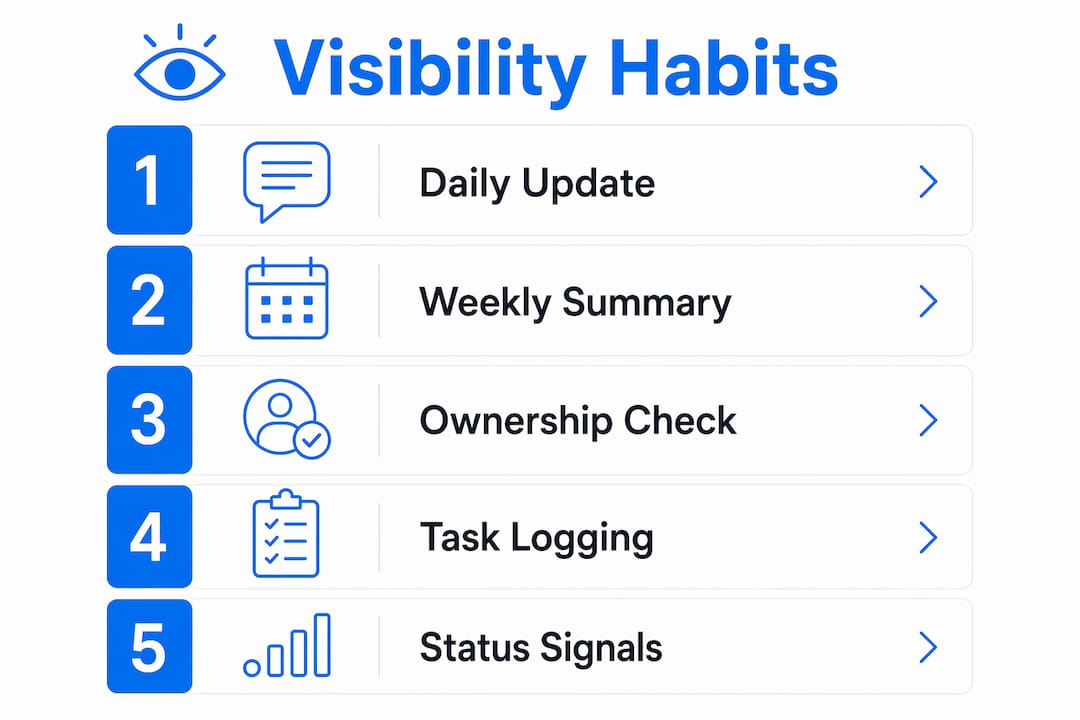
- Single source of truth. If work matters, it lives in the shared system. Not in a DM, not in a personal to-do list.
- Named ownership. Every task, ticket, or email thread has one person responsible. Not a team. One person.
- Simple status taxonomy. Four states: Not Started, In Progress, Blocked, Done. More than four creates overhead.
- Async updates. A brief written update posted at the end of each work period, visible to the whole team.
- Weekly summary ritual. One short message per person: what shipped, what is in progress, what is blocked.
- Defined collaboration windows. Policy templates recommend a 3–4 hour overlap window for distributed teams instead of rigid 9–5 rules.
| Governance element | Recommended practice |
|---|---|
| Update cadence | Daily async update + weekly written summary |
| Decision logging | Log in shared doc within 24 hours of any chat decision |
| Naming conventions | [Project]-[Task]-[Owner] format in task titles |
| Enforcement | Team lead reviews board health weekly, not daily |
Pro Tip: Run a 15-minute weekly “board health” check where the team lead scans for tasks with no owner or no status update in 5+ days. Fix those two things and most visibility gaps close.
Research on collaborative design teams confirms that visibility is a dynamic construct — it degrades without active habits. Buying a tool and hoping the team updates it is not a plan.
Which tools actually support team visibility?
Match the tool category to the problem, not the other way around. The smallest useful toolset wins.
| Tool category | Best for | Watch out for |
|---|---|---|
| Shared inbox | Email-driven support teams | Becomes a black box without assignment rules |
| Project management board | Product and cross-functional teams | Too many fields create update fatigue |
| Document workspace | Decision logs, runbooks, onboarding | Stale docs are worse than no docs |
| Async recording | Distributed standups, demos | Adds friction if not embedded in workflow |
| Status dashboard | Managers tracking workload | Vanity metrics if not tied to real tasks |
Selection principles:
- Prioritize sources of truth over chat. Chat is ephemeral; a task board is not.
- Integrate rather than duplicate. A tool that pulls data from your inbox and your task board beats two separate tools.
- For support teams, start with a shared inbox workflow before adding a project board.
- For product teams, a project board with a simple status taxonomy is the first move.
- Cross-functional squads need both, plus a shared decision log.
Understanding AI integration strategies can help managers decide where automation fits into their visibility stack without adding complexity.
How Sendsync improves visibility for remote support teams
For email-driven support teams, the inbox is where visibility breaks down first. Emails sit unread, get answered twice, or fall through the cracks when a teammate is out.
Sendsync connects Gmail or Microsoft 365 to a shared inbox where every conversation is assigned, labeled, and tracked. No DNS setup, no lengthy configuration.
| Visibility need | Sendsync feature |
|---|---|
| Named ownership | One-click assignment to a team member |
| Current status | Open, Assigned, Resolved labels visible to all |
| Context for the team | Internal notes on any thread |
| Workload distribution | Dashboard showing open vs. resolved by person |
| Saved views | Filter by tag, assignee, or status in seconds |
A shared inbox that shows who owns what, and what is still open, gives a remote support team the same situational awareness a co-located team gets by looking across the room.
A practical pilot: connect one shared mailbox, define two assignment rules (by topic or by shift), and run it for two weeks. By day 14, the dashboard will show average response time, open-thread count, and workload distribution — three visibility KPIs with zero extra tooling. Async inbox workflows make this especially effective for teams spread across time zones.
How do you measure whether visibility is improving?
Measurement starts with a visibility framework that defines what information should be visible, who accesses it, and how the team acts on it.
- % of tasks with a named owner — target 100%; anything below 80% signals a governance gap.
- % of tasks with a status update in the last 5 days — stale tasks are invisible tasks.
- Mean time to first response — for support teams, this is the clearest proxy for inbox visibility.
- Duplicate work incidents per sprint — track in retrospectives; a downward trend confirms visibility is working.
| Metric | Cadence | Who reviews |
|---|---|---|
| Open tasks without owner | Daily (automated) | Team lead |
| Status freshness | Weekly | Team lead |
| Mean response time | Daily | Support manager |
| Duplicate work incidents | Monthly retrospective | Whole team |
Reviewing employee productivity costs alongside these KPIs helps executives frame the business case for investing in visibility tooling.
Common pitfalls and how to avoid them
The most common mistake is confusing presence with productivity. A green dot proves nothing. A closed ticket does.
Pitfalls to watch for:
- Visibility theater: Teams update statuses to look busy, not because the information is useful. Fix: tie status updates to real handoffs, not to manager check-ins.
- Over-reporting: Excessive status pings and extended online hours are symptoms of a broken visibility system, not a disciplined team.
- Surveillance creep: Screenshot tools and keystroke loggers trigger what practitioners call the “Psychological Tax” — high burnout, low trust.
Successful visibility systems empower employees through self-reporting and transparent expectations, not top-down monitoring that signals distrust.
Pro Tip: Audit your visibility stack once a quarter. If any tool is primarily used to check whether someone is online rather than to track work outcomes, remove it.
Privacy matters. Structural visibility means making work legible, not making people legible. Keep monitoring scoped to work artifacts — tasks, tickets, emails — not to individual behavior patterns.
Your 30/60/90-day checklist to improve visibility
Days 1–30: Centralize and assign
- Pick one shared system for your team’s primary work type (inbox, task board, or doc workspace).
- Assign owners to the top 10 open tasks or conversations.
- Adopt the four-state status taxonomy: Not Started, In Progress, Blocked, Done.
- Run one weekly summary ritual: each person posts three lines by Friday.
Days 31–60: Enforce and refine
- Enforce the update cadence — the team lead flags stale tasks weekly.
- Start logging decisions in a shared doc within 24 hours.
- Fix the gaps discovered in month one (missing owners, unused statuses).
- Add a daily support huddle for support teams: 10 minutes, async-first.
Days 61–90: Automate and measure
| Action | Tool type | Effort |
|---|---|---|
| Automate assignment rules by topic or tag | Shared inbox or task board | Low |
| Add dashboard KPIs (owner coverage, response time) | Built-in analytics | Low |
| Run first monthly trend review | Any dashboard | Low |
| Adjust collaboration windows based on data | Policy update | Medium |
Key Takeaways
Team visibility in remote work is an organizational discipline: make work structurally legible, assign clear owners, and track outcomes — not presence.
| Point | Details |
|---|---|
| Visibility is structural | Every task needs an owner, a status, and a home in a shared system. |
| Outcomes beat presence | Shifting from activity monitoring to outcome tracking reduces burnout and speeds decisions. |
| Context switching has a cost | Teams lose up to 40% of productive time jumping between tools to signal activity. |
| Measure a few KPIs | Track owner coverage, status freshness, and mean response time to confirm progress. |
| Sendsync as a starting point | Sendsync’s shared inbox gives support teams named ownership, visible status, and a workload dashboard with minimal setup. |
A manager’s note on building visibility
The conventional wisdom says visibility is a tool problem. Buy the right project tracker, connect the right inbox, and the team will stay aligned. That framing is wrong, and it is why so many rollouts fail by month two.

Visibility is a leadership behavior before it is a system. The teams that sustain it are the ones where the manager models the discipline: they update the board, they log the decision in the shared doc, they post the weekly summary first. When the team sees the leader doing it, the habit spreads. When the leader only checks the board, the habit dies.
There is also a cultural trap worth naming. Visibility done badly looks like surveillance with better branding. The difference is intent and scope. Structural visibility makes work legible so the team can coordinate. Surveillance makes people legible so managers can control. Employees feel that distinction immediately, and they respond accordingly — either with genuine transparency or with performance theater.
The outcome-first framing matters here. A remote worker who delivers in four focused hours creates more value than one who logs eight hours of visible activity. Building a visibility system that rewards the former and ignores the latter is the actual management challenge. The tools are the easy part.
Sendsync makes email visibility simple for remote teams
If your team’s primary work arrives by email, visibility breaks down the moment more than two people share an inbox. Messages get missed, replied to twice, or silently dropped when someone is out.

Sendsync connects your Gmail or Microsoft 365 mailbox to a shared inbox where every conversation has an owner, a status, and a full internal note history — visible to the whole team, no DNS setup required. Unlimited users, no per-seat fees, and a setup time measured in minutes rather than days. The shared inbox gives remote support teams the situational awareness they need without adding another layer of tooling overhead.
Start a 14-day free trial, connect one shared mailbox, and run the two-week pilot described in the Sendsync section above. By the end of it, you will have real response-time and workload data — and a visibility system your team will actually use.
Useful sources and further reading
- Work Visibility: What It Means, Why Most Teams Don’t Have It, and How to Fix It — Morningmate. Best for: definition, duplicate-work evidence, and the discipline-over-tools argument.
- Remote Team Visibility: Building Transparency and Accountability in Distributed Teams — SoWork. Best for: presence vs. outcomes distinction, context-switching cost, and pitfalls.
- Remote Team Visibility: The Quiet System That Prevents Burnout and Drives Performance — Appcritica. Best for: over-reporting symptoms and burnout mitigation.
- Work Visibility Framework for Remote & Hybrid Teams — Meramonitor. Best for: KPI frameworks and dashboard design.
- Collaborative design teams research (visibility as a dynamic experience) — Tandfonline. Best for: academic grounding for habit-based visibility practices.
- A Remote Work Policy Template That Actually Works — AsyncInterview. Best for: governance rules and collaboration window recommendations.
- Visibility Across Remote Team Emails: 2026 Guide — Sendsync. Best for: email-specific visibility workflows and shared inbox setup.
- Keep Your Remote Team Email Aligned in 2026 — Sendsync. Best for: practical checklist and rollout advice for email-driven teams.