
Keep Your Remote Team Email Aligned in 2026
Keep Your Remote Team Email Aligned in 2026 ! Remote manager typing email in home office Aligned remote team email is defined as a structured communication system where every team member follows explicit response windows, urgency rules, and task-linked workflows.

Aligned remote team email is defined as a structured communication system where every team member follows explicit response windows, urgency rules, and task-linked workflows. Without that structure, distributed teams drift into inbox chaos: missed handoffs, duplicate replies, and the slow burn of “always-on” pressure. Fewer than 5% of emails require a same-hour response, yet most remote teams operate as if every message is urgent. That gap between reality and expectation is where burnout starts. To keep remote team email aligned, managers need defined protocols, not better writing habits.
What core principles support keeping remote team email aligned?
Email alignment fails primarily due to a lack of defined boundaries, not a lack of tools. The fix starts with three foundational principles: async session processing, urgency channel separation, and task anchoring.
Async session processing means your team checks and responds to email in one or two dedicated windows per day, not continuously. Batch processing email in 1–2 daily sessions reduces context switching and lowers the ambient anxiety that comes from a perpetually open inbox. A team that processes email at 9:00 AM and 3:00 PM knows exactly when to expect replies. That predictability is the foundation of async trust.

Urgency channel separation keeps email from becoming a catch-all. Assigning urgency levels to communication channels improves operational speed by 35%. The practical model routes critical issues to phone or SMS, time-sensitive project updates to a chat platform, and informational content to email or shared documents. When your team knows that email is not the emergency channel, they stop treating every message like a fire drill.
Task anchoring is the least-discussed but most important principle. Actionable emails must be linked to the specific task they concern rather than buried in a thread. When a decision lives only in an email chain, it disappears the moment someone archives the message. Anchoring that decision to a task in your project management system keeps context alive and prevents communication debt.
Process email in fixed daily sessions, not on demand.
Route urgent issues to phone or chat, not email.
Link every actionable email to a task before archiving the thread.
Set a team-wide response SLA of 24–48 hours for non-urgent messages.
Pro Tip: Create a shared team document that lists your three communication channels, what each one is for, and the expected response time for each. Pin it in your team’s chat platform so new hires find it on day one.
Which tools and workflows help maintain team-wide email alignment?
The right workflow architecture matters more than any single tool. Remote teams that align their email well use a combination of shared inboxes, governance tools, and visibility systems working together.
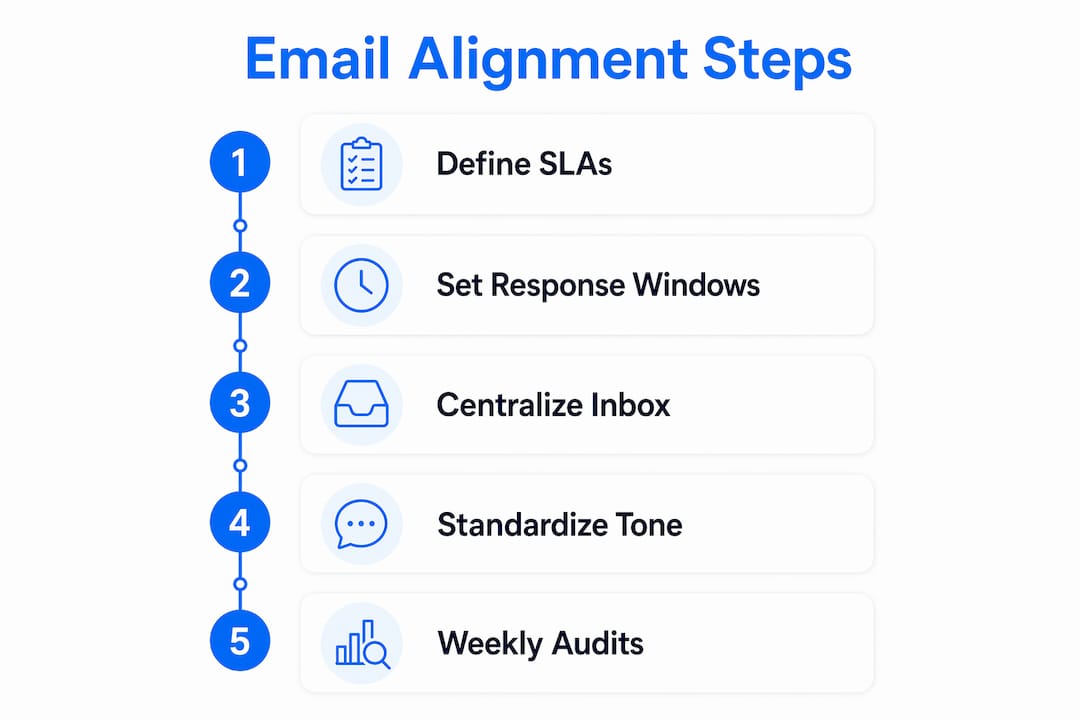
Shared inbox for centralized ownership
A shared inbox gives every team member visibility into incoming messages and removes the single-point-of-failure problem of individual inboxes. When email arrives in a shared space, managers can assign threads to specific teammates, track response status, and spot gaps before they become problems. Inbox delegation practices formalize who owns which messages, which eliminates the “I thought you handled it” confusion that plagues distributed teams.
Tone governance for consistency
Cross-department tone drift costs U.S. businesses $1.2 trillion annually. Email tone standardization in Microsoft 365 using governance tools and real-time rewriting technology reduces internal miscommunication and keeps external communication consistent. IT-administered tone governance achieves better uniformity than HR guidelines alone because it works at the infrastructure level, not the individual level.
Batching and handoff workflows
Batching is a scheduling discipline. Handoffs are a documentation discipline. Smooth email handoffs between teammates require a clear record of what was said, what was decided, and what action is pending. Without that record, the next person to pick up the thread wastes time reconstructing context.
Workflow element | What it does | Why it matters |
|---|---|---|
Shared inbox | Centralizes all incoming messages | Removes ownership ambiguity |
Urgency routing | Separates channels by priority | Prevents email from becoming an emergency line |
Task anchoring | Links emails to project tasks | Stops decisions from getting lost in threads |
Response SLA grid | Publishes expected reply windows | Reduces “always-on” pressure |
Tone governance | Standardizes message language | Cuts miscommunication across departments |
Pro Tip: Run a weekly 10-minute inbox audit with your team. Review any threads older than 48 hours that have no assigned owner and no linked task. That audit alone will surface most of your alignment gaps.
How can managers set and enforce response time guidelines?
Clear response time guidelines are the single most effective way to reduce inbox anxiety across a distributed team. The goal is to publish expectations so explicitly that no one has to guess.
Build a response-time grid. Publishing a clear response-time grid across all communication channels builds trust and removes the ambiguity that drives “always-on” behavior. A simple grid might read: Slack direct message, reply within 4 hours; email, reply within 24–48 hours; phone call, answer or return within 1 hour.
Write a team communication agreement. Document your async expectations in a one-page agreement that every team member signs during onboarding. State explicitly that async does not mean immediate response. Managers who make this clear empower team members to disconnect without guilt, which is the only sustainable way to run a distributed team long-term.
Model the behavior you want. Leadership modeling of email batching is the fastest way to normalize healthy email boundaries. When a manager sends emails at 11:00 PM and expects replies by morning, the team learns that boundaries are theoretical. When a manager visibly processes email twice a day and respects offline hours, the team follows. 58% of workers use calendar blocking to protect focus time, and leadership endorsement is the key driver of adoption.
Review and update your SLAs quarterly. Team size, client load, and project complexity all change. A response window that worked for a five-person team may not work at fifteen. Schedule a quarterly review of your communication agreement and adjust the grid when the team’s reality has shifted.
Pro Tip: Add your response-time grid to your email signature. It takes 30 seconds to set up and immediately sets expectations for every external contact and new internal colleague who emails you.
What common challenges arise in remote email alignment?
Even well-designed systems break down. Knowing the failure modes in advance lets you fix them before they become habits.
Role confusion happens when multiple people have access to a shared inbox but no clear ownership rules. The result is either duplicate replies or no reply at all. Fix this by assigning explicit ownership to every incoming thread within one business day.
Urgency creep is when non-urgent messages get treated as urgent because the sender used emotional language or a vague subject line. A subject line policy, such as tagging messages with [ACTION], [FYI], or [DECISION], cuts urgency creep immediately.
Communication debt builds when email decisions are never anchored to tasks. Decisions not linked to tasks become lost, disrupting workflows weeks later when no one can find the original context.
Time zone misalignment creates pressure to respond outside working hours. A weekly 45-minute sync plus a monthly 90-minute strategy session preserves 80–90% of daily communication as async, which is the right ratio for teams spread across multiple time zones.
When an async email thread exceeds five back-and-forth messages without resolution, the conversation has outgrown the medium. The five-message escalation rule says: move it to a live video call. Async becomes toxic when it drags on past the point where a 15-minute call would have resolved everything.
The escalation rule is not a failure of async communication. It is the correct use of it. Async handles information sharing well. It handles nuanced negotiation and conflict resolution poorly. Knowing the difference is what separates a well-run remote team from a frustrated one.
Key Takeaways
Keeping remote team email aligned requires explicit response SLAs, urgency channel separation, task anchoring, and leadership modeling of healthy inbox habits.
Point | Details |
|---|---|
Define response SLAs | Set a 24–48 hour window for non-urgent email and publish it across the team. |
Separate urgency channels | Route critical issues to phone or chat; reserve email for non-urgent updates. |
Anchor emails to tasks | Link every actionable message to a project task before archiving the thread. |
Model batch processing | Managers who check email twice daily normalize healthy boundaries for the whole team. |
Escalate at five messages | Move any async thread that exceeds five exchanges to a live video call. |
Why email alignment is a leadership problem, not a tool problem
I have watched teams spend months evaluating email tools while their real problem was a two-sentence policy they never wrote. The tool does not matter if your team has no shared definition of what “urgent” means or when a reply is actually expected.
The teams I have seen get this right share one trait: the manager went first. They published their own response windows, blocked their own focus time, and stopped sending emails at 10:00 PM. Within two weeks, the team followed. No new software required.
The harder truth is that most remote email dysfunction is a proxy for a deeper issue: managers who have not decided what they actually want from their team’s communication. Alignment starts with that decision. Once you know what “good” looks like, the tools and workflows are just implementation details.
My honest recommendation is to start with a one-page communication agreement before you buy anything. Write down your channels, your response windows, and your escalation rule. Share it with your team. Revisit it in 90 days. That document will do more for your team’s remote inbox collaboration than any platform switch.
— Nick
How Sendsync supports remote email alignment
Remote teams that want to put these principles into practice need a shared inbox that works without a week of setup.

Sendsync connects directly to Gmail or Microsoft 365 in minutes, with no DNS configuration required. Teams get a shared inbox where every message has a visible owner, a status, and a clear assignment workflow. Managers can see which threads are open, which are overdue, and who is handling what, all from one view. Sendsync’s unlimited-user pricing means the whole team works from the same system without per-seat costs adding up as you grow. For remote teams serious about keeping email organized, Sendsync removes the infrastructure friction that gets in the way of the protocols you have just built.
FAQ
What does “aligned remote team email” mean?
Aligned remote team email means every team member follows the same response windows, urgency rules, and task-linking practices. Alignment is a protocol, not a tool.
How often should remote teams check email?
1–2 dedicated email sessions per day produce better focus and lower anxiety than continuous monitoring. Set fixed windows and communicate them to your team.
What is a good email response time for remote teams?
A standard 24–48 hour response window works for non-urgent email. Fewer than 5% of emails require a same-hour reply, so “ASAP” expectations are rarely justified.
When should a remote team escalate from email to a video call?
Escalate when an async thread exceeds five back-and-forth messages without resolution. The five-message escalation rule prevents prolonged async conversations from creating misunderstandings or delays.
How do managers enforce email communication norms?
Managers enforce norms by modeling them first, then publishing a response-time grid and a written communication agreement. Leadership modeling of email batching is the fastest way to normalize healthy inbox behavior across a distributed team.