
Startup Team Communication Tools for Support Teams
Startup Team Communication Tools for Support Teams ! Support team collaborating in conference room A startup team communication tool, in the context of customer support, is a shared inbox platform that connects directly to your Gmail or Microsoft 365 mailbox so multiple agents ca

A startup team communication tool, in the context of customer support, is a shared inbox platform that connects directly to your Gmail or Microsoft 365 mailbox so multiple agents can view, assign, and reply to customer emails from one place. Without it, threads get lost, two agents reply to the same customer, and nobody knows who owns what. Tools like Sendsync, Gmail (Google Workspace), and Microsoft 365 each play a role here, but the shared inbox layer is what turns a personal mailbox into a collaborative support inbox.
Table of Contents
- What features should a support-focused team communication tool include?
- Why centralized support communication matters for startups
- Which channel should you use for which task?
- How to set up Gmail or Microsoft 365 integration
- What does a startup communication tool actually cost?
- How to evaluate and choose the right tool
- Key Takeaways
- The rollout reality nobody warns you about
- Sendsync connects your support inbox in minutes, not days
- Useful sources and further reading
What features should a support-focused team communication tool include?
The features below separate a real support tool from a generic email client. Prioritize the must-haves before evaluating nice-to-haves.
- Shared inbox / mailbox linking — connects your support@company.com address so every agent sees the same queue. Must-have.
- Assign / claim — one agent takes ownership of a thread; others see it’s covered. Prevents the “I thought you replied” problem.
- Collision detection — shows a live indicator when another agent is already typing a reply. Without this, duplicate replies go out daily.
- Internal notes — private comments visible only to the team, attached to the customer thread. Agents hand off context without forwarding chains.
- Tags and labels — categorize by issue type, product line, or priority. Pairs well with Gmail labels or Outlook categories.
- Automation and routing rules — auto-assign by keyword, sender domain, or mailbox. Saves the first 10 minutes of every shift.
- SLA tracking — flags threads approaching a response deadline. Critical once your team commits to any response-time promise.
- Canned responses / snippets — reusable reply templates for common questions. Cuts average handle time significantly.
- Reporting and analytics — volume by day, response time, resolution rate. You can’t improve what you don’t measure.
- Audit trail — a log of who replied, assigned, or changed status on every thread. Non-negotiable for compliance and coaching.
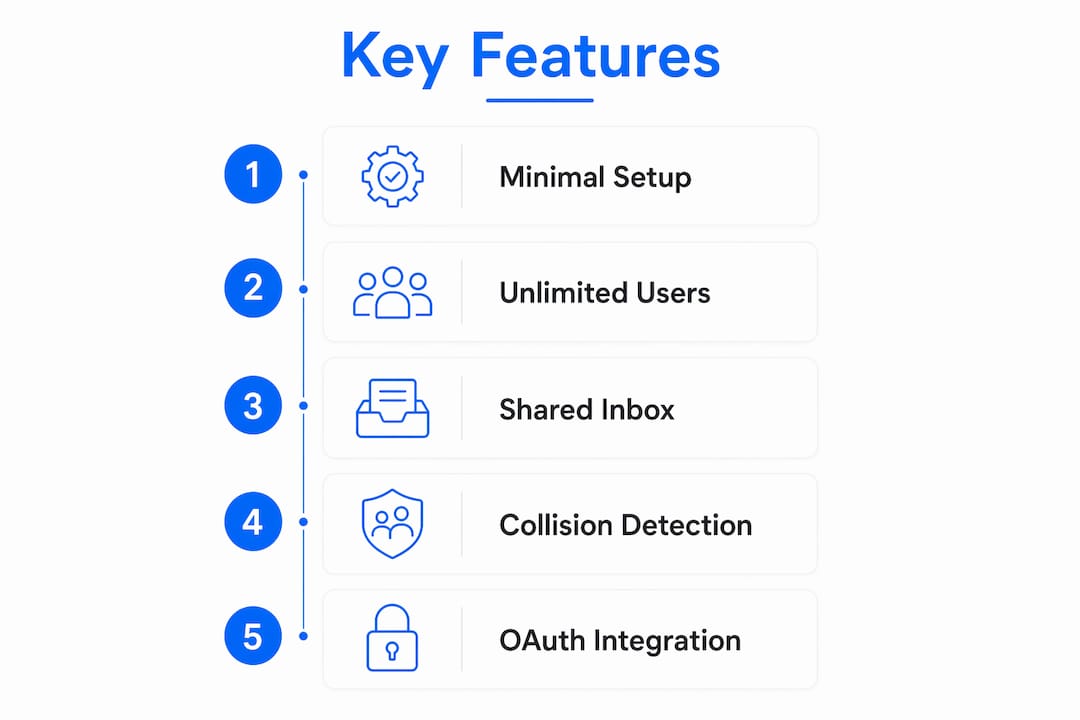
For startups specifically, minimal setup and unlimited-user pricing matter as much as the feature list. A per-seat model that charges for every new agent hire becomes a budget problem fast.
Why centralized support communication matters for startups
App sprawl is the real enemy, not a lack of tools. Adding another messaging app rarely fixes a broken support workflow; it usually adds another place to lose context. Successful teams treat communication as an operational system, defining ownership and response protocols before picking software.
A centralized shared inbox gives every agent the same view of customer history. New hires can read prior threads and get up to speed without asking a senior agent to brief them. That visibility cuts onboarding time and reduces the dependency on one person who “knows everything.”
The operational payoff is concrete: fewer missed threads, clearer ownership, and a single source of truth that survives agent turnover. Siloed inboxes actively hurt response times and team morale, especially when a startup is scaling from two agents to ten.
Which channel should you use for which task?
The rule is simple: email and the shared inbox handle customer-facing threads and the record of every interaction. Chat handles quick internal questions. Docs or ticket threads hold decisions and knowledge that need to survive beyond a conversation.

| Channel | Best use | Where it fails |
|---|---|---|
| Shared inbox (Gmail / M365) | Customer emails, thread history, ownership tracking | Internal team chatter, quick questions |
| Team chat (e.g., Slack, Teams) | Fast internal clarifications, escalations | Customer-facing replies, long-form context |
| Docs / knowledge base | Decisions, SOPs, canned response libraries | Real-time coordination, urgent issues |
| Video / phone call | High-nuance escalations, onboarding calls | Routine status updates, async updates |
Written channel rules that are short and updated as the team grows reduce notification fatigue more reliably than any new tool purchase.
Pro Tip: Default to async for internal communication. If a question can wait 30 minutes, put it in chat. If it genuinely cannot wait, call. After the call, write the decision back into the shared inbox thread or a doc so the context survives.
How to set up Gmail or Microsoft 365 integration
Most mailbox linking takes under 10 minutes. Routing rules and permission structures are where hours or days get added.
- Confirm admin access — you need Google Workspace admin or Microsoft 365 tenant admin rights before anything else.
- Decide mailbox ownership — will you link an existing support@ address or create a new one? Decide before touching any settings.
- Link the mailbox via OAuth — most lightweight shared inbox tools use OAuth, which requires no DNS changes and no IMAP credentials. Prefer this path.
- Set delegation and permissions — define which agents can read, reply, and assign. Restrict admin controls to one or two people.
- Configure routing and assignment rules — set auto-assign logic, tag rules, and SLA timers before going live.
- Run a test thread — send a test email, assign it, leave an internal note, and reply. Confirm the audit log captures it.
- Verify no DNS changes were made — unless your tool explicitly requires an MX record change, your DNS should stay untouched.
Pro Tip: OAuth authorization is the lowest-risk path for Gmail and Microsoft 365 linking. It requires no service account, no app passwords, and no MX record edits. If a vendor pushes you toward IMAP credentials or DNS changes for basic inbox linking, ask why before proceeding.
Following shared inbox best practices from the start prevents the most common rollout headaches.
What does a startup communication tool actually cost?
Pricing models vary widely, and the wrong model can quietly double your costs as the team grows.
| Model | Startup advantage | Watch out for |
|---|---|---|
| Per-seat / per-agent | Predictable per-person cost | Expensive as team scales; discourages adding agents |
| Unlimited-user plans | Fixed cost regardless of headcount | May cap mailboxes or automation runs instead |
| Usage-based (API / automation runs) | Low entry cost | Costs spike with volume; hard to budget |
| Per-mailbox pricing | Simple if you have few addresses | Penalizes teams managing multiple client inboxes |
Hidden costs that catch startups off guard: extra inboxes beyond the plan limit, required paid integrations for SLA or reporting features, mailbox migration fees, and compliance add-ons (HIPAA, SOC 2 audit logs). Lightweight tools layered on existing mailboxes often outperform heavy platforms for startups that need targeted automation without a six-month implementation.
For teams managing multiple client addresses, check the single-inbox multi-client approach before committing to a per-mailbox pricing model.
How to evaluate and choose the right tool
Prioritize integration fidelity, collision avoidance, ownership controls, and transparent pricing. Everything else is secondary.
- Test the Gmail or Microsoft 365 connection — does it link via OAuth in under 5 minutes, or does it require DNS edits?
- Run an assignment flow — assign a thread, claim it from a second account, and confirm the collision indicator fires.
- Check SLA reporting — can you pull a response-time report without exporting to a spreadsheet?
- Review the audit log — does it capture every reply, assignment, and status change with a timestamp?
- Test admin controls — can you restrict agent permissions without contacting vendor support?
- Measure onboarding effort — how long does it take a new agent to send their first reply without training?
- Confirm trial length and data export — can you export all threads and audit logs if you leave?
Vendor questions worth asking: Does your OAuth integration require tenant admin consent or just mailbox-owner consent? How are user accounts provisioned when a new agent joins? What is your data retention policy, and can we set our own? Can we export the full thread history in a standard format?
Red flags: No shared presence or collision detection. Per-seat pricing with a trial capped at two or three agents. No clear answer on data export format or retention period.
Key Takeaways
A startup support team’s communication tool lives or dies on how cleanly it connects to Gmail or Microsoft 365 and how clearly it assigns ownership of every customer thread.
| Point | Details |
|---|---|
| Define ownership first | Set assign/claim rules and channel protocols before rolling out any new tool. |
| OAuth beats IMAP | Linking via OAuth requires no DNS changes and takes minutes, not days. |
| Match channel to task | Customer threads belong in the shared inbox; quick internal questions belong in chat. |
| Watch the pricing model | Per-seat costs compound fast; unlimited-user plans fix costs as the team grows. |
| Sendsync fits the startup case | Connects Gmail or Microsoft 365 with minimal setup, no DNS hassles, and unlimited-user pricing. |
The rollout reality nobody warns you about
The first week after linking a shared inbox is the hardest. Not because the tool is difficult, but because the team’s old habits are deeply wired. Agents who spent months forwarding emails to each other will keep doing it by reflex. The collision detection fires, two people reply anyway, and the customer gets a duplicate. That is not a tool failure. It is a protocol gap.
The fix is boring but effective: write a one-page channel rule document before go-live. Three rules maximum. Where does a new customer email go? Who claims it? When do you escalate to a call? Post it in your team chat and reference it for the first two weeks.
The metric worth tracking during a pilot is first-response time, measured from email receipt to first agent reply. Most teams see it drop noticeably within the first two weeks, not because the tool is magic, but because ownership is finally explicit. Nobody waits for someone else to reply when the thread is assigned to them by name.
Sendsync connects your support inbox in minutes, not days
Most shared inbox platforms ask you to reconfigure DNS, set up service accounts, or sit through a multi-day onboarding. Sendsync skips all of that. Connect your Gmail or Microsoft 365 mailbox via OAuth, and your team is assigning, replying, and leaving internal notes within the same session.

The features that matter most for startup support teams are all there: collision detection so two agents never reply simultaneously, assign/claim ownership, internal notes attached to customer threads, and unlimited users on a single plan so adding a new agent costs nothing extra. No per-seat fees, no DNS headaches, no six-week implementation.
If your team is ready to move from a shared password on a personal inbox to a real collaborative support workflow, start with Sendsync and have your first mailbox linked before lunch.
Useful sources and further reading
- SendSync — Shared inbox for support teams — product home; start here for Gmail and Microsoft 365 linking and pricing details.
- How To Improve Team Communication With Smart Systems — Recurrr — best source for operational system thinking and app-sprawl warnings.
- Effective Communication Strategies for Teams — Rock.so — practical channel-to-purpose rules and written channel rule guidance.
- Team Communication Strategies That Improve Collaboration — monday.com — transparency and visibility research for support team onboarding.
- 12 Tried-and-True Ideas to Improve Team Communication — HubSpot — centralized hub rationale and shared inbox justification.
- 4 Must-Have Communication Tools — Asana — synchronous vs asynchronous tool framework for startup teams.
- Shared Inbox Best Practices for Support Teams — SendSync Blog — setup and operational rules for structuring a shared inbox from day one.
- Bilingual Client Follow-Up: A Guide for Professionals — Diaz Luna — useful if your support team handles multilingual follow-up or standardized response templates.