
Fix Support Email Tone in One Hour With 3 Before/After Templates
Fix Support Email Tone in One Hour With 3 Before/After Templates ! Support agent revising an email reply Use an adjusted human tone: empathic, clear, and solution-driven.

Use an adjusted human tone: empathic, clear, and solution-driven. That means acknowledging what the customer said, naming the next step before anything else, and cutting words that don’t earn their place. The exact mix shifts with the situation. An outage reply needs less warmth and more speed; a billing complaint needs the opposite.
TL;DR:
- Clear internal notes and shared templates help maintain consistent tone during handoffs and prevent repetition or tone drift.
- Building a support style guide with specific language rules and mapped tone sliders for common ticket types boosts team adherence and reduces escalation rates.
- Focusing on quick, actionable templates and regular weekly audits offers more impact on tone consistency than extensive training sessions.
- A shared inbox platform that simplifies onboarding and enforces uniform tone rules makes sustainable tone consistency accessible for growing teams.
- Matching tone to scenario—formal for legal issues, friendly for general questions, empathetic for refunds—improves customer satisfaction and reduces misunderstandings.
Table of Contents
- What Makes a Support Email Tone Work? A Quick Checklist
- Which Elements Actually Shape the Tone of an Email?
- How Do You Match Tone to the Situation?
- How Do You Build a Support Style Guide People Actually Use?
- Why Shared Inboxes Make Tone Consistency Easier
- A Quick Note on Priorities
- Get Your Team’s Tone Consistent Without the Setup Headache
- Sources
What Makes a Support Email Tone Work? A Quick Checklist
Print this list and tape it above your monitor. It covers the habits that separate a reply that calms someone down from one that makes them hit reply again in caps lock.
- Open with the person’s name and a one-line acknowledgment of what they told you, not a generic greeting.
- State the next step and timeline in your first sentence so the customer doesn’t have to hunt for the answer.
- Use plain verbs and active voice. “We’re fixing this” beats “This issue is currently being investigated.”
- Avoid blame-oriented phrasing. Never imply the customer caused the problem, even when they did.
- Keep sentences short. Break multi-step instructions into bullets instead of one dense paragraph.
- Limit exclamation marks to one, if any, and skip emojis in first replies to new customers.
- Never use ALL CAPS for emphasis. It reads as shouting regardless of intent.
- Match your sign-off to the relationship. “Best” works for most tickets; “Cheers” fits only casual, ongoing threads.
- Include a real next step or contact detail in the closing line, not just “let us know if you need anything.”
Which Elements Actually Shape the Tone of an Email?
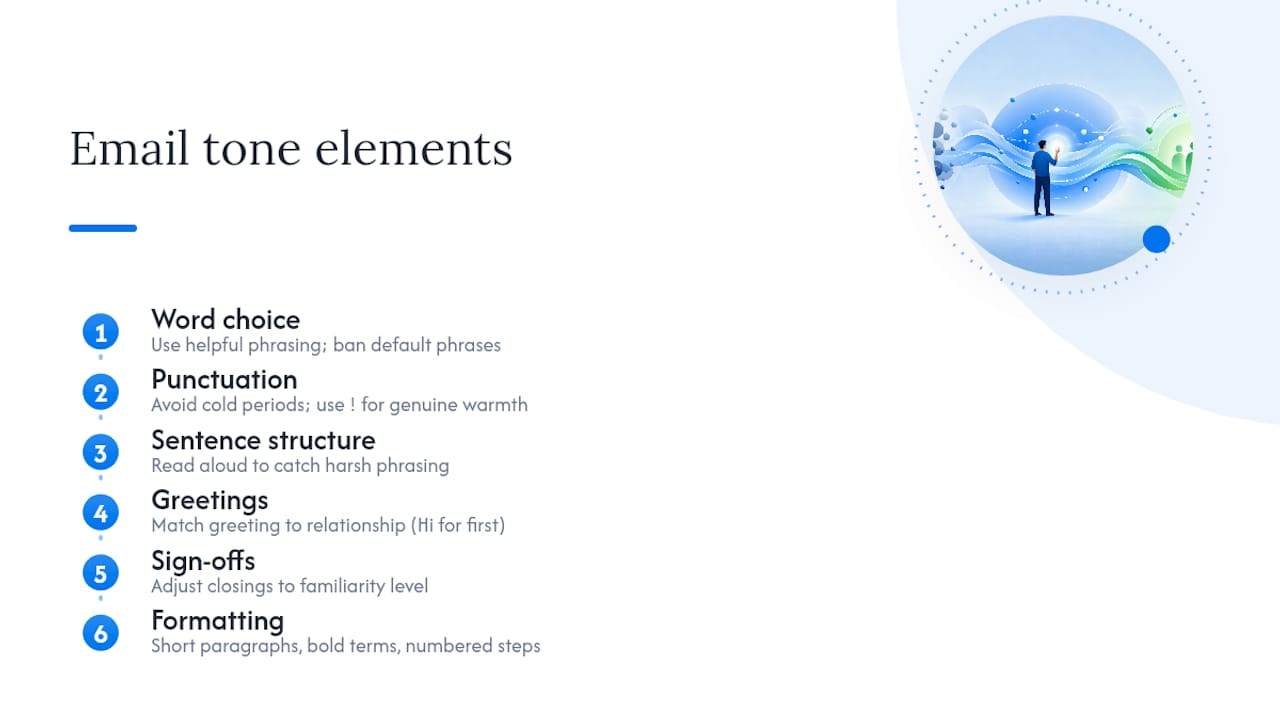
Tone lives in six controllable elements: word choice, punctuation, sentence structure, greetings, sign-offs, and formatting. Get these right and the “vibe” takes care of itself.
Word choice does the heaviest lifting. Swap “you failed to enter the correct password” for “here’s how to reset your password in under a minute.” Same information, opposite feeling. Build a short list of banned phrases your team keeps falling back on under pressure: “per my last email,” “as previously stated,” “unfortunately, that’s not possible.”
Punctuation changes meaning more than agents realize. A period after a short sentence can read as cold; a well-placed exclamation point after genuine good news reads as warm. Emoticons and casual phrasing split opinion sharply: a majority of surveyed customers actually preferred a casual tone, but a significant portion called emoji inappropriate and some found slang too informal. Read every reply aloud before sending. It’s the fastest way to catch a sentence that sounds harsher than intended, and it costs nothing.
Salutations and sign-offs should track the relationship, not a fixed template. First-time contact gets “Hi [Name]”; a long-running thread with a familiar customer can drop straight into the answer.
Formatting signals effort. Short paragraphs, bolded key terms, and numbered steps make a reply look like it was written for the reader, not dashed off.
Pro Tip: Keep a shared document of five or six banned phrases your team defaults to when stressed. Reviewing it monthly catches drift faster than any training session.
How Do You Match Tone to the Situation?
Not every ticket deserves the same voice. Think of tone as three sliders you adjust per scenario, not one fixed setting:
- Friendly ↔ Formal: slide toward formal for billing, legal, or security issues; friendly for general how-to questions.
- Concise ↔ Detailed: outages and status updates need concise, scannable updates; bug reports need enough detail that engineering can act.
- Empathetic ↔ Direct: apologies and refunds need empathy first; abusive or repetitive messages need calm directness.
Practitioners call this a tone slider system, and it works because it keeps one consistent voice while giving agents room to pivot by scenario.
Here’s how that plays out in real replies:
Apology + fix — Before: “We apologize for any inconvenience this may have caused.” After: “Sorry for the mix-up, Sarah. We’ve already reissued your order and it’ll arrive by Thursday.”
Refund — Before: “Your refund request has been processed and will be reflected in 5 to 7 business days.” After: “Your refund is on its way. You’ll see it back in your account within the usual processing time.”
Outage/status — Before: “We are currently experiencing technical difficulties.” After: “We’re aware of the login issue and expect it fixed within the hour. We’ll email you the moment it’s resolved.”
Short, example-driven templates like these are what support leads say agents actually use day to day, far more than a long policy document.
When a message turns abusive, drop the friendly slider entirely: stay calm, direct, and factual, and loop in a manager before the third exchange. Don’t try to de-escalate with warmth once someone has crossed into personal insults.
How Do You Build a Support Style Guide People Actually Use?
A style guide that sits in a shared drive nobody opens isn’t a style guide. Build one your team can scan in five minutes:
- Define three or four voice adjectives (warm, direct, plain, human) instead of vague ones like “professional” or “friendly.”
- Map tone sliders to your five most common ticket types so agents don’t have to guess.
- List language rules and banned phrases explicitly rather than describing tone in the abstract, since actionable rules outperform adjectives every time.
- Build a template library for your top ten ticket categories, each with a before/after pair.
- Run short training sessions, 20 minutes max, walking through real before/after tickets rather than lecturing on theory.
- Audit a sample of sent tickets weekly and flag tone drift early, before it becomes habit.
Consistent tone paired with clear next steps tends to reduce repeat contacts and shortens ticket threads, which is the real payoff of doing this work.
Pro Tip: Track escalation rate and repeat-contact rate by agent for one month before and after rolling out the guide. The shift usually shows up faster than CSAT scores do.
For teams managing shared responsibilities across a growing roster, organizing shared inbox workflows around clear ownership keeps tone consistent even as headcount changes. Clear, jargon-free internal communication habits, like the ones outlined in effective workplace communication strategies, reinforce the same discipline your customer-facing emails need.
Why Shared Inboxes Make Tone Consistency Easier
Tone rules fall apart fastest at handoffs, when a second agent picks up a thread without the full context and repeats a question the customer already answered. A shared inbox setup fixes the structural cause, not just the writing habit:
- Assignment and internal notes keep the history and context attached to the thread, so nobody restarts an apology the customer already received.
- Shared templates and tags mean the “before” version of a bad reply never gets typed twice.
- Unlimited users with no per-seat fees let every agent, even part-time ones, work from the same playbook instead of a personal inbox with its own habits.
Support teams that miss context on handoffs tend to see more tone drift, simply because nobody remembers what tone the previous agent used.
A Quick Note on Priorities
Support teams tend to overthink tone philosophy and underinvest in the two things that actually move the needle: a short template library and a weekly five-minute audit of sent replies. If you only have an hour this week, spend it building three before/after templates for your worst ticket type and skip the workshop.
— Nick
Get Your Team’s Tone Consistent Without the Setup Headache
Sendsync gets your whole team writing from the same playbook in minutes, not weeks, because there’s no DNS configuration or IT ticket standing between you and a shared inbox that works. Connect your Gmail or Microsoft 365 mailbox, load your before/after templates and internal notes into one place, and every agent inherits the same tone rules automatically instead of guessing.

Assignment keeps handoffs clean so context and tone never get lost between agents, and unlimited users means adding a new hire doesn’t cost you a per-seat fee or a rebuilt workflow. A shared client inbox built for teams turns the style guide you just built into something your team actually follows on every ticket, not just the ones someone remembers to double check.
Start a 14-day free trial at Sendsync and see how fast your team’s replies get consistent.
Sources
- 7 essentials for a customer service voice and style guide
- Tone of voice for support teams: The complete guide + copy-paste examples | Typewise
- How to build a support style guide (With examples) | Supp
- Most emails sound more negative than intended — Writing Cooperative