
Multi Client Email Management: A 2026 Team Guide
Multi Client Email Management: A 2026 Team Guide ! Person working on multi-client email management setup Multi-client email management is defined as a centralized system for handling multiple clients' email domains, mailboxes, and sending infrastructure from a single platform, wi

Multi-client email management is defined as a centralized system for handling multiple clients’ email domains, mailboxes, and sending infrastructure from a single platform, with strict per-tenant isolation to protect deliverability and operational efficiency. Teams and agencies that skip this structure pay for it in reputation damage, missed messages, and hours of manual work. The industry standard approach combines SPF, DKIM, and DMARC authentication per client with tiered IP pools and automated provisioning. Understanding what is multi client email management, and building it correctly from the start, is the difference between scaling to hundreds of client inboxes and watching deliverability collapse under shared infrastructure.
What is multi client email management and how does it work?
Multi-client email management, also called multi-tenant email infrastructure, is the practice of running separate sending domains, mailboxes, and authentication records for each client from one unified control plane. The “multi-tenant” framing is the recognized industry term. It signals that each client occupies a logically isolated environment, even when the underlying servers are shared.
The core architecture has three layers. The first is domain isolation: each client gets its own sending domain with unique SPF, DKIM, and DMARC records. The second is IP management: clients are assigned to shared or dedicated IP pools based on their sending volume and risk profile. The third is a centralized dashboard that lets one team monitor, provision, and troubleshoot every client account without switching logins.

Agencies managing over 1,000 inboxes enforce unique sending patterns and domain separation for every client. That scale is only possible when provisioning is automated and isolation is enforced at the infrastructure level, not just the policy level.
Per-client domain and authentication setup
Every client needs its own SPF record, DKIM key pair, and DMARC policy. SPF tells receiving mail servers which IP addresses are authorized to send on behalf of a domain. DKIM adds a cryptographic signature to each message. DMARC ties both together and specifies what happens when a message fails either check.
Running these records separately per client means one client’s authentication failure cannot affect another client’s domain reputation. This is the foundational rule of multi-tenant email architecture.
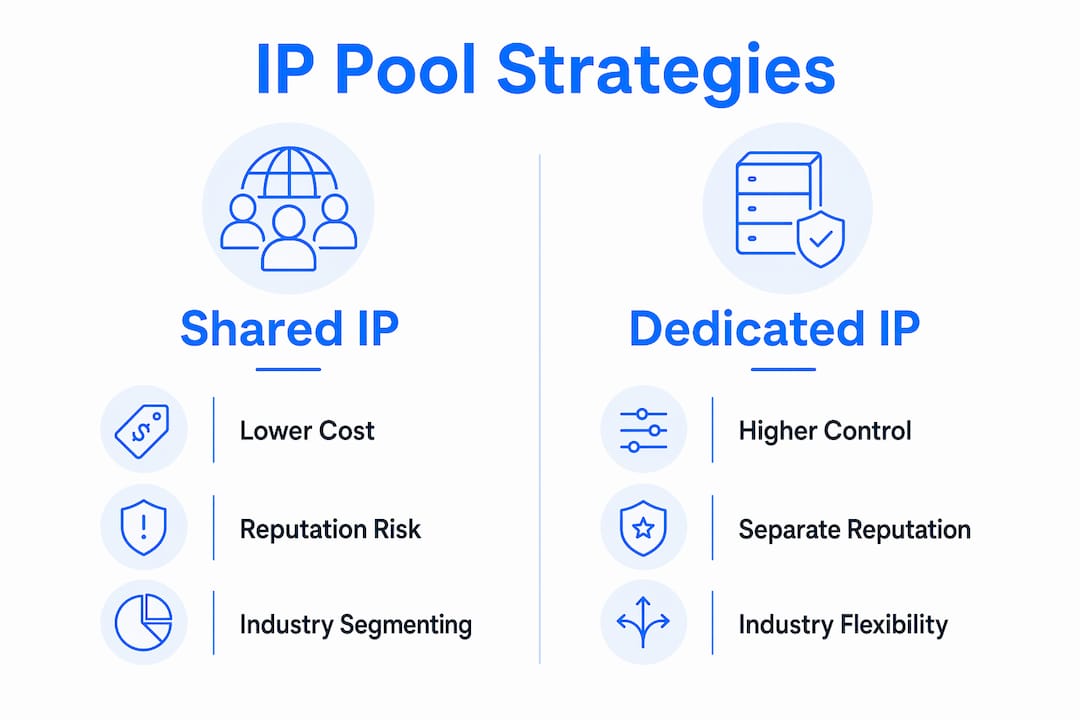
IP pool strategies: shared vs. dedicated
Shared IP pools work only if all tenants behave well. One client sending spam or generating high bounce rates poisons the pool for everyone else. Dedicated IPs solve this but require a warm-up period and higher cost. Hybrid models assign new or low-volume clients to shared pools and graduate high-volume or enterprise clients to dedicated IPs. This balance improves operational scalability without forcing every client onto expensive dedicated infrastructure from day one.
Pro Tip: Segment clients into IP pools by industry, not just volume. A financial services client and a marketing agency have very different spam complaint rates. Mixing them on the same IP pool creates unnecessary risk.
Automated DNS provisioning and zero-config onboarding
Zero-config provisioning automates DKIM, SPF, DMARC generation, and IP assignment for each new tenant. This removes the manual step of logging into a DNS provider, creating records, and verifying them. It also eliminates the human errors that come with repetitive configuration tasks. For agencies onboarding dozens of clients per month, automation is not a convenience. It is a requirement.
How does multi-client email management protect sender reputation?
Reputation bleed is the biggest risk in any multi-tenant email setup. It happens when one client’s poor sending behavior, high bounce rates, or spam complaints affect the IP or domain reputation of other clients on the same infrastructure. Only cryptographic and network-level isolation prevent reputation bleed reliably. Policy-level rules are not enough.
The consequences of reputation bleed are severe. Emails land in spam folders. Domains get blacklisted. Clients lose trust in the agency managing their communications. Rebuilding a damaged domain reputation takes weeks.
Shared convenience, not technical limitations, is what most often hinders deliverability in multi-client environments. When agencies cut corners by sharing warm-up pools or reusing sending patterns across clients, they create detectable traffic signatures that spam filters flag. Unique client traffic signatures are essential for long-term deliverability.
Independent warm-up schedules per client
Shared warm-up pools lead to deliverability collapse through shared reputation contamination. Each client’s inbox warm-up schedule must run independently. A warm-up schedule gradually increases sending volume over days or weeks so that receiving mail servers learn to trust the new IP or domain. When two clients share a warm-up pool, their reputation signals mix. If one client sends low-quality email during the warm-up period, it degrades the reputation being built for the other client.
Segregated complaint and bounce handling
Each client needs its own feedback loop registration and bounce processing. Complaint rates and bounce rates are tracked per sending domain and IP. Mixing these signals across clients makes it impossible to diagnose which client is causing a deliverability problem. Segregated handling also lets teams set client-specific thresholds and trigger alerts when a single client’s metrics drift outside acceptable ranges.
Provider diversification
Relying on a single email infrastructure provider creates a single point of failure. Dedicated DMARC monitoring platforms enable scalable client management with automated alerts and policy enforcement. Distributing clients across two or more sending providers means a provider outage or policy change affects only a subset of clients. This is standard practice for managed service providers handling enterprise-level email accounts.
What operational benefits do email management solutions deliver?
The operational case for proper multi-client email management is straightforward. Flat-rate infrastructure reduces overhead costs by 60–90% for organizations managing over 20 users or multiple domains. That cost reduction comes from pooled storage, shared infrastructure, and programmatic provisioning rather than paying per seat for every client mailbox.
A single dashboard for managing multiple client domains removes the need for separate logins, separate monitoring tools, and separate billing accounts. Teams can handle multiple clients in a single inbox view, assign conversations to specific team members, and track response times across all accounts simultaneously.
The table below compares the two main operational models teams choose between when scaling client email management.
Feature category | Per-seat licensing model | Flat-rate pooled model |
|---|---|---|
Cost structure | Scales with each added user or mailbox | Fixed cost regardless of user count |
Provisioning speed | Manual setup per account | Programmatic, automated onboarding |
Isolation control | Limited by vendor configuration | Full per-tenant domain and IP control |
Monitoring | Separate dashboards per account | Unified dashboard across all clients |
Scalability | Cost increases linearly with growth | Cost stays flat as client count grows |
Programmatic domain provisioning cuts operational costs by up to 90% compared to traditional per-seat licensing. That number reflects the real cost of manual provisioning: staff time, error correction, and the delays that come with human-dependent workflows.
Collaboration also improves when email management is centralized. Support teams can see which conversations are assigned, which are waiting, and which clients have open issues. This visibility reduces duplicate replies and missed messages. Teams that adopt scalable inbox workflows report faster response times and lower per-ticket handling costs.
What are the best practices for implementing multi-client email management?
Getting the architecture right from day one prevents the most common and costly mistakes. The following practices apply whether a team is managing 10 client domains or 1,000.
Establish strict domain and tenant segregation immediately. Never share a sending domain between two clients, even temporarily. Operating multiple client domains without strict isolation risks cascading deliverability failures due to shared reputation damage. The cost of fixing a contaminated domain far exceeds the cost of setting up a separate one.
Automate DNS and reputation monitoring from the start. Manual DNS management does not scale. Automation of domain provisioning, DNS configuration, and reputation monitoring is the key to operational success for agencies managing multiple domains. Set up automated DMARC report parsing and alert thresholds before onboarding the first client.
Assign unique sending schedules per client. Sending patterns are a fingerprint. If multiple clients send emails at the same times, in the same volumes, with the same cadence, spam filters detect the pattern. Vary send times, volumes, and frequency per client to keep each account’s traffic signature distinct.
Monitor deliverability metrics continuously. Track open rates, bounce rates, spam complaint rates, and blacklist status per client domain. Set up weekly reviews and automated alerts for any metric that crosses a threshold. Adjust IP assignments, sending volumes, or authentication records as clients scale.
Plan for client offboarding. When a client leaves, their domain reputation and sending history stay behind. Archive DMARC reports, document the IP history, and revoke DKIM keys. Clean offboarding prevents a former client’s domain from being misused and protects the agency’s infrastructure.
Pro Tip: Build a client intake checklist that includes DNS verification, IP pool assignment, warm-up schedule setup, and DMARC monitoring enrollment. Running this checklist for every new client takes 20 minutes and prevents weeks of deliverability troubleshooting later.
Key Takeaways
Multi-client email management requires per-tenant domain isolation, automated provisioning, and independent warm-up schedules to protect deliverability and reduce operational costs at scale.
Point | Details |
|---|---|
Domain isolation is non-negotiable | Every client needs unique SPF, DKIM, and DMARC records to prevent reputation bleed. |
IP pool strategy affects all clients | Hybrid shared and dedicated IP models balance cost and deliverability risk across client tiers. |
Automation cuts costs significantly | Flat-rate programmatic provisioning reduces overhead by up to 90% versus per-seat manual models. |
Warm-up schedules must be independent | Shared warm-up pools contaminate reputation signals and cause cascading deliverability failures. |
Centralized dashboards improve team output | A single control plane reduces login overhead and gives teams full visibility across all client accounts. |
The infrastructure investment most agencies delay too long
The most common mistake I see agencies make is treating multi-client email infrastructure as something to fix later. Teams start with one or two clients, share a domain, share an IP, and tell themselves they will separate things when it becomes a problem. By the time it becomes a problem, they are dealing with a blacklisted IP, three angry clients, and a two-week remediation project.
The technical barrier to proper isolation is lower than most teams assume. Automated DNS provisioning tools handle the hard parts. The real investment is in process: building intake checklists, setting monitoring thresholds, and training team members to treat each client’s email environment as a separate, protected asset.
What I have found is that agencies that invest in isolation architecture early grow faster. They can onboard new clients in hours instead of days. They spend less time on deliverability firefighting and more time on actual client work. The benefits of a professional client inbox compound over time because reputation is cumulative. A well-managed domain that has been sending clean email for 12 months is a durable asset.
The other thing most guides skip: reputation isolation is not just a technical concern. It is a client trust concern. When you tell a client that their email domain is fully isolated from every other client you manage, that is a meaningful service guarantee. Teams that can make that guarantee credibly win more business and retain clients longer.
— Nick
How Sendsync supports multi-client email collaboration for teams
Sendsync is built for teams that need to manage client communications from a single, organized inbox without the overhead of traditional help desk configuration.

Teams connect their Gmail or Microsoft 365 mailboxes directly to Sendsync, with no DNS configuration required on their end. From there, team members assign conversations, reply to clients, and track open threads across every account in one place. Sendsync’s flat-rate pricing means teams add users without watching costs climb per seat. For support teams and agencies handling multiple client accounts, that pricing model alone changes the math on what is affordable. Get started with Sendsync and see how fast a shared inbox can be set up for your team.
FAQ
What is multi client email management?
Multi-client email management is a centralized system for managing multiple clients’ email domains, mailboxes, and sending infrastructure with strict per-tenant isolation. It combines SPF, DKIM, and DMARC authentication per client with tiered IP pools and a unified dashboard.
Why does domain isolation matter for agencies?
Domain isolation prevents reputation bleed, where one client’s spam complaints or bounce rates damage the deliverability of other clients on the same infrastructure. Without isolation, a single poorly performing client can trigger cascading failures across all accounts.
What is the difference between shared and dedicated IP pools?
Shared IP pools distribute sending reputation across multiple clients, which lowers cost but creates risk if any one client sends low-quality email. Dedicated IPs give a single client full control over their sending reputation and are recommended for high-volume or enterprise accounts.
How does automated DNS provisioning help teams?
Automated provisioning generates SPF, DKIM, and DMARC records for each new client without manual DNS entry. This removes human error from onboarding and lets agencies add new client domains in minutes rather than hours.
What email management solution works best for support teams?
Support teams benefit most from a shared inbox platform that centralizes all client conversations, supports conversation assignment, and offers flat-rate pricing. Sendsync connects directly to Gmail or Microsoft 365 and requires no complex configuration to get started.