
Benefits of a Professional Client Inbox for Teams
Benefits of a Professional Client Inbox for Teams ! Team collaborating on client inbox workflow A professional client inbox is a centralized communication system that consolidates all client emails into one shared, organized workspace accessible to every team member.

A professional client inbox is a centralized communication system that consolidates all client emails into one shared, organized workspace accessible to every team member. Teams that manage client email through a shared inbox respond faster, miss fewer messages, and maintain a consistent brand voice across every interaction. Tools like Sendsync and Microsoft Outlook have made this approach practical for businesses of every size. The benefits of a professional client inbox go beyond simple organization. They touch response speed, team accountability, compliance, and long-term client retention.
1. What workflow improvements does a professional client inbox enable?
Filters and rules are the foundation of any well-run inbox. Filters and rules handle 60–80% of incoming email automatically, routing messages to the right folder, person, or queue without manual sorting. That reduction in manual work frees your team to focus on replies that actually require judgment.
Inbox organization strategies work best when they stay simple. Keeping folders to 3–7 categories combined with smart filtering rules cuts cleanup time and reduces the cognitive load of managing a busy client inbox. More folders create more decisions, not more clarity.

A centralized inbox also creates a searchable communication history. Every client message, reply, and note lives in one place, so no one wastes time hunting through personal email threads for context. That searchability is one of the most underrated advantages of email management for client-facing teams.
Pro Tip: Set up rules on day one, before your inbox fills up. Retroactive sorting is far more time-consuming than building the system from the start.
Route messages by sender domain to separate clients from vendors automatically
Create a “Needs Reply” label that clears when a response is sent
Archive newsletters and automated notifications instantly with a single rule
Flag any message containing words like “urgent” or “contract” for priority review
2. How does a professional client inbox support team collaboration?
Shared visibility is the single biggest shift a team inbox creates. Shared inboxes improve team collaboration by giving every team member a live view of open conversations, assigned threads, and pending replies. No one wonders whether a client has been contacted. The answer is visible to everyone.
Assignment features remove the ambiguity that kills accountability. When a message arrives, a team lead assigns it to a specific person with one click. That person owns the reply. No thread falls through the cracks because everyone assumed someone else handled it.
Internal notes change how teams coordinate without confusing clients. A team member can leave context, ask a question, or flag a risk inside a thread. The client never sees it. This keeps the external conversation clean while the internal discussion stays attached to the right message.
Assign conversations to specific team members with clear ownership
Use internal notes to share context before replying to a client
Reassign threads when a team member is out without losing conversation history
Track open, pending, and resolved conversations in a single view
Remote team inbox collaboration becomes far more manageable when the entire team works from the same shared workspace rather than forwarding emails between personal accounts.
3. What customer experience benefits come from a professional inbox?
Response speed is a direct revenue driver. Companies that respond within 1 hour are 7x more likely to qualify a lead. After 5 minutes, lead quality drops by 80%. A professional inbox reduces the time between message arrival and first reply by eliminating the routing confusion that slows personal inboxes.
Consistent communication builds client trust. When every team member replies from the same shared address using shared templates, the client experiences one coherent brand voice. They do not receive three different tones depending on who picked up the thread that day.
Missed messages are one of the fastest ways to lose a client. A centralized inbox with clear assignment rules means every message gets acknowledged. Clients who feel ignored do not give second chances. Businesses that use centralized client communication tools report fewer dropped threads and stronger repeat business rates.
Faster first response time through automatic routing and assignment
Consistent brand voice via shared reply templates and unified sender addresses
Fewer missed messages through visible open conversation queues
Higher client satisfaction from predictable, professional communication patterns
Stronger client retention because clients feel reliably heard and prioritized
4. What compliance and security benefits does a professional inbox provide?
Email document management treats every client message as an official business record. That means access controls, encryption, and secure archiving apply to your client communications the same way they apply to contracts or financial documents. Most personal inboxes offer none of this by default.
Audit trails matter in regulated industries. When a client dispute arises, the ability to pull a complete, timestamped record of every message in a thread is not just useful. It is often legally required. A professional inbox with proper archiving makes that retrieval fast and reliable.
Centralized email management also reduces knowledge silos. When client conversations live in one shared repository rather than individual accounts, the business retains that knowledge even when employees leave. Projects continue without interruption because the context stays with the thread, not the person.
Pro Tip: Set a retention policy for your inbox archive on day one. Decide how long messages are stored and who has access. Revisiting this after a compliance audit is far more painful than building it into your setup.
Feature | Personal inbox | Professional client inbox |
|---|---|---|
Audit trail | None by default | Full timestamped history |
Access controls | Individual only | Role-based, team-wide |
Knowledge retention | Lost when employee leaves | Stays in shared repository |
Compliance support | Minimal | Built-in archiving and encryption |
5. How does a professional inbox reduce individual dependency?
Organizations that treat email as a strategic business asset reduce dependency on individual employees and improve business continuity. This is the most underappreciated benefit of moving to a shared inbox. When one person owns every client relationship through their personal account, the business is one resignation away from a communication crisis.
A shared inbox breaks that dependency. Any team member can pick up a thread, read the full history, and reply with context. The client experiences no disruption. The team experiences no panic.
This also applies to vacation coverage, sick days, and role transitions. Scalable inbox workflows built around shared access mean coverage is a process, not a scramble. The right team member steps in, reads the thread, and continues the conversation without asking the client to repeat themselves.
6. How to choose the right professional client inbox solution
The right solution depends on three factors: your team’s size, your existing tools, and your volume of client messages. A small team handling 50 client emails a day needs different features than an enterprise support team managing 5,000.
Searchability is non-negotiable. Every solution you evaluate must let you search across all conversations by sender, keyword, date, and status. Without that, the centralized repository loses most of its value.
Shared access and assignment features separate a professional inbox from a basic email client. Look for tools that let you assign threads, leave internal notes, and track conversation status without requiring a complex help desk setup. Sendsync connects directly to Gmail or Microsoft 365 without DNS configuration, which removes the most common barrier to adoption for small and mid-sized teams.
Confirm the tool integrates with Gmail or Microsoft 365 without complex setup
Check whether pricing is per seat or per team, since per-seat costs scale painfully
Test the assignment and internal notes features before committing
Verify that the search function covers full message history, not just subject lines
Ask whether the vendor provides onboarding support or documentation for your team size
Choosing between shared inbox tools often comes down to setup time and pricing structure. Tools with unlimited users and flat pricing give growing teams a predictable cost as volume increases.
7. What email productivity habits maximize inbox benefits?
A professional inbox only delivers its full value when the team uses it consistently. The tool creates the structure. The team’s habits determine whether that structure holds.
Response time targets are the most effective habit to establish. Set a team standard, such as a first reply within two hours for all client messages. Publish that standard internally. When everyone knows the benchmark, the shared inbox queue becomes a shared responsibility rather than a passive notification list.
Weekly inbox reviews catch problems before they become client complaints. A 15-minute team check of open threads, overdue replies, and unassigned messages prevents the slow drift toward inbox chaos. Assigning emails to teammates with clear ownership rules makes these reviews faster and more productive.
Template libraries are the most underused feature in most professional inboxes. When your team writes the same reply ten times a week, a shared template cuts that effort by 80% and keeps the language consistent. Build templates for your five most common client scenarios and update them quarterly.
Key Takeaways
A professional client inbox is the most direct way to reduce missed messages, cut response times, and give every team member shared ownership of client communication.
Point | Details |
|---|---|
Centralization reduces missed messages | One shared inbox with assignment rules ensures every client message gets a response. |
Response speed drives lead conversion | Replying within 1 hour makes a team 7x more likely to qualify a lead. |
Shared access removes individual dependency | Client conversations stay with the team, not with individual employees who may leave. |
Compliance requires proper archiving | Treat email as official records with access controls and timestamped audit trails. |
Automation handles the majority of routing | Filters and rules manage 60–80% of incoming mail without manual intervention. |
Why response time is the metric most teams ignore
Most teams I have worked with track client satisfaction scores and renewal rates. Very few track first response time as a standalone metric. That is a mistake. Response time is the single most controllable variable in client experience, and a professional inbox is the most direct tool for improving it.
The 7x lead qualification finding is not a soft insight. It is a hard number that connects inbox setup directly to revenue. When I see a team still routing client emails through personal accounts, I know their response time is slower than it needs to be. The fix is not hiring more people. It is changing the system.
The other thing I have seen repeatedly: teams underestimate how much knowledge walks out the door when an employee leaves. A client relationship that lived entirely in one person’s inbox is not a business asset. It is a liability. Shared inboxes convert that liability into something the whole team owns.
If you are evaluating professional communication tools, start with the question of dependency. Ask yourself how many client relationships would be disrupted tomorrow if your best account manager left today. The answer tells you exactly how urgent the inbox problem is.
— Nick
Sendsync makes shared client inboxes simple to set up
Teams that want the benefits of a professional client inbox without a lengthy configuration process have a direct path forward with Sendsync.
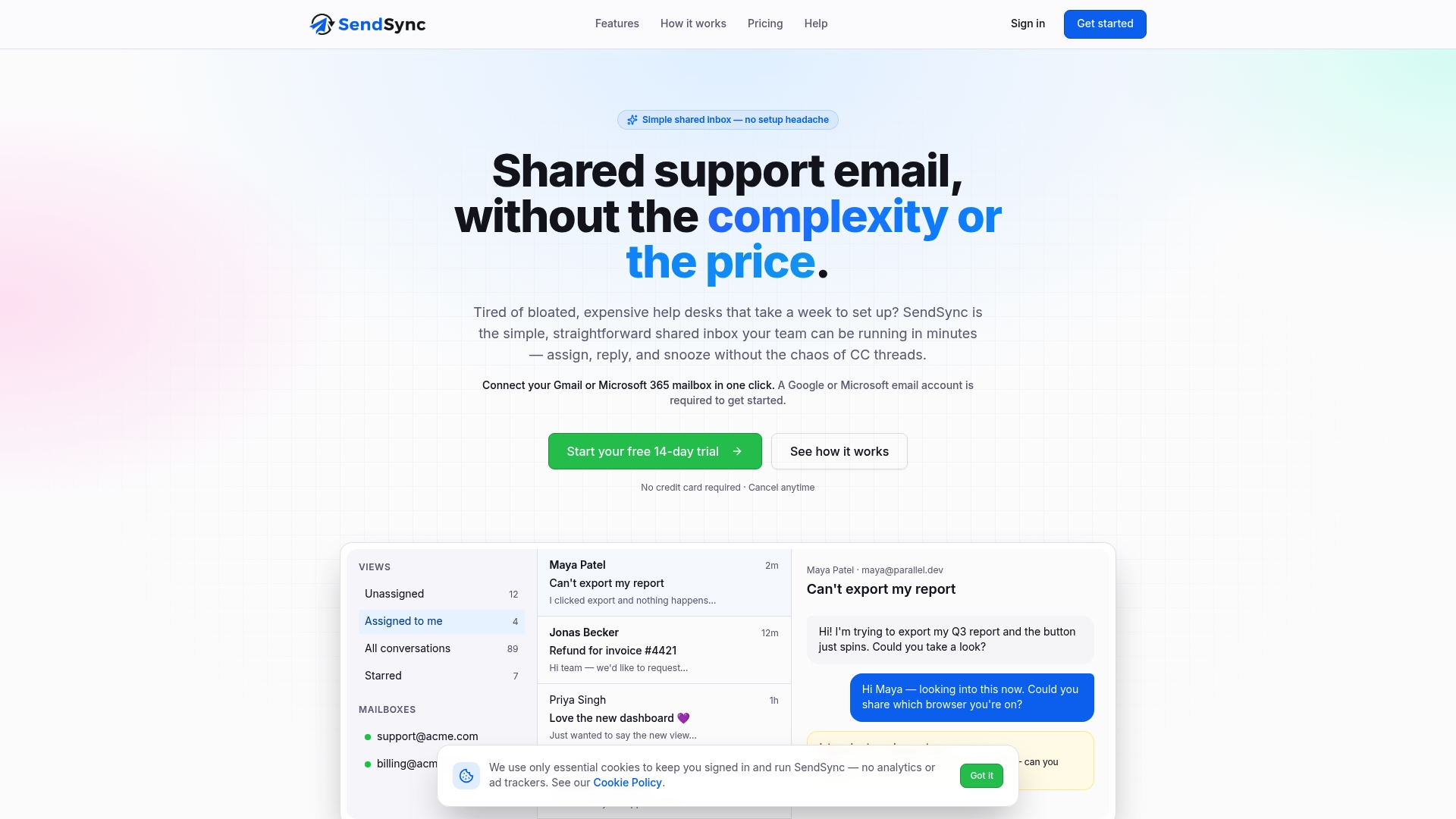
Sendsync connects to Gmail or Microsoft 365 in minutes, with no DNS changes and no complex help desk setup. Teams get shared access, conversation assignment, internal notes, and full message history from day one. Pricing covers unlimited users with no per-seat fees, which means the cost stays flat as the team grows. For teams ready to move client communication out of personal inboxes and into a shared, accountable workspace, Sendsync’s shared inbox is built for exactly that transition.
FAQ
What is a professional client inbox?
A professional client inbox is a shared email workspace that centralizes all client communications, giving every team member visibility, assignment tools, and a searchable message history.
How does a shared inbox improve response times?
Shared inboxes reduce response times by routing messages to the right person automatically and making open threads visible to the whole team, eliminating the delays caused by personal inbox silos.
What is the difference between a shared inbox and a personal email account?
A shared inbox gives multiple team members access to the same conversations, with assignment, internal notes, and audit trails. A personal account limits visibility and context to one individual.
How do filters and rules help manage client emails?
Filters and rules automatically sort 60–80% of incoming messages, routing them to the correct queue or folder without manual intervention and reducing the time spent on inbox maintenance.
Why does a professional inbox support compliance?
Email document management stores client messages as official business records with access controls, encryption, and timestamped audit trails that support legal and regulatory requirements.