
Launch On Call Rotation Support for Small Teams in Under an Hour
Launch On Call Rotation Support for Small Teams in Under an Hour ! Small team planning on-call coverage On-call rotation support means assigning shared-inbox responsibility to one team member at a time, on a published schedule, so every customer email gets a fast, accountable rep

On-call rotation support means assigning shared-inbox responsibility to one team member at a time, on a published schedule, so every customer email gets a fast, accountable reply. The default setup that works for most small teams: a shared inbox, a weekly rotation, a written SLA, and one backup person for escalations. Tools like shared inbox software make that setup possible in under an hour, without touching DNS records.
TL;DR:
- Weekly rotations work best for support teams of three to ten members, providing enough context without causing burnout.
- A pilot week helps identify issues in handoff routines, and midweek handoffs reduce the risk of missing critical information.
- Using tools like shared inbox software with assign, claim, and automation features can make setup instant and avoid complex IT configurations.
- Support teams should assign only one or two escalation levels to stay manageable and avoid unnecessary friction.
- Implementing fair shift swapping and tracking workload indicators prevents burnout and signals when a dedicated support hire becomes necessary.
Table of Contents
- What Is the Quickest Way to Set Up On-Call Coverage?
- Which Rotation Schedule Fits a Small Team?
- How Should the On-Call Handoff Actually Work?
- How Do You Prevent Burnout During On-Call Weeks?
- What Features Actually Make Rotations Run Smoothly?
- What Should a Written On-Call Policy Include?
- Why Rotations Work Early, and When to Outgrow Them
- Set Up Your Rotation in Sendsync, Not in a Spreadsheet
- Sources
- FAQ
What Is the Quickest Way to Set Up On-Call Coverage?
You don’t need a formal policy document to get coverage running today. You need six decisions made in one sitting, then a week to test them.
- Pick your canonical address. Route everything through one support@ or help@ inbox, and attach a specific SLA to it. A billing@ address, if you have one, gets its own separate SLA.
- Set the rotation cadence. Weekly works for most teams. Name the backup person too, not just the primary.
- Define your status labels. New, mine, waiting, and done covers almost every workflow without overengineering it.
- Fix your handoff time. Pick a specific day and hour, and put it on the calendar, not just in someone’s head.
- Publish the rota. A shared doc or a scheduling feature inside your inbox tool both work, as long as everyone can see who’s on point today.
- Run one pilot week. Ask what broke, then fix that one thing before week two.
Structuring your process around setting SLAs per address and running scheduled triage, as outlined in shared inbox best practices, prevents the two most common failures: tickets sitting untouched, and two people answering the same email.
Pro Tip: Don’t skip the pilot week. The gap between a policy that sounds good on paper and one that survives contact with a real Monday morning is almost always visible within the first five days.
Which Rotation Schedule Fits a Small Team?
The right cadence depends almost entirely on headcount, not on how “serious” your support operation feels. Bigger rotation systems built for enterprise contact centers usually just add friction for a five-person startup.
- Weekly rotations fit teams of 3 to 10 people. This is the sweet spot recommended for small-team on-call scheduling, and it gives each person enough days in the seat to build context without burning out.
- Multi-week rotations suit very small or volunteer teams. If you only have two people covering support part-time, a two-week block reduces handoff overhead.
- Business-hours-only coverage works until customers start emailing outside those hours regularly. Once that pattern becomes routine, it’s a signal to add a light weekend check-in or move toward paid premium coverage rather than pretending nobody’s watching.
- Keep escalation to one or two levels. Teams under roughly 15 people don’t need a three-tier escalation chain, according to the same small-team scheduling guidance. One backup person is usually enough.
- Build in fairness rules. Let people swap shifts freely, consider seniority-based bidding for holiday weeks, and always hand off on the same day of the week so nobody loses their weekend to a Sunday-night transition.
Fair rotation of undesirable shifts also matters for retention long term, a point echoed in contact-center scheduling research, even outside the enterprise context that guide is written for.
How Should the On-Call Handoff Actually Work?
Handoffs fail quietly. Nobody announces “I forgot to mention the refund thread,” and three days later a customer is furious. A repeatable routine closes that gap.
- Schedule handoffs mid-week, not Monday or Friday. Tuesday or Wednesday transitions reduce the context loss that happens when someone tries to reconstruct a weekend’s worth of tickets, a pattern backed by small-team on-call research.
- Run through a short handover checklist before signing off: open tickets, anything awaiting a customer reply, SLAs close to breach, and any known product issue worth flagging.
- Start each day with a triage sweep. Scan new arrivals, assign or claim what’s yours, flag anything urgent, and leave a one-line internal note on anything you’re deferring.
- Preserve context with tags and saved views, rather than relying on memory or a Slack message that scrolls away.
Pro Tip: Write your handover as one paragraph, not a spreadsheet. If it takes longer than two minutes to read, the next person on call will skim it and miss the one line that mattered.
Assigning single ownership per conversation, instead of leaving every thread open to whoever happens to be online, is one of the shared mailbox practices that most reliably kills duplicate replies.
How Do You Prevent Burnout During On-Call Weeks?
The rotation itself rarely burns people out. What burns people out is being on call and still expected to hit every other deadline on their plate. Treat the on-call week as a reduced-load assignment, not an addition to a normal workload, and you’ll keep the model sustainable far longer.
- Cut the on-call person’s other deliverables for that week, even modestly. It’s a planning adjustment, not a formal reward.
- Offer comp time or a small premium for disruptive shifts, and put swap rules in writing so nobody feels stuck.
- Track ticket volume per shift, response times, and SLA misses. A spike in any of the three is your earliest warning sign of overload.
- Watch for the scale signal that actually matters: sustained SLA misses even with a fair rotation in place. That’s when a dedicated support hire, not another rotation tweak, is the right fix.
Practical experience across small teams shows the ones that succeed treat on-call duty as a genuine reduction in other work, not a tax layered on top of it. Sendsync’s guidance on tracking workload reports covers how to spot that overload pattern before it shows up as a resignation letter.
What Features Actually Make Rotations Run Smoothly?
Most of the friction in shared-inbox rotations comes from tools that weren’t built for handoffs in the first place. A handful of features do almost all the real work.
- Take/assign/claim buttons so ownership is visible at a glance, not buried in a reply chain.
- Status labels and internal notes that travel with the conversation instead of living in a separate app.
- Templates and saved views that cut repetitive typing and let the on-call person filter straight to what’s urgent.
- Light automation: auto-tagging by keyword, routing rules by address, and an auto-acknowledgment so customers know they’ve been heard while the human reply is in progress.
Fast Gmail or Microsoft 365 integration matters more than it sounds like it should. Teams that avoid DNS configuration and lengthy setup delays get their rotation live the same day instead of losing a week to IT tickets, a point that shows up consistently in shared inbox research on small-team support models. Resist the urge to automate everything, though. Edge cases (an angry customer, a legal complaint, a VIP account) still need a human eye before anything gets sent.
What Should a Written On-Call Policy Include?
A one-page policy beats a long document nobody rereads. Cover scope, hours, cadence, backups, SLA targets, handoff time, and swap rules, then publish it somewhere everyone actually checks.
- Announce the policy with the rota attached, not just described.
- Pilot for one to two weeks, then gather quick feedback from whoever was on call.
- Measure after two to four weeks: response times, SLA misses, and how many swaps were requested.
- Iterate once, then leave it alone until the data tells you otherwise.
Keep three short templates on hand: a handoff summary, a triage note format, and a swap request. For a ready-made structure, Sendsync’s handoff best practices guide includes copy-paste versions of all three.
Why Rotations Work Early, and When to Outgrow Them
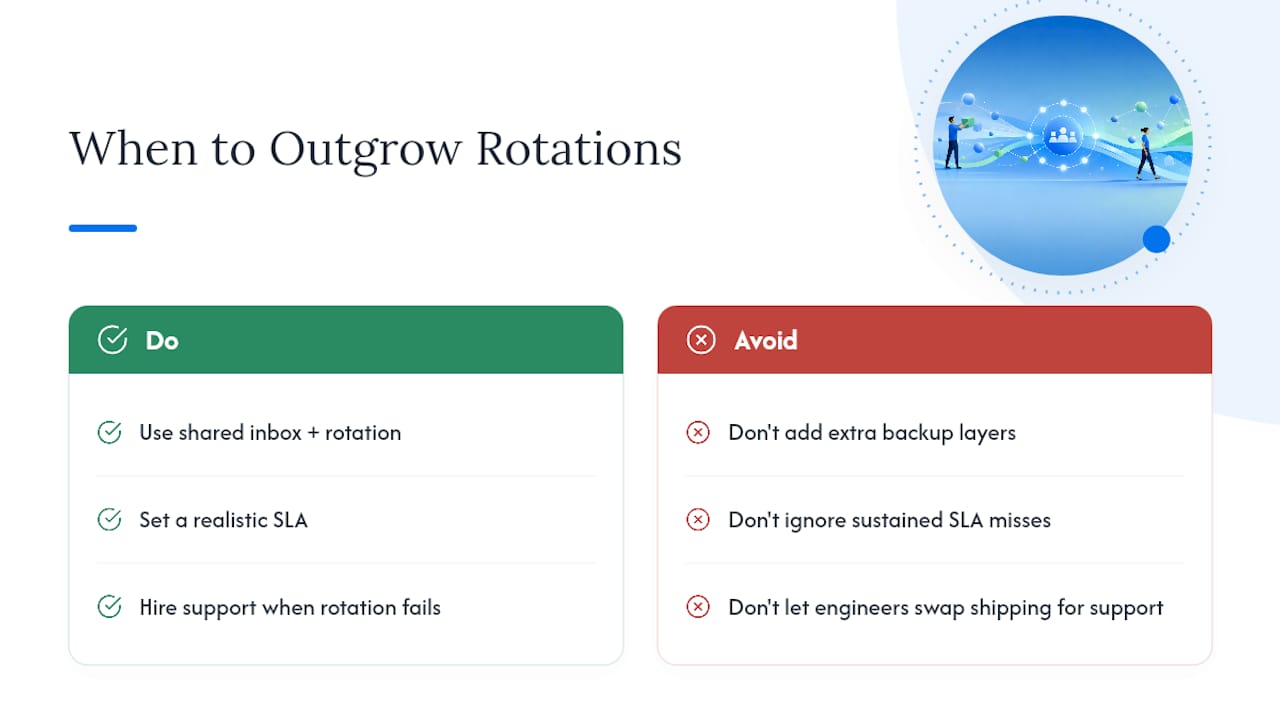
A shared inbox with a rotation and a realistic SLA is genuinely enough support infrastructure for most early-stage teams, and it’s better than enough. It keeps founders and engineers reading real customer complaints instead of a summarized version filtered through three layers of management, which is exactly the case made in research on skipping a dedicated support team early on.
The signal to change models isn’t a headcount milestone. It’s sustained SLA misses despite a fair rotation, or engineers spending more time answering tickets than shipping code. When either shows up consistently, that’s your cue to hire a dedicated support role rather than adding another backup layer to the rotation.
— Nick
Set Up Your Rotation in Sendsync, Not in a Spreadsheet
This software is built for exactly the workflow this article describes: a shared inbox that connects to Gmail or Microsoft 365 in minutes, with take/assign/claim built in, internal notes attached to every thread, and automation for tagging and routing without hiring an IT person to configure it.

Where most help desks charge per seat and demand a week of setup, this shared inbox software offers unlimited-user pricing and skips DNS configuration entirely, so your rotation can go live the same afternoon you decide to build one. If workload tracking is your next concern, the load-based assignment guide walks through balancing tickets across a rotation without a spreadsheet. Start a 14-day trial at Sendsync and have your first rotation published before the day’s out.
Sources
For deeper implementation detail, see contact center shift scheduling for fairness models, and Sendsync’s remote support team guide for running rotations across distributed teams. AmmarAI’s piece on scaling client work without burnout offers a useful outside perspective on workload automation.
- Skip the Support Team: Shared Inbox + Rotation First
- On-Call Scheduling for Small Teams: Skip the Enterprise Complexity
- How to Run a Shared Inbox: 9 Best Practices for info@, support@, and billing@ | Serif
- Shared mailbox best practices for your team | timetoreply
FAQ
What Is On-Call Rotation Support in a Shared Inbox?
It’s a scheduling system where one team member owns the shared inbox for a set period, backed by a published SLA and a designated backup for escalations.
How Long Should a Support On-Call Shift Last?
Weekly rotations fit teams of 3 to 10 people best, while very small or volunteer teams often do better with a two-week block, per small-team scheduling guidance.
How Many Escalation Levels Does a Small Team Need?
Just two: a primary on-call person and one backup. Teams under roughly 15 people rarely benefit from a deeper escalation chain.
When Should On-Call Handoffs Happen?
Mid-week, ideally Tuesday or Wednesday, since transitions on Monday or Friday tend to lose more context than they save.
Can Sendsync Handle On-Call Rotation Scheduling?
Yes. Sendsync’s shared inbox includes assignment, status labels, and internal notes, connecting to Gmail or Microsoft 365 without DNS setup, which makes standing up a rotation a same-day task.