
Support Team Handoff Best Practices That Stop Errors
Support Team Handoff Best Practices That Stop Errors ! Hands passing token symbolizing handoff Four practices catch most handoff failures before they hit a customer: use one standardized handoff format across the whole team, transfer ownership visibly with a required acknowledgme

Four practices catch most handoff failures before they hit a customer: use one standardized handoff format across the whole team, transfer ownership visibly with a required acknowledgment from the receiver, capture context and commitments instead of just task lists, and run at least one test handoff before it counts for real. Skip any one of these and you’re relying on memory and goodwill, which is exactly how tickets get dropped during shift changes.
Support team handoff best practices work the same way clinical handoff research has shown for years: structured formats with a built-in chance for questions cut communication errors far more reliably than a quick Slack message on the way out the door. Here’s the short version before we get into the mechanics:
- Pick one handoff template and enforce it, no freelancing
- Make ownership changes visible and require the incoming person to confirm receipt
- Write down the “why” behind decisions, not just the “what”
- Test the handoff with a live case before the real transition happens
Key Takeaways
Support team handoff best practices come down to one standardized template, visible ownership with required acknowledgment, context captured beyond the task list, and at least one test run before it’s real.
| Point | Details |
|---|---|
| Standardize the format | Pick SBAR, I-PASS, ANTICipate, or a simple owner-based routine, and enforce it team-wide. |
| Require acknowledgment | A handoff isn’t complete until the receiving person confirms they understand it. |
| Capture the “why” | Document decision rationale and relationships, not just steps, so context survives departures. |
| Test before it counts | Run shadowing, reverse shadowing, or a live test handoff before a real transition happens. |
| Make ownership visible | Sendsync’s shared inbox shows assignment and attaches notes directly to each conversation. |
Table of Contents
- A Compact, Prioritized Handoff Checklist Support Teams Can Copy
- Standardized Handoff Templates: I-PASS, SBAR, ANTICipate, and Simple Owner-Based Formats
- How to Run a Handoff, Step by Step
- Documentation That Survives When People Leave
- Shadowing, Reverse Shadowing, and Test Handoffs Before They Matter
- Who Owns What: Roles and Escalation Rules
- Copy These Templates Directly
- Frequently Asked Questions
- Sources
A Compact, Prioritized Handoff Checklist Support Teams Can Copy
Every open case needs the same six fields filled in before a handoff, regardless of how simple the ticket looks:
- Owner — who’s responsible right now, by name, not by team
- Current status — where the case actually stands, in one sentence
- What’s been tried — steps already taken, so the next person doesn’t repeat them
- Promised deadline — any commitment made to the customer, exact time if possible
- Next step — the single next action, not a list of options
- Blockers — anything stuck waiting on another team, a customer reply, or engineering
Mark priority and deadlines directly in the ticket, not in a side spreadsheet nobody checks mid shift. A tag like “Promised: Today 5 PM” does more work than a verbal reminder that evaporates by lunch.
The tightest handoffs run exceptions-first. Instead of summarizing all 40 open tickets, the outgoing agent flags the three that need attention:
- “Ticket #4021: refund promised by 3 PM, waiting on finance approval”
- “Ticket #4033: customer escalated twice, needs a call not another email”
- “Ticket #4050: new, untouched, low priority, can wait until tomorrow”
That’s a handoff someone can act on immediately, not a status report they have to decode first.
Standardized Handoff Templates: I-PASS, SBAR, ANTICipate, and Simple Owner-Based Formats
Support teams borrow most of their structured handoff formats from healthcare, where the cost of a dropped handoff is measured in patient harm rather than a bad review. That pressure produced tools worth stealing.
I-PASS stands for Illness severity, Patient summary, Action list, Situation awareness, and Synthesis by receiver. It’s built for complex, multi-step cases where missing context causes real downstream damage, think a technical escalation that’s been bouncing between three people for a week.
SBAR (Situation, Background, Assessment, Recommendation) is faster and works well for quick shift swaps where the case is simple but still needs a clear next action stated out loud.
ANTICipate (Administrative data, New information, Tasks, Illness severity, Contingency plans) leans into forward planning, useful when you’re handing off a ticket that’s likely to need judgment calls while you’re away.
Simple owner-based routines skip the acronym entirely and just require: owner, status, next step, deadline. Good enough for most day-to-day queues.
| Format | Best fit | Trade-off |
|---|---|---|
| I-PASS | Complex, high-stakes escalations | Slower to fill out, more training needed |
| SBAR | Routine shift-to-shift handoffs | Less room for nuance on multi-part cases |
| ANTICipate | Tickets likely to need decisions later | Requires forecasting, harder for juniors |
| Owner-based | Small teams, simple queues | Can miss context on complicated cases |
AHRQ’s TeamSTEPPS guidance makes a point that applies directly here: pick one tool and train everyone on it consistently, rather than letting each agent freestyle their own format. A mixed bag of handoff styles is worse than a mediocre single standard, because the receiving person has to guess which format they’re getting each time.
For most support teams, that means SBAR or an owner-based format for daily handoffs, with I-PASS reserved for the handful of cases complicated enough to need it.
How to Run a Handoff, Step by Step
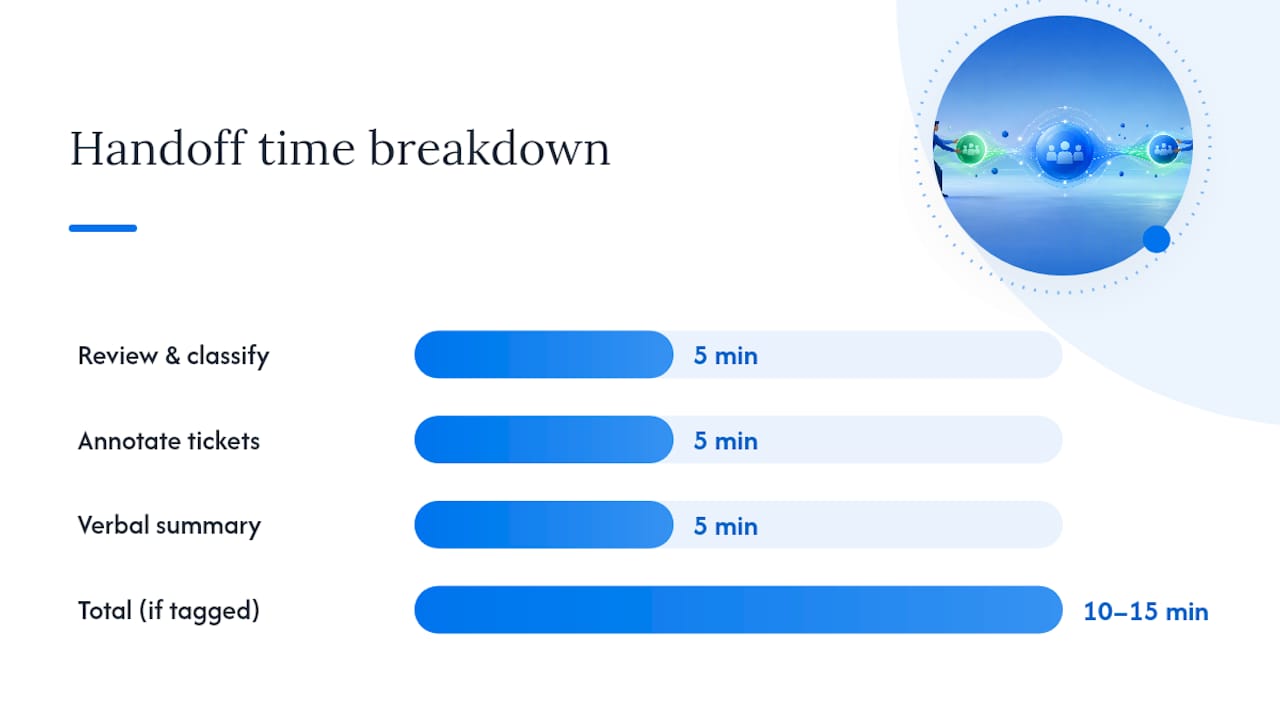
A good handoff routine fits inside 10 to 15 minutes if the underlying tickets are already tagged correctly. Here’s the sequence:
- Review the queue and flag anything with a deadline in the next 24 hours.
- Classify each flagged item as urgent, in progress, or informational only.
- Annotate each ticket with the six fields from the checklist above, focusing extra detail on anything urgent.
- Summarize verbally or in writing, exceptions only, skipping anything routine and unremarkable.
- Transfer ownership explicitly in the system, tagging the new owner by name.
- Acknowledge receipt. The incoming person confirms they’ve seen and understood each flagged item before the outgoing person logs off.
That last step is the one most teams skip, and it’s the one AHRQ’s handoff framework treats as non-negotiable: a handoff isn’t complete until the receiver acknowledges it. Transfer of responsibility without confirmation is just an announcement.
Two-person teams can compress this further. A support handoff guide built for two-person shops recommends keeping ticket states dead simple and skipping ceremony that only makes sense once you’ve got a rotation of five or six agents. Larger rotations need more structure precisely because no single person holds the full picture in their head anymore.
Pro Tip: Set a hard timebox, five minutes for review and classification, five for annotation, five for the verbal summary. Handoffs that run long usually mean tickets weren’t tagged well during the shift, not that the handoff process itself is broken.
Documentation That Survives When People Leave
Most support teams document the “how” and skip the “why,” which is exactly backward. A new hire can look up how to process a refund. They can’t look up why your team makes an exception for one client but not another, unless someone wrote it down.
Effective documentation for support team handoffs covers four things: standard operating procedures written in second person (“you’ll open the billing tab first”), role context docs explaining what decisions this role owns, a contact map of who to reach for what, and short video walkthroughs for anything too visual to describe in text.
- Write SOPs as if you’re talking someone through it live, not drafting a policy memo
- Keep a relationship map of key contacts, both internal and customer-facing
- Record a five-minute video for any process that’s easier shown than typed
- Store everything in one searchable place, not scattered across three tools
NASA’s guidance on sustaining institutional knowledge recommends leadership-led legacy discussions and scheduled review meetings as part of any serious transition, not just a document dump on someone’s last day. That structure matters more for senior or relationship-heavy roles, where a minimal handover runs 30 days but a senior role benefits from 60 to 90 days of overlap.
Pro Tip: Assign one person as the transfer owner for any planned departure, with specific milestones and a sign-off requirement after a test handoff. Without an owner, documentation projects drift until the departure date arrives and nothing’s finished.
Shadowing, Reverse Shadowing, and Test Handoffs Before They Matter
Documentation tells you what should happen. Testing tells you what actually will. The gap between the two is where most handoff failures live.
- Shadowing: the new person watches the outgoing agent work a live queue, asking questions in real time
- Reverse shadowing: the outgoing agent watches the new person work the same queue, catching gaps before they become customer-facing mistakes
- Recorded walkthroughs: useful for asynchronous teams or when the outgoing person won’t be available for questions later
Run shadowing before any planned departure, weave reverse shadowing into onboarding, and repeat periodic test handoffs for anything complex enough to drift out of date. One useful method: have the incoming person execute two or three critical tasks independently while the outgoing person watches, catching gaps without waiting for a real customer to expose them.
Keep a gap log during testing. Every miss becomes a remediation task, and sign-off only happens once the log is clear.

Who Owns What: Roles and Escalation Rules
A shared inbox creates a specific failure mode: everyone can see a ticket, so everyone assumes someone else owns it. Fix that by separating queue owner (responsible for the whole inbox during a shift) from case owner (responsible for one ticket until it closes or gets formally reassigned).
- Signal ownership visibly through assignment tags, not verbal agreements that live in someone’s memory
- Require the incoming case owner to acknowledge each transferred ticket individually
- Escalate immediately for security or privacy issues, risk of data loss, a blocked high-value customer, or any missed deadline
- Long-running tickets need a named owner at every shift change, even if that owner doesn’t touch the ticket that day
Continuity across shifts breaks down fastest on tickets that span more than one handoff cycle. Assign a single owner who tracks it start to finish, even as day-to-day work gets shared.
Copy These Templates Directly
A short handoff summary, written exceptions-first: “Two urgent items: Ticket #4021 needs finance sign-off by 3 PM, Ticket #4033 needs a call today. Everything else is on track, no action needed.”
An internal ticket note capturing commitments: “Promised customer a refund by EOD Friday. Approval requested from finance 2/14, no response yet. Next step: follow up finance by noon.”
| Template | Use case | Core fields |
|---|---|---|
| Handoff summary | Shift change, daily | Exceptions, deadlines, next steps |
| Ticket note | Any commitment made | Promise, evidence, follow-up date |
| Knowledge-transfer checklist | Role change, departure | SOPs, contact map, test sign-off |
Keep every template short enough to fill out in under two minutes, or people will stop using it by the second week.
Publisher perspective: pragmatic trade-offs
Minimal beats perfect when speed matters more than completeness, early stage teams especially. Add documentation and testing incrementally; the real trap is unclear ownership, not thin paperwork.
Making Handoff Visibility Automatic Instead of Manual
Everything above works better when the tools don’t fight you. A shared inbox built for support teams makes ownership changes visible the moment they happen, no separate spreadsheet, no “who’s got ticket #4021” thread in chat.

Sendsync assigns conversations to a named owner, keeps internal notes attached directly to the thread so context travels with the case instead of living in someone’s head, and lets you build saved views for anything tagged urgent or promised-today. Automation handles routine triage so agents spend handoff time on the exceptions that actually need a human decision. Teams switching from a crowded shared Gmail account or a stripped-down help desk tend to feel the difference fastest, since ownership was probably invisible before.
If you’re evaluating whether a shared-inbox workflow fits your team, check three things during a trial: can you see who owns each conversation at a glance, can you attach a note that survives the handoff without getting buried, and does triage automation actually reduce manual sorting instead of adding another step. Sendsync runs a 14-day free trial with unlimited users and no DNS setup, so you can test a real handoff with your own queue before committing. For more on setting up shared ownership day to day, see how shared inbox best practices apply to teams still relying on manual assignment.
Frequently Asked Questions
What is the single most important support team handoff best practice? Requiring acknowledgment from the receiving person. A handoff without confirmation is just an announcement, and it’s the step most teams skip under time pressure.
How long should a shift handoff take? Ten to fifteen minutes if tickets are tagged correctly during the shift. Longer handoffs usually mean the underlying tickets weren’t classified as they came in.
Which handoff template should a small support team use? A simple owner-based format covering owner, status, next step, and deadline works for most day-to-day queues. Save SBAR or I-PASS for complex, multi-step escalations.
How often should teams run test handoffs? Before any planned departure, during onboarding for new hires, and periodically for any process complex enough to drift out of date between reviews.
What’s the difference between a queue owner and a case owner? A queue owner is responsible for the whole inbox during a shift. A case owner is responsible for one specific ticket until it closes or gets formally reassigned, even across multiple shift changes.
Sources
- The art of effective handoffs: What is the evidence?
- Tool: Handoff | Agency for Healthcare Research and Quality
- Knowledge transfer plan (Prialto)
- Sustaining knowledge through transitions (NASA)