
The Simple Help Desk Approach That Gets Small Teams Running Fast
The Simple Help Desk Approach That Gets Small Teams Running Fast ! Hands unplugging computer monitor cable For a small IT or support team, the right move is a lightweight shared inbox rather than a full ticketing platform.

For a small IT or support team, the right move is a lightweight shared inbox rather than a full ticketing platform. Sendsync represents this approach well: it connects directly to Gmail or Microsoft 365, skips DNS configuration entirely, and charges by team instead of by seat.
That matters for two reasons. First, setup takes minutes, not days, because you’re not routing mail through a new domain or waiting on IT approval for MX records. Second, unlimited-user pricing means adding a third or fourth agent doesn’t trigger a new invoice line.
If you run support for a small team and want ticket assignment, status tracking, and shared visibility without a configuration project, this is your starting point.
- Connect your existing Gmail or Microsoft 365 inbox
- Assign your first ticket to a teammate within minutes
- Skip DNS setup entirely
- Start a free trial to see time-to-first-ticket for yourself
Key Takeaways
A simple help desk built on a shared inbox wins for small teams because it cuts setup time to minutes and removes per-seat cost penalties as the team grows.
| Point | Details |
|---|---|
| Match the tool to team size | A shared inbox fits teams under roughly 20 people; larger or more complex operations need full ITSM features. |
| Test setup speed directly | Time your first real ticket from signup, not from when support “starts,” to judge true onboarding friction. |
| Prioritize DNS-free integration | Any tool requiring MX record changes adds days to setup that a native Gmail or Microsoft 365 connection avoids. |
| Measure the pilot, not the features list | Track time-to-first-response and admin hours during a trial rather than counting checkboxes on a comparison page. |
| Sendsync fits the shared-inbox-first approach | It connects to Gmail or Microsoft 365 without DNS setup and prices by team, not by seat, matching the criteria this guide recommends. |
Table of Contents
- What Is a Simple Help Desk, and Who Actually Needs One?
- Simple vs. Complex Help Desks: What the Trade-Off Actually Costs You
- Essential Features Checklist for a Simple Help Desk
- How to Choose: A 7-Day Trial Checklist and the Questions That Matter
- Running a Shared-Inbox Pilot: A Practical Path With Sendsync
- Why the “More Features” Instinct Usually Backfires
- Get Started With Sendsync’s Shared Inbox
- Sources
What Is a Simple Help Desk, and Who Actually Needs One?
A simple help desk is ticketing software built around one email inbox, minimal configuration, and a handful of people managing requests together. It’s the difference between a shared inbox with structure and a full IT service management (ITSM) platform with workflows, service catalogs, and change advisory boards.
The term “simple help desk” isn’t the formal industry name. What you’re actually shopping for falls under shared inbox software or lightweight ticketing systems, distinct from enterprise ITSM suites like those built around ITIL frameworks. Both terms describe the same practical thing: email-first ticket handling without the administrative weight.
This fits three situations especially well:
- Internal IT support for a company under roughly 50 employees, where one or two people field password resets, hardware requests, and access issues.
- Frontline customer support for a small business or startup where email volume is moderate and a team of two to five people shares the load.
- Any team currently running support out of a personal inbox and losing track of who replied to what.
A simple help desk is the wrong fit if you need change management workflows, a configuration management database (CMDB), formal service-level agreement (SLA) escalation chains, or multi-department ticket routing with approval hierarchies. Those requirements point toward full ITSM platforms, not shared inboxes. Practitioner communities on Reddit’s r/sysadmin consistently steer tiny IT teams toward minimal tools precisely because heavier platforms add overhead that never gets used.
Simple vs. Complex Help Desks: What the Trade-Off Actually Costs You
The appeal of a complex help desk is depth: custom fields, multi-step approval workflows, asset tracking, and granular permission structures. The cost is time. Every one of those features requires setup, and setup requires someone who understands the platform well enough to configure it correctly.
Here’s where the trade-offs actually bite for a small team:
- Onboarding time. A simple help desk can be live the same day; a full ITSM platform often takes weeks of configuration before the first real ticket flows through. MAK23’s product positioning claims teams go live the same afternoon, which reflects the ceiling on how fast lightweight setup can go.
- Admin burden. Complex platforms typically need a dedicated administrator to maintain workflows, permissions, and integrations. Simple tools mostly run themselves once connected.
- Extensibility. Complex platforms win here. If you expect to need custom workflows or multi-team routing within a year, that flexibility has real value.
- Pricing structure. Per-seat pricing on enterprise platforms adds up fast once you cross five or six agents; unlimited-user models avoid that scaling penalty entirely.
- Hidden costs. Implementation consultants, training time, and ongoing configuration maintenance rarely show up on the pricing page but show up on the invoice.
PCMag’s testing coverage of IT help desk software makes a similar point: the tools with the deepest feature sets aren’t automatically the best fit, and ease of use often trades directly against configurability.
Pro Tip: Before you commit to a platform, count how many people will actually touch it daily. If the answer is under five, weigh setup speed and admin overhead more heavily than feature depth.
Essential Features Checklist for a Simple Help Desk
Not every feature on a vendor’s pricing page matters for a small team. Here’s what actually moves the needle, and what to test before you sign anything.
Email-to-ticket conversion is non-negotiable. Every incoming email should become a trackable ticket automatically, without manual forwarding or copy-pasting into a separate system. The integration should connect directly to Gmail or Microsoft 365 without requiring you to change your mail exchanger (MX) records or repoint your domain. That DNS step is where a lot of “quick setup” promises fall apart in practice, and it’s the single biggest reason teams abandon a setup halfway through.
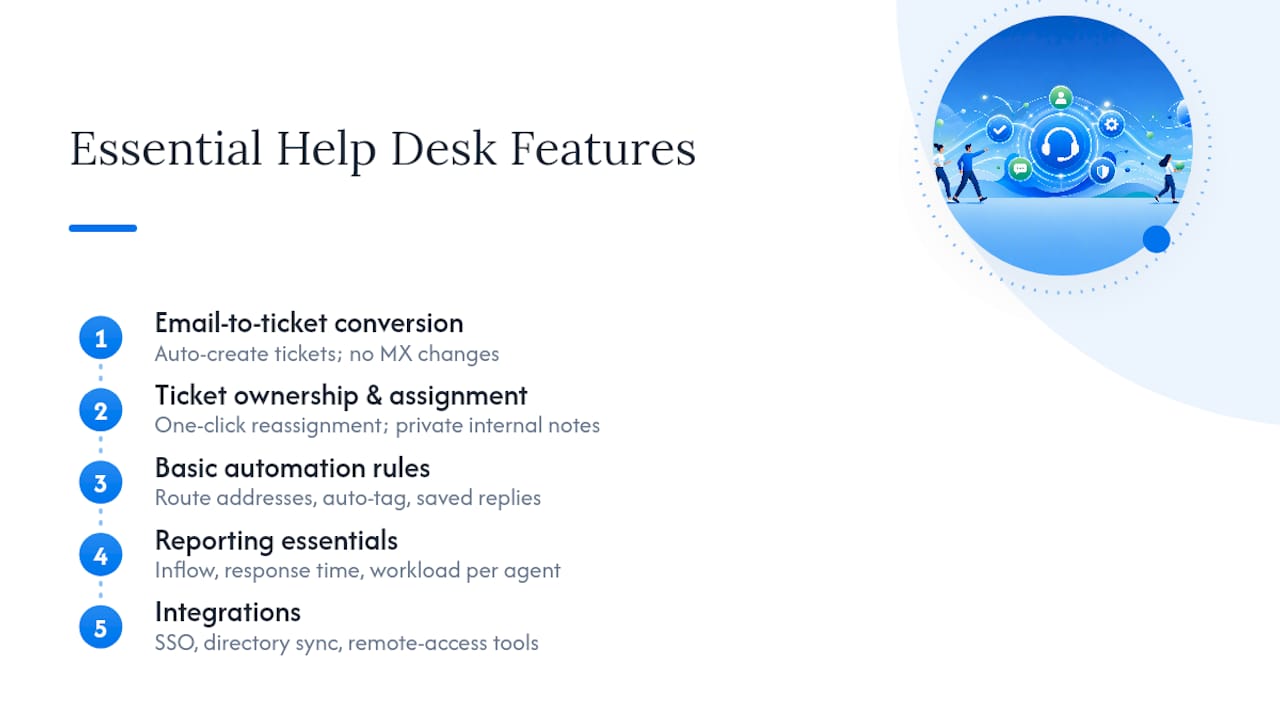
Ticket ownership and assignment comes next. You need to see, at a glance, who owns which conversation and be able to reassign it in one click. Internal notes matter just as much: a way to leave context for a teammate without that note accidentally going out in a reply to the customer. Status tracking (open, pending, resolved) rounds this out, and it should update automatically when a reply goes out, not require someone to remember to change a dropdown.
Basic automation is where a lot of tools try to oversell themselves. You don’t need AI-driven triage for a five-person team. You need simple rules: route emails from a specific address to a specific person, auto-tag by keyword, or send a canned reply to common questions. Saved reply templates and macros save real time here without adding complexity. Zoho Desk’s product messaging illustrates the more advanced end of this, with an AI assistant that drafts responses, useful for larger teams but overkill for a five-person shop just trying to stop losing track of email threads.
Reporting should answer three questions without a dashboard-building exercise: how many tickets came in, how fast did the team respond, and who’s carrying the heaviest load. Anything beyond that is a nice-to-have.
Small teams that lean on shared-inbox workflows rather than full platforms report exactly this pattern: fewer features used, fewer things to configure, faster time to value. Community threads on Spiceworks back this up, with IT professionals repeatedly recommending free or basic tools over feature-heavy platforms when ticket volume stays low.
Last, check integrations before you buy: single sign-on (SSO) support, directory sync if you’re managing employee access, and compatibility with whatever remote-access tool your IT team already uses for troubleshooting.
How to Choose: A 7-Day Trial Checklist and the Questions That Matter
Most help desk decisions get made on a features list. That’s backward. The better test is a short pilot where you measure what actually happens when real tickets flow through the system.
Here’s the sequence to follow during a trial week:
- Connect your real email account, not a test address. If the setup process asks you to touch DNS records or wait on domain verification, that’s your first signal something is more complicated than advertised.
- Import your actual team, not a placeholder user. Watch how long it takes to get someone from “invited” to “actively answering tickets.”
- Run 10 to 15 real tickets through the system, including at least one that needs to be reassigned mid-conversation.
- Check the reporting view after those tickets close. Can you see response time and ticket volume without exporting to a spreadsheet?
While you’re testing, ask the vendor directly:
- Does the email integration work with Gmail and Microsoft 365 natively, or does it require a forwarding rule?
- Is pricing per seat, or does it scale by ticket volume, or is it unlimited users at a flat rate?
- Can you export your ticket data if you decide to leave? A vendor that makes this hard is telling you something.
- What happens to open tickets if you exceed a free-tier limit mid-month?
Three numbers are worth tracking through the pilot: time-to-first-response on a sample ticket, total tickets handled per agent per day, and hours spent on admin tasks like reassigning, tagging, or fixing miscategorized tickets. PCMag’s help desk testing makes the same recommendation: measure operational impact during the trial window rather than counting features on a comparison chart.
Watch for red flags that should end a trial early: a setup process that stalls on DNS verification, pricing pages that hide per-seat costs behind “contact sales,” or a data export function that doesn’t actually work when you test it. If the vendor can’t answer the seat-pricing question in one sentence, that’s a signal worth taking seriously.
Pro Tip: Time your pilot’s first ticket from the moment you sign up, not from when support “officially” starts. That number, sometimes called time-to-first-ticket, tells you more about real-world usability than any feature list.
For teams anticipating growth beyond a shared inbox, Sendsync’s guide comparing shared inboxes to full helpdesk software walks through the specific signals that indicate it’s time to graduate.
Running a Shared-Inbox Pilot: A Practical Path With Sendsync
A pilot doesn’t need to be complicated to be useful. Here’s a version that takes an afternoon, not a sprint.
Step one: connect your Gmail or Microsoft 365 mailbox to Sendsync. There’s no DNS record to touch and no domain verification wait, which is the detail that usually eats the first day of setup elsewhere.

Step two: assign one or two agents to start. Give them visibility into the shared inbox and let them claim tickets as they come in.
Step three: route the next 10 tickets that land through the normal workflow, letting agents assign, reply, and add internal notes as they would in production.
Step four: measure response time against whatever baseline you had before, whether that was a shared personal inbox or no formal tracking at all.
The operational benefits Sendsync’s product messaging points to line up with what a pilot like this is designed to surface: reduced setup time compared to DNS-dependent alternatives, unlimited-user pricing that doesn’t punish you for adding a third agent, and better visibility into who’s handling what.
| What Changes | Why It Matters for a Small Team |
|---|---|
| Setup time | Minutes instead of days, since no DNS configuration is required |
| Pricing shape | Unlimited users means team growth doesn’t increase your bill |
| Ticket visibility | Shared inbox structure replaces guesswork about who replied to what |
A shared-inbox-first approach stops making sense once you need multi-department routing, formal SLA escalation tiers, or asset and configuration tracking tied to tickets. At that point, the trade-offs discussed earlier tip toward a full ITSM platform. For most teams under 20 people, that point arrives later than they expect. Sendsync’s guide to support workflows for small teams covers the signals worth watching for as your team scales.
Why the “More Features” Instinct Usually Backfires
The conventional advice on choosing help desk software leans hard on feature comparisons: count the automations, count the integrations, pick whoever has the longest list. That instinct is backward for a team of two to ten people. Every feature you don’t use is still a feature you have to understand well enough to ignore, and that costs time during setup and during onboarding every time someone new joins the team.
What the evidence here actually supports is narrower and more useful: prioritize time-to-first-ticket over feature count, because setup friction is the thing that actually kills adoption. A platform with fewer bells but a same-day connection beats one with a longer feature list that takes two weeks to configure correctly. The DNS step, in particular, deserves more skepticism than it gets. It sounds like a small technical detail. In practice, it’s the difference between a support team live today and one still waiting on IT approval next week.
If you take one thing from this guide, let it be this: run the pilot before you read another comparison chart.
— Nick
Get Started With Sendsync’s Shared Inbox
Sendsync is the alternative to a DNS-heavy help desk setup: connect your Gmail or Microsoft 365 mailbox directly, skip the domain configuration entirely, and have your team assigning tickets the same day you sign up.

That matters most for the exact team this guide is written for: small IT and support teams who don’t have a spare week to configure a new platform or a budget that scales painfully with every new hire. Sendsync’s pricing adds agents without adding per-seat costs, so a team of three can grow to six without renegotiating anything. Internal notes, ticket assignment, and status tracking work the way this guide’s checklist describes, right out of the connection step.
If the 7-day trial checklist above sounds like the right next move, start a free trial with Sendsync and connect your team’s inbox today. You’ll know by the first afternoon whether it fits.