
Route Support Email in Minutes: Naming Examples for Small Teams
Route Support Email in Minutes: Naming Examples for Small Teams ! Hands setting up a shared support email address The clearest support address is a short, role-based local-part like support@ or help@, not a person's name.

The clearest support address is a short, role-based local-part like support@ or help@, not a person’s name. It survives staff turnover, tells customers exactly what the inbox is for, and works with any shared inbox setup. Use a personal address only for one-on-one relationship management, like a dedicated account manager. Once you pick a name, the real work is routing it so nothing gets lost.
TL;DR:
- Using a short, role-based address like support@ or help@ ensures support continuity despite staff turnover and aligns with standard RFC 2142 practices for essential operational addresses.
- Avoid mixing case styles across your support addresses, and test the chosen name by having others type it out to ensure customers will do the same without errors.
- Keep support email local-parts brief, common, and free of underscores or hyphens to improve memorability and reduce the chance of misspelling.
- Separate transactional emails from marketing by maintaining dedicated domains or subdomains for support addresses to prevent spam filtering issues and maintain deliverability.
- For small teams, forwarding or shared inboxes are simplest to set up, with full help desk platforms becoming more beneficial as support volume and complexity increase.
Table of Contents
- Role-Based vs. Personal Addresses: What RFC 2142 Actually Says
- How Do You Write a Good Support Email Address?
- What Are Good Names for a Support Email Address?
- Will a Role-Based Address Hurt Your Email Deliverability?
- How Do You Set Up and Route a Support Email Address?
- Ready-to-Use Templates for Solo Founders and Small Teams
- What I’ve Learned Watching Teams Rename Their Support Inbox
- What the Conventional Advice Gets Wrong
- Get Your Support Address Routing in Minutes, Not Weeks
- Sources
- FAQ
Role-Based vs. Personal Addresses: What RFC 2142 Actually Says
Every support inbox falls into one of two camps: role-based or personal. A role-based address belongs to a function, not a person. Think support@, help@, or billing@. A personal address, like alice@yourcompany.com, belongs to one human and disappears the day they leave. That distinction is a standard practice for separating customer-facing functions from individual staff, according to Serif’s guide to generic email addresses.
The internet has actual rules about this. RFC 2142, a decades-old technical standard, defines a baseline set of role mailboxes every domain is expected to maintain. Some of these carry operational weight far beyond customer support:
- postmaster@ — handles mail delivery problems; most mail servers expect this to exist.
- abuse@ — receives spam and phishing reports; monitored by anti-abuse systems industry-wide.
- hostmaster@ — handles domain and DNS-related contacts.
- webmaster@ — handles website issues, though it’s largely fallen out of daily use.
- security@ — receives vulnerability reports and security disclosures.
The detection and handling guide from SMTPedia is blunt about this: postmaster@ and abuse@ aren’t naming suggestions, they’re expected infrastructure. Repurpose them for general customer support and you risk confusing spam filters and security researchers who assume those addresses mean something specific.
Here’s the trade-off in plain terms. Role addresses win on resilience: five people can share support@, and when one quits, nothing breaks. Personal addresses win on accountability: a customer knows exactly who they’re emailing, and tone feels warmer. Most support teams should default to role-based naming for the main queue and reserve personal addresses for account managers, sales reps, or anyone building a one-to-one relationship with a client.
How Do You Write a Good Support Email Address?
Naming a support inbox is not the place to get creative with spelling. Follow a short set of rules and you’ll avoid nearly every mistake that trips up small teams.
- Use common words, not internal jargon. support@, help@, and care@ work because everyone understands them instantly. Nobody outside your building knows what “cx-ops@” means.
- Keep the local-part short. Five to twelve characters is the sweet spot. Long local-parts get mistyped, and mistyped addresses bounce.
- Skip underscores, periods, and hyphens where you can. support_team@ and support.team@ both work technically, but a single word like supportteam@ or, better, just support@, is easier to say over the phone and easier to remember.
- Match tone to your brand, not your mood that day. A law firm should probably stick with support@ or inquiries@. A direct-to-consumer skincare brand can get away with hello@ or hi@. Pick one register and stay consistent across every published address.
- Publish the address everywhere a customer would look. That means your contact page, your website footer, the signature block of every transactional email, and any order confirmation or shipping notice.
Companies that handle this well tend to make the split explicit. Revolut’s support page, for example, publishes a general support@ address for everyday customer questions and keeps separate addresses for legal processes like court orders. That separation matters more than it sounds. A support inbox flooded with legal requests slows down both queues.
Pro Tip: Before you finalize a name, say it out loud to someone else and ask them to type it without seeing it. If they get it wrong, so will your customers.
One more formatting note: avoid mixing cases (Support@ vs support@) across your marketing materials. Email is technically case-insensitive on most servers, but consistency in how you display it builds trust and looks intentional rather than sloppy.
What Are Good Names for a Support Email Address?
Readers hunting for support email naming ideas usually want options, not theory. Curated lists circulating in customer experience communities regularly run past 50 suggested local-parts, and startup forums like Hacker News tend to converge on the same handful of favorites. Here’s a grouped set you can pull from directly.
Formal and core options
These are the safest, most universally understood choices. If you’re not sure what to pick, start here.
- support@
- help@
- customerservice@
- service@
- inquiries@
- contact@
Friendly and brand-forward options
Consumer brands, especially ones with a casual voice, lean toward these. They read warmer without sacrificing clarity.
- hello@
- hi@
- wecanhelp@
- talktous@
- askus@
- friends@ (works only if your brand voice genuinely supports it)
Branded and team-specific options
Once you have more than one function or team handling inquiries, these help route mail before a human even opens it.
- brandcare@ (swap in your actual brand name, like acmecare@)
- support.team@
- customer.success@
- onboarding@
- feedback@
Escalation, security, and internal options
Not every address is meant for the general public. These exist to route sensitive or high-priority mail to the right person fast.
- security@ — for vulnerability reports; treat this one seriously and check it daily.
- abuse@ — for spam or policy violation reports; expected by RFC 2142 conventions.
- vip@ or priority@ — for enterprise accounts or your highest-value customers.
- billing@ — separates payment disputes from general product questions.
- legal@ — keeps subpoenas and compliance requests out of your main queue.
A quick gut check before you commit: would a stranger understand this address without any context? support@ passes instantly. cx-escalation-tier2@ does not. If you run a two-person shop, you probably only need two or three of these. If you’re scaling past ten support staff, splitting into five or six targeted addresses (support@, billing@, security@, feedback@) keeps your shared inbox from turning into a single unsorted pile.
Will a Role-Based Address Hurt Your Email Deliverability?
Role addresses come with real risk if you’re not careful, and it’s worth understanding before you set one up. Anti-abuse systems and email service providers generally treat role-based prefixes with extra scrutiny. Marketing platforms in particular flag addresses like info@, admin@, and support@ as higher risk for spam-trap behavior, because these mailboxes are more likely to be abandoned, shared by multiple people, or never actually read by a real subscriber who opted in.
The practical risk breaks into three buckets, according to guidance on role-based email detection and handling: higher complaint rates when marketing content lands in a role inbox nobody personally requested, lower engagement metrics that can drag down your sender reputation, and outright spam-trap risk if the address is old, unmonitored, or scraped from a public webpage.
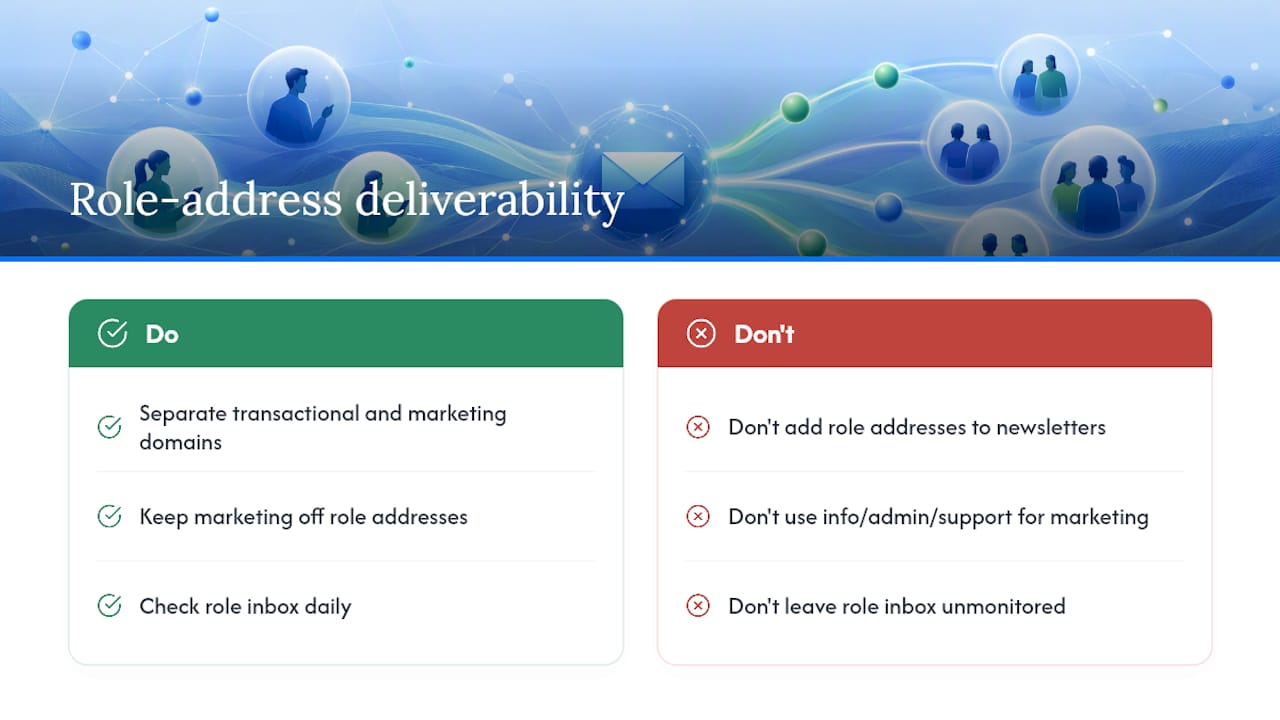
None of this means avoid role addresses. It means separate your traffic. Keep transactional email (password resets, order confirmations, support replies) on one sending domain or subdomain, and keep marketing sends away from any address ending in support@, info@, or admin@ entirely. Never add a role address to a newsletter list just because someone emailed you from it once. And whatever name you choose for customer support, make sure a real person checks it daily. An unmonitored role inbox is functionally worse than no inbox at all, since customers assume someone’s watching.
How Do You Set Up and Route a Support Email Address?
Picking the name is the easy part. Getting mail from that address to the right person, quickly, is what actually determines whether customers think your support is good.
Start by creating the address as an alias on your existing domain rather than a brand-new mailbox, if your email provider supports it. Then choose one of three handling models:
- Simple forwarding — mail sent to support@ forwards to one person’s personal inbox. Works for solo founders, breaks down fast once a second person joins.
- Shared inbox — multiple people see and manage the same queue, can assign messages, and see who’s already replied. This is the middle ground most small teams land on.
- Full help desk platform — ticketing, automation, and reporting layered on top. Powerful, but often more setup than a five-person team needs.
Whichever model you pick, run through this checklist before you publish the address anywhere:
- Confirm at least one person checks the inbox every business day, ideally with a defined response window.
- Set an auto-reply confirming receipt and giving a rough response time.
- Add routing rules or labels so billing questions, security reports, and general inquiries don’t all land in one undifferentiated pile.
- Write a one-line escalation rule: who handles it if the first responder is out sick or on vacation.
- Note your service-level target somewhere internal, even if it’s informal, like “reply within one business day.”
Some companies add a security layer worth knowing about: for account-specific issues, providers like Current will only respond to the email address already on file for that account. If you handle any billing or account-sensitive support, build a similar verification step into your process.
Shared inboxes solve the most common failure mode in small-team support: the “I thought you replied to that” problem, where a message sits unanswered because two people assumed someone else handled it. A team inbox works fundamentally differently than everyone forwarding mail to themselves, because visibility and assignment happen in one shared place instead of scattered across individual mailboxes.
Ready-to-Use Templates for Solo Founders and Small Teams
You don’t need to write these from scratch. Adapt the templates below to your tone and ship them today.
- Auto-reply template: “Thanks for reaching out to [Company] support. We typically respond within one business day. In the meantime, check our [help center link] for answers to common questions.”
- Subject-line pattern for ticketing: Keep a consistent structure like “[Support] Order #12345 - Shipping delay” so tickets stay searchable and sortable even without a dedicated help desk tool.
- Escalation subject tag: Add “[Urgent]” or “[VIP]” as a prefix only for genuinely time-sensitive cases, so the tag keeps its meaning.
- Signature block for role addresses: “The [Company] Support Team” reads better than an individual’s name signing from a shared inbox, since it sets accurate expectations about who’s replying.
Small formatting choices like these do a lot of quiet work. A consistent subject-line pattern alone can save a two-person team from re-reading half their inbox just to figure out what’s already been handled.
What I’ve Learned Watching Teams Rename Their Support Inbox
Teams that rename a vague inbox to something clear, like switching from a founder’s personal address to support@, almost always report fewer messages falling through the cracks. Part of that is psychological. A dedicated address signals “this goes somewhere specific,” so people stop guessing whether to email the founder directly or the general contact form.
But naming only solves half the problem. The other half is whether anyone can see, in real time, that a new message landed. Teams that pair a clean role address with fast setup, no DNS changes, no waiting days for a help desk to configure, and unlimited people watching the same queue tend to catch messages faster simply because more eyes are on the inbox at once.
If you’re still deciding on a name, don’t agonize over it. Test support@ for a month, watch how customers respond to it, and adjust if something feels off. Naming is reversible. Lost messages aren’t.
What the Conventional Advice Gets Wrong
Most guides treat support email naming like the whole problem, and it isn’t. A well-chosen name with no monitoring behind it is worse than a mediocre name someone actually checks daily. The naming decision matters, but it’s a five-minute decision. The routing decision is the one that determines whether customers feel heard.
The conventional advice also underrates how fast small teams outgrow a single personal inbox. Founders often start by using their own email for everything, then realize months later that customer questions are buried between vendor invoices and internal Slack notifications. By the time they switch to a proper role address, they’ve usually already lost some messages nobody noticed.
Here’s what I’d prioritize first: pick support@ or help@ without overthinking it, get it forwarding somewhere immediately, and only then worry about polish. Fancy naming schemes and elaborate escalation rules can wait. A monitored inbox beats a clever one every time.
— Nick
Get Your Support Address Routing in Minutes, Not Weeks
Once you’ve settled on a name like support@ or help@, the next problem is making sure it actually works day to day, without a week of DNS configuration standing between you and your first ticket. The platform connects directly to your existing Gmail or Microsoft 365 mailbox, so your role address can start routing to a shared queue quickly, avoiding the DNS setup and configuration cycle typical of traditional help desk platforms.

There’s no per-seat pricing to worry about as your team grows. Sendsync plans, from Founder at $10 per month up to Scale at $200 per month, all include unlimited users, so adding a fourth or fifth person to watch support@ doesn’t mean negotiating a new contract. Every reply, assignment, and internal note live in one shared view instead of being scattered across individual inboxes and guesswork about who answered what.
If you’ve picked your address and you’re ready to make sure nothing sent to it gets lost, start your setup on Sendsync and see how quickly a shared inbox comes together without touching a single DNS record.
Sources
- Generic Email Addresses: Which Ones Your Business Needs (info@, support@, sales@) | Serif
- Role-Based Email Addresses: Detection, Risks and Handling (2026)
- 68 Customer Support Email Address Name Ideas
- How Do I Contact Revolut Customer Support | Revolut Email, Phone Number | Revolut United States
- How do I contact Current
FAQ
What Are Good Professional Email Names for Support?
Short, common words work best: support@, help@, customerservice@, or hello@ for a friendlier brand voice. Avoid underscores, long phrases, or internal jargon that a customer wouldn’t recognize on sight.
What Is a Support Email Address?
A support email address is a role-based inbox, like support@yourcompany.com, dedicated to customer inquiries rather than tied to one person. It typically routes into a shared inbox or ticketing system so multiple team members can respond.
What Is the Gmail Naming Trick for Support Addresses?
Gmail lets you add a plus sign and any text after your username (like yourname+support@gmail.com) and mail still arrives in the same inbox, useful for filtering. For an actual business support address, though, a dedicated alias like support@yourdomain.com looks more professional and doesn’t depend on one person’s personal Gmail account.
What Are the 5 C’s of Email Support?
Definitions vary across different customer service frameworks, so there’s no single agreed-upon list. Most versions emphasize being clear, concise, courteous, correct, and complete in how support replies are written.
Should I Use My Name or a Role Address for Support?
Use a role-based address like support@ for anything customer-facing, since it survives staff changes and keeps routing predictable. Reserve a personal address for dedicated account managers or one-on-one relationships where a customer needs a consistent point of contact.