
The Role of Shared Context in Early Support Teams
The Role of Shared Context in Early Support Teams ! Diverse team collaborating on support emails Why shared context defines how early customer support teams perform Shared context is the common understanding your team holds about goals, active conversations, past decisions, and h

Why shared context defines how early customer support teams perform
Shared context is the common understanding your team holds about goals, active conversations, past decisions, and how work gets done. For a customer support team handling email, it is the difference between a rep who answers a customer’s third follow-up with full history and one who asks them to repeat everything from scratch. Research confirms that shared mental models correlate positively with team effectiveness, and that effect shows up fast in early teams where norms are still forming.
The role of shared context in an early team is not passive. It has to be built deliberately, especially when your team is remote or distributed. Key elements include:
- A shared understanding of team goals and each rep’s responsibilities
- Visibility into prior customer conversations and decisions
- Consistent messaging so customers get the same answer regardless of who replies
- Psychological safety so team members feel comfortable flagging gaps or asking questions
- A central place where decisions and context live, not scattered across private inboxes
Sendsync addresses this directly by connecting Gmail and Microsoft 365 mailboxes into a shared inbox where conversations, assignments, and replies are visible to the whole team.
Table of Contents
- How shared context shapes email collaboration in customer support
- What makes building shared context hard for remote and early teams
- Best practices and tools that keep shared context alive in email workflows
- Key insights on shared context for early customer support teams
- How to build shared context from day one of a new support team
- How to measure whether shared context is actually working
- What successful shared context looks like in practice
- Key Takeaways
How shared context shapes email collaboration in customer support
Shared understanding in teams cuts duplicated effort. When two reps can see the same thread and its full history, neither sends a conflicting reply. That alone reduces customer frustration and speeds up resolution.
The benefits of team collaboration built on shared context go further:
- New team members onboard faster because the context is already documented in the thread
- Reps can cover for each other without a lengthy handoff call
- Managers spot bottlenecks earlier because work is visible, not buried in personal inboxes
- Customer satisfaction improves because responses are consistent and informed
Cultural factors matter here too. Teams where members feel safe admitting they missed context perform better than those where people guess rather than ask. Psychological safety is the top cultural determinant of knowledge sharing in virtual environments, and early teams set that tone quickly.
What makes building shared context hard for remote and early teams

Context slips away without physical proximity. In an office, you overhear a decision, notice a whiteboard, or catch a colleague’s reaction. Remote teams lose all of that by default.
Common challenges include:
- Information scattered across email threads, Slack channels, and private DMs no one else can see
- No established norms in early teams for where decisions get recorded
- Reluctance to surface uncertainty, especially in teams without psychological safety
- Knowledge silos where one senior rep becomes the human search engine for institutional memory
- Meeting overload as teams try to reconstruct lost context through calls instead of fixing the system
The result is slow responses, duplicated work, and customers who feel like they are starting over every time they write in.
Best practices and tools that keep shared context alive in email workflows
The fix starts with treating decisions as first-class artifacts. Write them down when they happen, link them to the work they affect, and make them visible by default.
Practical steps:
- Pick one primary knowledge base and make it non-negotiable for decisions and processes
- Default to public channels over private DMs so context becomes searchable over time
- Run weekly “TIL” threads where each rep shares one thing they learned that week
- Keep a decision log with a one-paragraph entry for every significant call the team makes
- Use a shared inbox so every customer conversation is visible to the whole team, not just the rep who replied last
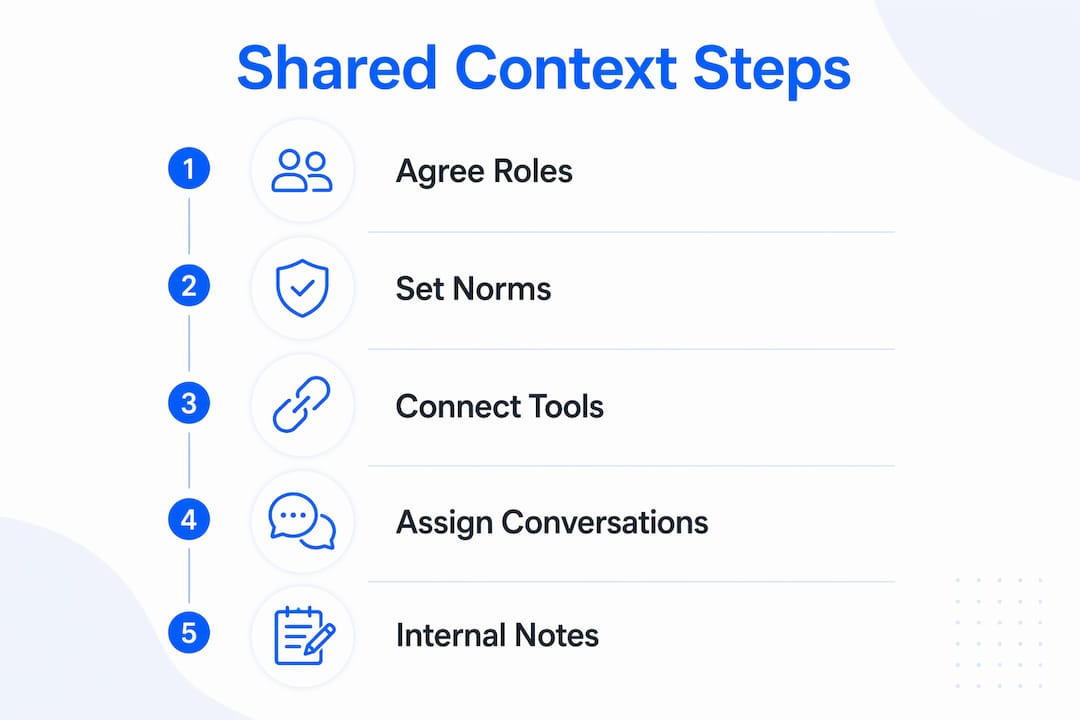
Sendsync makes this concrete. Teams connect their Gmail or Microsoft 365 accounts in minutes, then assign conversations, add internal notes, and reply from a single shared view. No DNS configuration, no per-seat fees. The shared inbox keeps the full thread history attached to every conversation, so context travels with the ticket.
For remote team email alignment, the platform removes the need to forward threads or paste history into Slack just to loop someone in.
Pro Tip: Instead of scheduling a sync meeting to catch someone up, leave an internal note on the thread in Sendsync. The context stays where the work is, and you get that meeting slot back.
Key insights on shared context for early customer support teams
Shared context is not a one-time setup. It requires ongoing maintenance, especially as teams grow and customer volume increases.
Quick recap:
- Shared context means common understanding of goals, conversations, and decisions, not just access to information
- Early teams that build this foundation onboard faster, respond more consistently, and satisfy customers more reliably
- Remote teams face steeper challenges because informal context transfer disappears without proximity
- Culture, specifically psychological safety, determines whether team members actually share what they know
- Tools like Sendsync reduce the friction by making context visible inside the workflow rather than requiring separate documentation
How to build shared context from day one of a new support team
The formation stage is when habits stick. Outsourced support teams that establish shared norms in the first four weeks outperform those that try to retrofit structure later.
Start with three moves. First, agree on where decisions live before the team handles its first ticket. Second, set a norm that every customer thread gets an internal note summarizing the resolution and why. Third, hold a brief weekly review where the team surfaces recurring questions and documents the answers together. These habits cost almost nothing at five people and become invaluable at fifteen.
How to measure whether shared context is actually working
Track response time consistency across reps, not just average handle time. If one rep resolves tickets in four hours and another takes two days on the same issue type, context is not shared, it is siloed. Watch for repeat contacts on the same issue, a direct signal that the first reply lacked the full picture. Monitor how long new hires take to reach average resolution speed. Teams with strong shared context typically see that ramp time drop as documentation and thread history do the teaching.
What successful shared context looks like in practice
A small support team using a shared inbox noticed that multiple reps were independently answering the same billing question with conflicting answers. After moving to Sendsync and adding a pinned internal note with the approved response, the inconsistency resolved quickly. New reps joining the team could read the thread history and understand the reasoning without a single onboarding call dedicated to that topic. The unified inbox did not just organize email. It made the team’s collective knowledge visible and usable.
Key Takeaways
Shared context in early customer support teams is the foundation that determines response quality, onboarding speed, and customer satisfaction across every email interaction.
| Point | Details |
|---|---|
| Define context early | Agree on where decisions and processes live before the first ticket arrives. |
| Psychological safety matters | Teams that feel safe flagging gaps share knowledge more reliably than those that guess. |
| Decisions as artifacts | Write decisions down when they happen and link them to the work they affect. |
| Shared inbox as context layer | Sendsync keeps full thread history visible to every rep, reducing handoff friction. |
| Measure context health | Track response consistency and new-hire ramp time to spot context gaps early. |