
How to Run a Remote Team Communication Audit That Works
How to Run a Remote Team Communication Audit That Works ! Hands holding clipboard with audit flowchart A remote team communication audit produces a prioritized list of fixable problems you can test as experiments inside 30 days.

A remote team communication audit produces a prioritized list of fixable problems you can test as experiments inside 30 days. It is not a survey and it is not a vibe check. Done right, it maps every channel your team uses, measures meeting load and response times, and turns what you find into two or three changes worth trying immediately.
Any team lead can run one with four weeks of data: message and meeting exports, a short pulse survey, and five to eight quick interviews. You do not need special software or a consultant.
Start today with one of these:
- Pull a list of every active chat channel, email alias, and shared doc your team touches, and note who owns each one.
- Or send a single pulse question right now: “What’s one thing about how we communicate that wastes your time?”
Key Takeaways
A remote team communication audit works when it pairs quantitative exports with short qualitative interviews and converts findings into time-boxed experiments rather than a one-time report.
| Point | Details |
|---|---|
| Scope it tight | Limit the first audit to one team over a 2 to 4 week window before scaling up. |
| Combine data types | Pair channel exports and response-time samples with 5 to 8 short stakeholder interviews. |
| Watch the 90th percentile | A slow response tail matters more than a decent median when judging async health. |
| Prioritize by impact and effort | Run low-effort, high-confidence fixes as 30-day experiments before touching structural changes. |
| Repeat quarterly | Rerun the audit each quarter, with lighter monthly pulse checks for fast-growing teams. |
| Fix email visibility with SendSync | A shared inbox like SendSync speeds up ownership and response-time measurement for email-heavy teams. |
Table of Contents
- What Should the Scope and Goals of a Remote Team Communication Audit Be?
- What Should a Remote Team Communication Assessment Actually Collect?
- Which Metrics Actually Reveal Communication Problems?
- How Do You Run the Audit Step by Step?
- How Do You Prioritize Fixes and Turn Them Into Experiments?
- How Often Should You Repeat the Audit and Track Results?
- Where Does Email Visibility Fit Into the Audit?
- What Should Stakeholder Interviews and Feedback Collection Look Like?
- How Do You Assess Tool Adoption and User Proficiency?
- How Do Culture and Time Zones Shape Remote Communication?
- What Security and Compliance Factors Belong in the Audit?
- What Training and Support Should Follow the Audit?
- What the Audit Data Actually Tells You
- Close the Email Visibility Gap SendSync Found in Your Audit
- Sources
What Should the Scope and Goals of a Remote Team Communication Audit Be?
Pick a boundary before you collect a single data point. A useful audit covers one team or one cross-functional workflow, over a 2 to 4 week window, not your whole company at once. Trying to audit everything simultaneously is how these efforts stall out in spreadsheets nobody finishes.
Tie the scope to a specific objective, because “improve communication” is not measurable and won’t survive contact with a budget conversation.
- Reduce rework. Track how often people ask clarifying questions on the same task. Fewer repeated “wait, what did we decide?” threads is your signal.
- Cut unnecessary meetings. Measure meeting hours per person per week and the share of meetings with a written agenda.
- Speed up async responses. Measure median response time by channel against a stated service level.
Each objective gets one or two KPIs, not five. More metrics just means more noise to explain later.
What Should a Remote Team Communication Assessment Actually Collect?
A reproducible audit methodology blends exports you can pull from existing tools with a handful of short conversations. Combining quantitative signals with qualitative input is the core method behind an effective remote communication audit, and skipping either half leaves you guessing.
Start with a full channel inventory: every chat channel, shared email alias, document library, project board, and standing meeting series your team touches. Most teams are surprised to find 15 to 20 active channels they’d forgotten existed.
From there, pull:
- Message volume by channel over the past 30 days.
- Calendar meeting hours logged per person per week.
- A sample of response times on 20 to 30 recent threads.
- Edit history and last-updated timestamps on your top 10 reference docs.
Pair that with qualitative input: five to eight 10 to 15 minute interviews across roles and time zones, a five-item pulse survey, and one recorded meeting reviewed against the Team Communication Scale’s three behavioral dimensions: focused communication, knowledge sharing, and spontaneous communication.
Budget roughly 8 to 12 hours total, split across a data owner (usually you or an ops lead) and a note taker for interviews.
Pro Tip: Record one recurring meeting and have two people independently tag every comment as “decision,” “status update,” or “clarifying question.” The gap between how people remember a meeting and what the tape actually shows is usually the most persuasive evidence you’ll present.
Which Metrics Actually Reveal Communication Problems?
Four categories of data tell you almost everything: channel health, meeting health, async quality, and documentation health. Each has a rough threshold that flags trouble without requiring statistical training to interpret.
| Category | Warning sign | Why it matters |
|---|---|---|
| Channel health | Zero messages in 30 days, or one channel absorbing 40%+ of all traffic | Dead channels confuse newcomers; overloaded channels bury important threads |
| Meeting health | Recurring meetings with no end date, low agenda rate | Standing meetings that outlive their purpose eat hours nobody notices |
| Async quality | 90th percentile response time far above your stated SLA | A median that looks fine can hide a long tail of ignored messages |
| Documentation health | Docs untouched 90+ days, repeated “how do I” questions | Stale docs push people back into asking a person instead of searching |
The starkest finding often shows up in the async numbers. A team of 25 to 40 people that ran a structured audit and consolidated channels saw a 25% reduction in channels, a 30% drop in meetings per person, and 37% faster response times after acting on the results. That is roughly what a focused four-week intervention can realistically move.
Watch the 90th percentile, not just the average. A channel with a median response of two hours can still have a quarter of its messages waiting two days.
How Do You Run the Audit Step by Step?
Run the audit as five sequential steps, each with a concrete deliverable. Skipping the order tends to produce opinions dressed up as data.
- Map every channel. Build a spreadsheet listing each chat channel, email alias, and meeting series with its owner, stated purpose, and how long it’s been active. Deliverable: a channel inventory anyone on the team can review in five minutes.
- Run a meeting-load analysis. Pull calendar data for two to four weeks and calculate hours per person, agenda presence, and attendee counts. Deliverable: a heatmap by day and role, plus a short list of meetings flagged for cancellation, shrinking, or a format change.
- Measure async response behavior. Sample response times across your top five channels and compare them against any stated or implied service expectations. Deliverable: a response report showing median and 90th percentile times, with mismatches called out by channel.
- Audit documentation and handoffs. Check last-updated dates on key docs, count recent “how do I” questions in chat, and map who owns which handoff points between teams. Deliverable: a doc-gap list paired with a named owner for each gap.
- Run a synthesis workshop. Bring the four deliverables to a 60 to 90 minute session with stakeholders and convert findings into a ranked backlog of experiments.
Each step produces something concrete:
- A spreadsheet, not a summary paragraph.
- A number, not a feeling.
- A named owner, not a vague “we should fix this.”
Skip the synthesis workshop and you’ll end up with four documents nobody acts on. The workshop is where data becomes a decision, and it works best with the same people who supplied the interviews sitting in the room.
How Do You Prioritize Fixes and Turn Them Into Experiments?
Score every finding on three axes: impact, effort, and confidence. A fix that scores high on impact and confidence but low on effort goes first, always. Structural changes, the ones that touch org design or headcount, get flagged for later rather than crammed into a 30-day test.
Quick wins that consistently score well: clarifying a channel’s stated purpose, archiving channels with zero activity, standardizing a meeting agenda template, setting explicit response-time SLAs, and starting a lightweight decision log.
| Fix type | Typical effort | Typical impact |
|---|---|---|
| Archive dead channels | Low | Low to medium |
| Add meeting agenda template | Low | Medium |
| Set async response SLAs | Medium | High |
| Build a decision-record habit | Medium | High |
| Restructure team reporting lines | High | High (but slow) |
Design each experiment with a hypothesis, one success metric, and a fixed duration, usually 30 days works well. State it plainly: “If we set a 4 hour response SLA on the #client channel, median response time drops by half within 30 days.”
Pro Tip: Run one experiment per team at a time. Stacking three changes at once makes it impossible to tell which one actually moved the numbers.
How Often Should You Repeat the Audit and Track Results?
Track the KPIs tied to each experiment for 4 to 12 weeks after you make a change, not just at the 30-day mark. Response-time improvements tend to show up fast, often within two weeks, while meeting-load reductions take longer to stick once people relapse into old scheduling habits.
A quarterly baseline audit works for most teams. High-growth teams, especially ones adding a person every few weeks, benefit from a lighter monthly pulse check on top of that. Short 30-day trials of new SLAs or channel changes reliably produce measurable movement and keep the team engaged rather than treating the audit as a one-time event.
When you report results:
- Lead with the number, not the person who caused the original problem.
- Frame findings as “the system produced this outcome,” never “Sarah’s channel was a mess.”
- Keep every spreadsheet, interview note, and heatmap from this round. Next quarter’s audit starts by comparing against them, not from zero.
Treating communication as a living system you measure repeatedly, rather than a one-time fix, is the core premise behind maturity frameworks like C2M, and it’s the difference between an audit that sticks and one that gathers dust in a shared drive.
Where Does Email Visibility Fit Into the Audit?
Email is usually the least visible channel in any audit, precisely because it lives in individual inboxes instead of a shared space anyone can inventory. Teams that route client or partner communication through email specifically need a way to see who owns what without forwarding threads around.
A shared inbox setup accelerates three parts of the audit at once:
- Visibility into message volume and response times, since assigned conversations carry a timestamp and an owner automatically.
- Ownership clarity, because handoffs get logged instead of buried in a “please see below” reply chain.
- Response-time measurement, since you can pull SLA data straight from the inbox rather than sampling threads by hand.
For teams where email carries real weight, that visibility gap is often the single biggest blind spot the rest of the audit misses.
What Should Stakeholder Interviews and Feedback Collection Look Like?
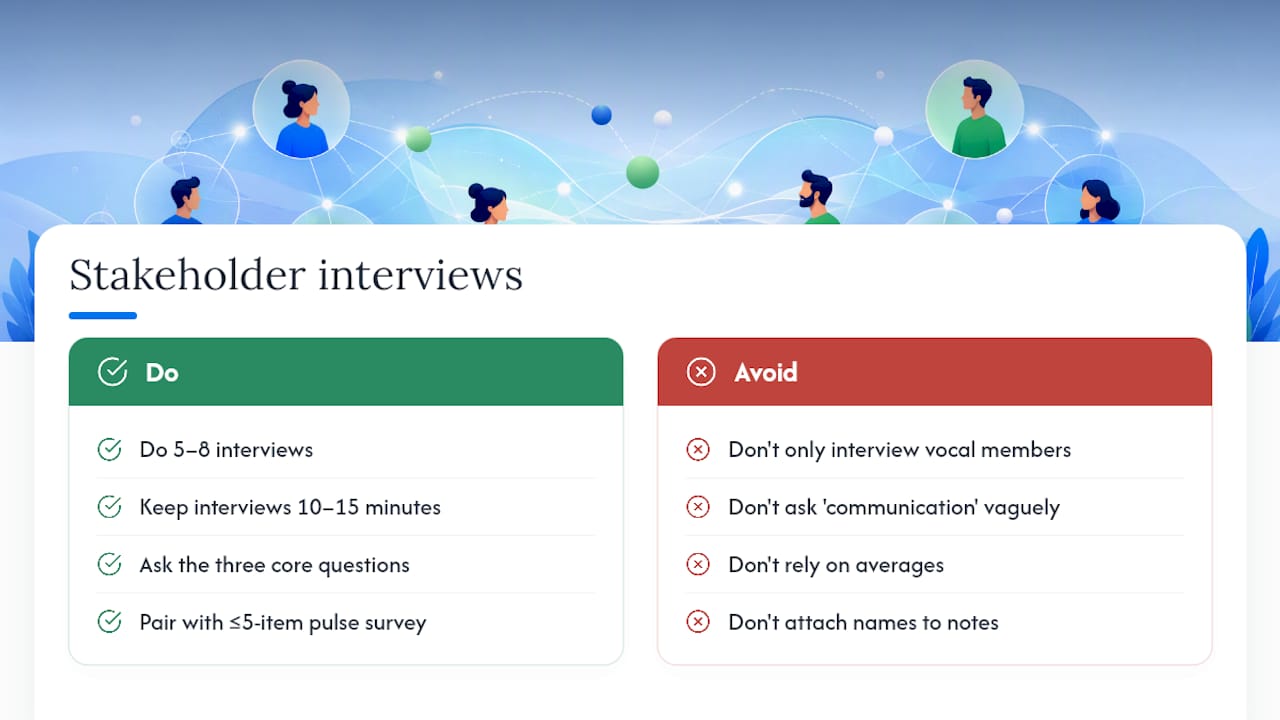
Five to eight short interviews, spread across roles and time zones, surface problems that spreadsheets never will. Aim for 10 to 15 minutes each, structured around three questions: What communication wastes your time? Where do you feel out of the loop? What would you fix first if you could only fix one thing?
Interview people who represent different vantage points, not just your most vocal team members. A quiet contributor in a different time zone often has the sharpest read on what’s broken, precisely because they feel the friction of every delayed handoff and every meeting scheduled without them in mind.
Pair interviews with a short pulse survey, five items or fewer, sent to the whole team. A 15-question team communication health check is a solid reference for building your own shorter version, since it isolates specific behaviors (channel discipline, response expectations, documentation habits) rather than asking people to rate “communication” as one vague blob.
Look for variance, not averages. If four people rate response times a 4 out of 5 and one rates it a 1, that gap is more informative than the mean. It usually means the problem is real but isolated to a specific role, project, or reporting line, and that’s exactly the kind of finding a synthesis workshop should surface and assign to someone.
Keep interview notes anonymized in the synthesis workshop. People say more when they trust a comment won’t be traced back to them in a meeting the following week.
How Do You Assess Tool Adoption and User Proficiency?
An audit isn’t complete until you know whether people actually use the tools you’ve given them the way they were intended. It’s common to find a team paying for three different platforms while half the staff still coordinates over personal text messages because nobody trained them on the “real” tool.
Check adoption with a simple cross-reference: pull usage logs from each platform and compare them against your team roster. Anyone with zero logins in 30 days is either not using the tool or has found a workaround worth understanding.
Proficiency is a separate question from adoption. Someone can log in daily and still not know how to search past messages, tag a teammate correctly, or find the right channel for a question. Ask directly in your interviews: “Do you know how to find last month’s decision on X without asking someone?” The answer tells you more about training gaps than any usage dashboard will.
Common findings worth flagging:
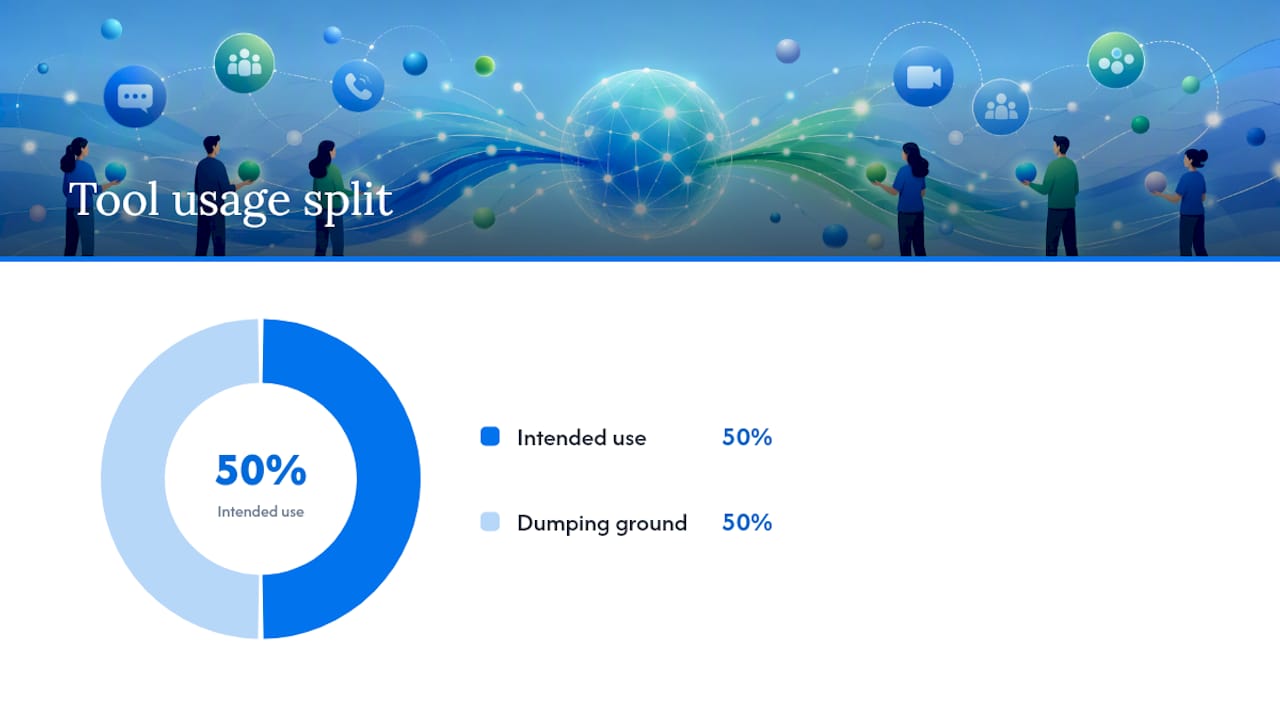
- One tool used for its intended purpose by half the team, and as a dumping ground by the other half.
- A newer hire still using email for internal chat because nobody walked them through the team’s actual workflow.
- Senior staff bypassing the documented process because the “old way” still works for them personally.
Each of these becomes a training recommendation later. None of them shows up in a raw message-count export, which is exactly why the interview layer of the audit matters as much as the numbers.
How Do Culture and Time Zones Shape Remote Communication?
A response-time SLA that feels reasonable in one time zone can feel punishing in another, and an audit that ignores this will misread its own data. A “4 hour response expected” standard assumes overlapping work hours; for a team split across a 9 to 12 hour spread, that standard silently excludes half the roster from ever meeting it.
Map your team’s time zones before you set any SLA. Note where overlap windows exist, how many hours per day the full team is actually online together, and whether any single person is consistently the one waiting overnight for an answer.
Cultural norms around communication style vary just as much as clocks. Some team members come from workplace cultures where direct disagreement in a group chat is normal; others were trained to raise concerns privately first. Neither is wrong, but an audit that only measures message volume will read the quieter pattern as disengagement when it’s actually a communication style difference.
Build this into your interview questions directly: ask whether people feel comfortable raising disagreement in the main channel, and whether meeting times consistently favor one region over another. If your 9 a.m. leadership sync happens to be 11 p.m. for a third of the team, that’s not a scheduling footnote. It’s a structural bias the audit should flag with the same weight as a broken SLA.
What Security and Compliance Factors Belong in the Audit?
Every channel inventory you build doubles as a security inventory, whether you planned it that way or not. Each chat tool, shared drive, and email alias is a place where client data, credentials, or sensitive internal discussion can sit unmonitored if nobody’s checking.
While mapping channels, note who has access to each one and whether that access list has ever been reviewed. It’s common for audits to turn up former contractors still sitting in active channels, or a shared inbox with a password that half the team has forgotten was ever changed.
Flag a few specific risks as you go:
- Client-sensitive information shared in channels without access controls or retention policies.
- Personal email accounts used for work communication because the official tool felt slower.
- No clear record of who can view, forward, or export conversations involving customer data.
If your team handles regulated data, whether that’s health information, financial records, or contractual terms, the audit should note which channels touch that data and whether those channels meet your organization’s retention and access requirements. This isn’t a legal review, and you shouldn’t treat audit findings as a compliance determination. Loop in whoever owns that responsibility on your team once you’ve flagged where the gaps are.
What Training and Support Should Follow the Audit?
Findings without a training plan just repeat themselves next quarter. Match each category of problem to a specific, low-effort intervention rather than a generic “communication training” session that nobody remembers a month later.
If the audit found low tool proficiency, run a 20-minute walkthrough on search, tagging, and channel etiquette rather than a full onboarding redo. If it found SLA confusion, post the response-time expectations somewhere visible and reference them for two weeks until they’re habit. If it found documentation gaps, assign one owner per gap with a two-week deadline rather than a vague “someone should update this.”
Keep the follow-up light:
- A single async-friendly training video beats a scheduled live session across five time zones.
- A pinned message with the new SLA beats a policy doc nobody opens.
- One owner per fix beats a committee.
Revisit adoption of the fix at your next monthly pulse check, not just at the next full quarterly audit.
What the Audit Data Actually Tells You
Most remote teams treat communication problems as a culture issue when the data usually points to something more specific and more fixable: too many channels with no clear owner, meetings that outlived their purpose, and response-time expectations nobody ever wrote down. The conventional advice, “communicate more” or “be more transparent,” misses that the fix is almost always structural, not attitudinal.
What gets underrated is the spontaneous communication piece. Teams obsess over meeting hours and response times because those are easy to measure, but missing spontaneous touchpoints predicts lower collective efficacy even when the formal metrics look fine. An audit that only counts messages and meetings will miss the hallway-conversation replacement that never got built.
Prioritize the channel inventory and the interviews before you touch a dashboard. Numbers tell you where the friction is; people tell you why it’s there. For teams drowning in email specifically, that friction usually traces back to invisible ownership, threads nobody claimed, replies that got lost in someone’s personal inbox. Fix visibility there first, and the rest of the audit gets noticeably easier to act on.
— Nick
Close the Email Visibility Gap SendSync Found in Your Audit
If your audit turned up slow response times or unclear ownership in shared email threads, that’s usually the fastest fix to test. SendSync sets up in minutes by connecting your existing Gmail or Microsoft 365 mailbox, no DNS changes, no per-seat fees, and unlimited users on every plan.

Run your audit first. Then trial SendSync on the single highest-priority email workflow it flagged, whether that’s a client alias with inconsistent response times or a handoff point where messages go quiet. Assigning conversations and adding internal notes turns invisible email threads into something your team can actually measure and improve, the same way you’d measure a chat channel or a meeting series.
Start a free trial at SendSync and connect your mailbox in under ten minutes to see the difference in your next response-time report.
Sources
- C2M: a maturity model for the evaluation of communication in distributed software development
- Team communication scale (TCS): focused communication, knowledge sharing, spontaneous communication
- How to run a remote team communication audit effectively?