
Best Primesync.co Alternatives for Support Teams in 2026
Best Primesync. co Alternatives for Support Teams in 2026 !

Sendsync is the recommended alternative to primesync.co for small support teams on Gmail or Microsoft 365. It connects both platforms without DNS changes, prices by workspace rather than per seat, and takes minutes to configure. If Sendsync isn’t the right fit, three other categories are worth evaluating:
- Gmail-native extensions (live inside Gmail, lowest onboarding friction, no context switching)
- Standalone team inboxes (better for omnichannel and deep CRM integrations)
- AI triage layers (smart routing and suggested replies, now a key differentiator in 2026)
Table of Contents
- What are the best primesync.co alternatives for Gmail and Microsoft 365?
- What does each alternative actually deliver for support teams?
- How do you choose between these alternatives?
- Setting up Gmail or Microsoft 365: what to expect
- What does switching cost for a 10-person support team?
- Migration pitfalls and how to avoid them
- What do users say about these alternatives?
- Key Takeaways
- The real problem with most shared inbox migrations
What are the best primesync.co alternatives for Gmail and Microsoft 365?
| Tool / Category | Best for | Gmail / M365 support | Assignment, collision detection, notes, AI | Reporting & SLA | Pricing model | Free plan / trial | Setup complexity | Scalability |
|---|---|---|---|---|---|---|---|---|
| Sendsync | Small support teams, Gmail or M365 | Both (native connector) | All four, including AI triage | Yes, analytics dashboard | Unlimited users, per workspace | 14-day free trial | No DNS required | CRM integrations, Slack |
| Help Scout | Growing support teams | Both (forwarding/connector) | Assignment, notes, automation | Yes, SLA reporting | Per user (~$22+/user/mo) | 15-day trial | Low, forwarding | Docs, integrations |
| Front | Multi-channel teams | Both (native) | All four | Yes, advanced SLA | Per user (~$19+/user/mo) | 7-day trial | Low to moderate | SMS, social, CRM |
| Hiver | Gmail-only teams | Gmail native | Assignment, collision detection, notes | Yes | Per user (~$15+/user/mo) | 7-day trial | No DNS, Gmail add-on | Google Workspace only |
| Gmelius | Gmail power users | Gmail native | Assignment, notes, automation | Basic | Per user (~$10+/user/mo) | 7-day trial | No DNS, Gmail add-on | Zapier, Slack |
| Missive | Small teams, email-first | Both (forwarding) | Assignment, notes, rules | Basic | Per user (~$14+/user/mo) | Free plan (3 users) | Low, forwarding | Integrations, API |
| Native M365/Workspace mailbox | Micro teams, very low volume | Both (built-in) | None | None | Included in M365/Workspace | N/A | None | None |
2026 differentiator: AI triage, smart routing, and suggested replies are now standard expectations in shared inbox platforms. Tools without them are losing ground in competitive evaluations.
What does each alternative actually deliver for support teams?
Native shared mailboxes in Microsoft 365 and Google Workspace are included at no extra cost, but they stop there. No assignment, no collision detection, no internal notes, no SLA reporting. Two agents can reply to the same email simultaneously and never know it. For any team handling real support volume, that’s a daily problem.
Sendsync sits in a different category. It connects directly to Gmail or Microsoft 365 via a native connector, no MX record edits, no mail forwarding rules to maintain. Agents assign conversations, leave internal notes, and see at a glance who is already typing a reply. The unlimited-user pricing means a 10-person team costs the same as a 3-person team. Onboarding typically takes under an hour.
Gmail-native extensions like Hiver and Gmelius live inside Gmail itself. Agents never leave their inbox, which drives faster adoption on teams that resist new tooling. The tradeoff is scope: Gmail-native tools excel at email-first workflows but struggle when you need SMS, live chat, or social channels in the same queue. They also tie you to Google Workspace.
Standalone team inboxes like Front and Help Scout are built for teams that need omnichannel routing, deep CRM integrations, and enterprise-grade SLA tracking. Front handles email, SMS, and social from one interface. Help Scout adds a knowledge base and customer profiles. Both charge per seat, which adds up fast on larger teams, and both require some configuration time.
Missive is a compact, email-first option with a free plan for up to three users. It uses forwarding rather than a native connector, which is simple but means shared-sent visibility depends on how you configure it. Good for very small teams that want something lightweight.
During any trial, check third-party review aggregators for response-time complaints, uptime history, and how quickly each vendor’s own support team replies to tickets. That last point is telling.
How do you choose between these alternatives?
Start with three questions before you open a single trial account.
- Is your team Gmail-only or do you also use Microsoft 365? If Gmail-only, a native extension removes all setup friction. If you use both or plan to migrate, you need a tool with genuine connectors for both platforms.
- How many conversations does your team handle per month? Teams under roughly 500 conversations per month fit a shared inbox well. Above that, a full help desk with ticketing and SLA enforcement becomes the better call.
- Is per-seat pricing going to hurt you? A 10-person team on a $22/user/month plan costs $220/month; an unlimited-user plan at a flat workspace rate can cut that significantly.
Trial checklist — test these before you commit:
- Assign a conversation to a teammate and confirm they receive a notification.
- Have two agents open the same email simultaneously and check whether collision detection fires.
- Send a reply and verify it appears in the shared sent folder for all agents.
- Create a canned reply and use it in a live conversation.
- Set up one automation rule (e.g., route emails with “refund” in the subject to a specific agent).
- Test AI triage or suggested replies if the plan includes them.
- Pull a response-time report and confirm the data matches what you sent.
- Connect your CRM or Slack and confirm the integration works without manual workarounds.
Red flags to walk away from: no collision detection at all; per-seat pricing with no annual discount; Gmail or Outlook integration that requires MX record changes; a vendor that can’t tell you the expected migration timeline in under two minutes.
Setting up Gmail or Microsoft 365: what to expect
Two connector patterns cover almost every shared inbox migration.
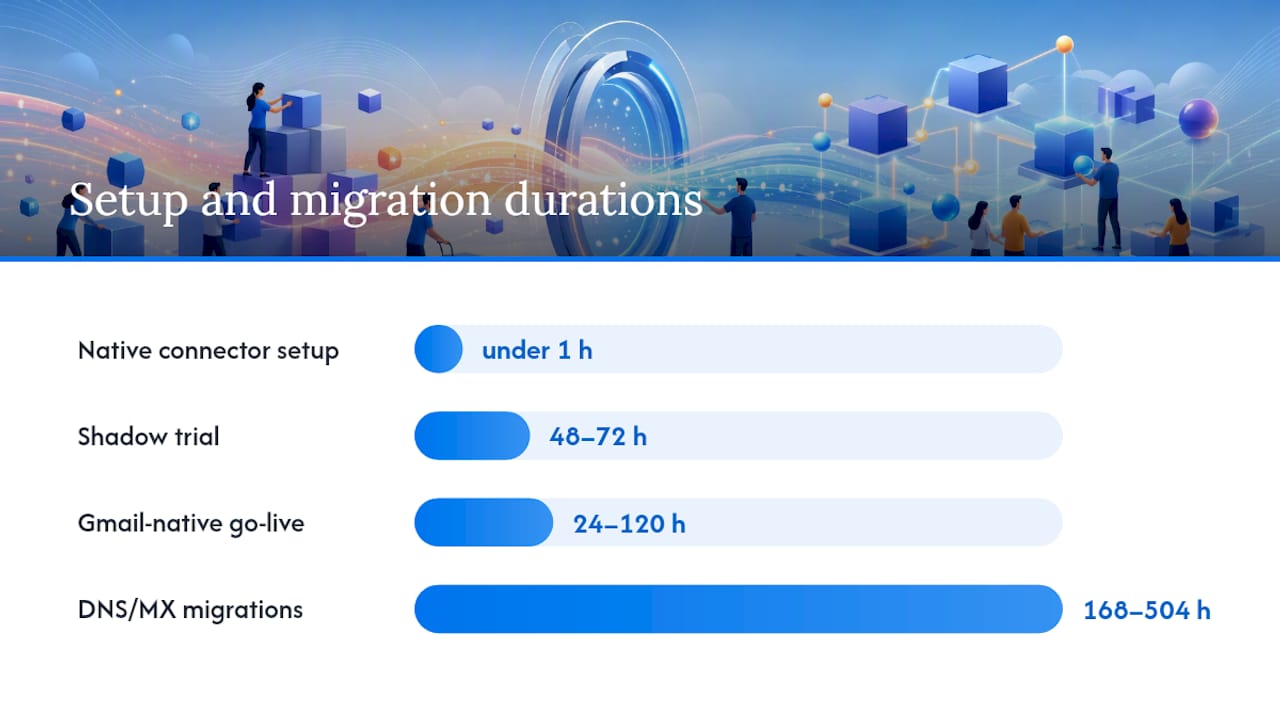
Native connector: the tool authenticates directly with Gmail or Microsoft 365 via OAuth or an admin-level API connection. No DNS changes, no MX edits. Sendsync uses this approach. Setup time for a single shared mailbox is typically under an hour.
Forwarding or SMTP relay: the tool receives email via a forwarding rule or SMTP relay from your existing mailbox. Simpler in concept, but forwarding setups sometimes require mailbox delegation or DNS changes depending on your mail host, and shared-sent visibility needs extra configuration.
Migration checklist:
- Create or identify the shared mailbox (e.g., support@yourcompany.com).
- Connect it via the native connector or configure forwarding.
- Set up assignment rules and routing logic.
- Import canned replies and response templates.
- Map users, set permissions, and confirm each agent can see the shared sent folder.
- Run a 48–72 hour shadow trial with real traffic before cutting over.
- Disable the old flow only after confirming no emails are falling through.
Gmail-native tools typically go live in 1–5 days. Migrations involving DNS or MX changes on standalone tools can take 1–3 weeks for small teams, and most delays come from permissions misconfigurations, not the tool itself.
Pro Tip: Run real traffic through both the old and new setup simultaneously for at least 48 hours. This catches routing gaps and permission errors that a test environment never surfaces.
What does switching cost for a 10-person support team?
| Plan type | Starting price | Free plan | Est. monthly cost (10 users) | Setup complexity |
|---|---|---|---|---|
| Gmail-native extension (per user) | ~$10–$15/user/mo | 7-day trial | — | Very low (no DNS) |
| Standalone team inbox (per user) | mid-tier per-user pricing | 7–15 day trial | — | Low to moderate |
| Unlimited-user workspace (Sendsync) | Flat per workspace | 14-day free trial | Lower than per-seat at 10+ users | Very low (no DNS) |
| Native M365/Workspace mailbox | Included in plan | N/A | included at no extra cost | None |
Per-user pricing in the shared inbox market ranges roughly from $6 to $65 per user per month depending on feature tier. Free plans exist but typically cap users at 2–3 or restrict automation and reporting. For a 10-person team, the unlimited-user model is usually the cheaper option once you’re past about 5–6 seats on a mid-tier per-user plan.
Migration pitfalls and how to avoid them
Permissions misconfigurations are the most common cause of delayed migrations. An agent who can read the shared inbox but can’t send from it will create duplicate replies from personal addresses. Audit send-as permissions before go-live.
Forwarding loops happen when a forwarding rule sends email to the new tool, which then replies from a different address, triggering another forward. Test reply routing explicitly, not just inbound delivery.
Lost historical context catches teams off guard. Most tools don’t import historical email threads from a previous shared inbox. Agents lose context on open conversations mid-migration. The fix: keep the old inbox readable for 30 days post-cutover, even if it’s no longer receiving new mail.
Agent resistance is underestimated. If the new tool requires a browser tab switch for Gmail users, expect pushback. Gmail-native tools reduce this friction by keeping agents in the interface they already use. For standalone tools, a short 30-minute onboarding session per agent pays for itself in adoption speed.
Canned reply gaps slow down the first week. Export all templates from the old system before migration day, not after.
What do users say about these alternatives?
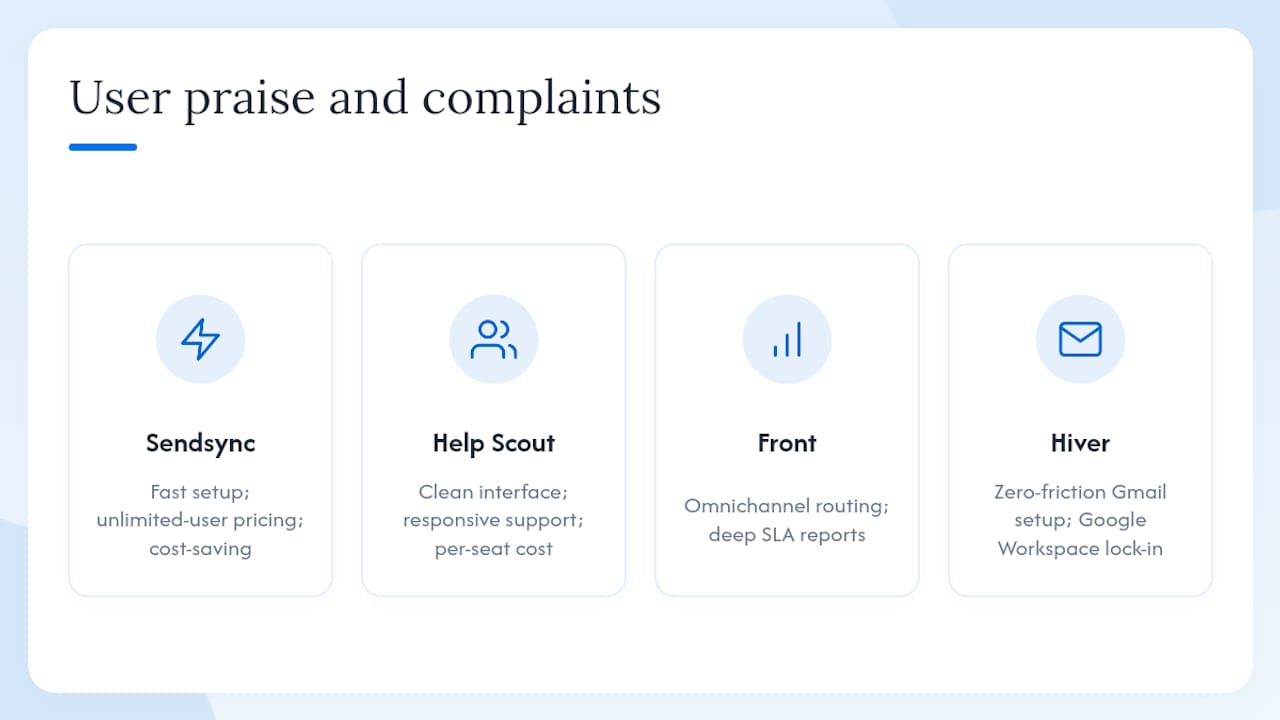
Sendsync earns consistent praise for setup speed and the unlimited-user pricing model. Teams that switched from per-seat tools frequently cite the cost savings at 8–10 agents as the deciding factor.
Help Scout holds strong ratings for its clean interface and responsive customer support. The most common complaint in user reviews is that the per-seat cost climbs quickly as teams grow, and the knowledge base feature adds value mainly for teams with a public help center.
Front gets high marks for omnichannel routing and SLA reporting depth. Users on smaller teams sometimes find the interface more complex than their volume justifies. The analytics are genuinely strong.
Hiver is consistently rated well by Gmail-heavy teams for its zero-friction setup. The limitation users flag most often is the Google Workspace dependency. If your company ever moves to Microsoft 365, you’re starting over.
Gmelius reviews highlight its Zapier and Slack integrations as standout features. Some users note that the reporting is lighter than Front or Help Scout, which matters if SLA tracking is a priority.
Missive users appreciate the free plan for very small teams and the clean email-first design. The main limitation cited is that it’s not built for high-volume support queues.
Key Takeaways
Sendsync is the strongest primesync.co alternative for small support teams on Gmail or Microsoft 365 because it offers unlimited users, no DNS setup, and a native connector for both platforms.
| Point | Details |
|---|---|
| Recommended pick | Sendsync connects Gmail and Microsoft 365 natively, with no DNS changes and unlimited-user pricing. |
| Gmail-native vs standalone | Choose Gmail-native for low friction; choose standalone for omnichannel or deep CRM needs. |
| Trial checklist priority | Test collision detection, shared sent visibility, and AI triage accuracy before committing. |
| Per-seat cost warning | At 10 users, per-seat plans at $19–$22/user/month cost $190–$220/month; flat workspace pricing saves money. |
| Sendsync setup speed | Sendsync’s 14-day free trial and native connector mean most teams are live in under a day. |
The real problem with most shared inbox migrations
Most teams spend more time evaluating feature lists than testing the one thing that actually breaks migrations: permissions. Every tool in this comparison looks fine in a demo. The gaps show up when agent A replies from the wrong address, or when a forwarding rule creates a loop at 11 PM on a Tuesday.
The other thing teams consistently underestimate is the cost of per-seat pricing at scale. A 10-person team that starts on a $15/user plan and grows to 15 agents is suddenly paying $225/month for a tool they chose when they were smaller. Unlimited-user pricing isn’t just a budget convenience. It removes a friction point that otherwise makes teams hesitant to add new agents to the shared inbox.
Sendsync’s approach, connecting directly to Gmail or Microsoft 365 without touching DNS, and pricing by workspace rather than headcount, addresses both of those problems at once. For teams that want to build scalable inbox workflows without a two-week IT project, that combination is hard to beat.