
Best Corebee.ai Alternatives for SMB Support Teams 2026
Best Corebee. ai Alternatives for SMB Support Teams 2026 !

The best Corebee.ai alternatives for most SMB support teams are Sendsync, Freshdesk, Help Scout, Gorgias (for ecommerce), and Crisp (for chat-first teams). If your team runs on Gmail or Microsoft 365 and wants predictable monthly costs without per-seat fees, Sendsync is the strongest pick for email-first teams — but Gorgias or Corebee are a better fit for ecommerce support that relies on order-level actions.
Here is the short verdict for each top alternative:
-
Sendsync — Best for email-first SMBs. Unlimited users, flat pricing, Gmail/MS365 setup in minutes.
-
Freshdesk — Best for growing teams that want a full helpdesk feature set with modular add-ons.
-
Help Scout — Best for email-centric teams that want a clean, human-feeling support workflow.
-
Gorgias — Best for Shopify merchants who need order-level actions inside support tickets.
-
Crisp — Best for small teams on a tight budget who prioritize live chat.
-
Intercom (Fin) — Best for product-led SaaS teams that need in-app messaging alongside AI.
-
Zendesk — Best for mid-market to enterprise teams that need deep admin controls and SLAs.
When to pick Sendsync specifically: your team handles support primarily over email, you are paying per-seat fees elsewhere and want to stop, and you need to be operational in a day rather than a week.
Key Takeaways
For most SMB support teams, the single most important decision is choosing between flat pricing and per-resolution AI billing before signing any contract.
| Point | Details |
|---|---|
| AI billing is the biggest cost variable | Per-resolution and per-conversation AI fees can spike unpredictably; model your ticket volume before committing. |
| Flat plans reduce budget risk | Sendsync, Crisp, and Chatwoot offer flat pricing that stays predictable as ticket volume grows. |
| Migration speed matters | Sendsync connects to Gmail or MS365 in under a day; full helpdesk migrations typically take one to four weeks. |
| Match the tool to your primary channel | Email-first teams fit Sendsync or Help Scout; ecommerce teams fit Gorgias or Tidio; WhatsApp-first teams fit Wati. |
| Sendsync for email-first SMBs | Unlimited users, no per-seat fees, and same-day setup make it the strongest pick for email-driven support teams. |
Table of Contents
- How do the top Corebee.ai alternatives compare side by side?
- Which Corebee.ai alternatives are searched most often?
- When does an enterprise platform make sense over Corebee?
- Which tools work best for mid-market and SMB teams?
- How do you choose the right alternative to Corebee.ai for your team?
- When is Sendsync the right alternative to Corebee.ai?
- How we evaluated these alternatives
- Why Sendsync is the right call for most email-first SMBs
- Sendsync: a fast, predictable alternative to Corebee.ai
- Sources and further reading
How do the top Corebee.ai alternatives compare side by side?
Corebee markets a flat $99/month plan with unlimited agents and action-capable AI that can execute refunds and order changes, not just answer questions. That is a genuinely strong pitch. The alternatives below each trade something to gain something else.
| Tool | Pricing model | AI capability & billing | Best for | Channels | Key integrations | Setup time | Scalability | Support & SLA |
|---|---|---|---|---|---|---|---|---|
| Sendsync | Flat, unlimited users | Email triage automation; included in plan | Email-first SMBs | Gmail, MS365, Slack | Under 1 day | SMB to mid-market | Email support; standard SLA | |
| Corebee | Flat $99/mo, unlimited agents | Action AI (refunds, orders); included | SMBs needing AI actions | Chat, email | Shopify, multiple integrations (as reported by vendor listings) | 1–3 days | SMB | Standard |
| Intercom (Fin) | Per-seat + usage | Fin AI; per-resolution billing | Product-led SaaS | Chat, email, in-app | Salesforce, Stripe, Slack (per vendor documentation) | 2–5 days | Mid-market to enterprise | Priority SLA on higher tiers |
| Zendesk | Per-seat | AI add-on; per-resolution | Mid-market to enterprise | Email, chat, phone, social | Salesforce, Jira, Slack (according to product info) | 1–4 weeks | Enterprise | Dedicated SLA options |
| Freshdesk | Per-seat (free tier available) | Freddy AI; per-session on paid tiers | Growing SMB to mid-market | Email, chat, phone, social | Shopify, Slack, Jira (based on available sources) | 1–3 days | SMB to enterprise | 24/5 on paid plans |
| Help Scout | Per-seat | Basic AI drafts; included | Email-first teams | Email, chat | Shopify, Slack, HubSpot (per vendor site) | 1–2 days | SMB to mid-market | Email/chat support |
| Front | Per-seat | AI drafts; included | Collaboration-heavy teams | Email, SMS, chat | Salesforce, Slack, Jira (per vendor information) | 2–5 days | Mid-market | Priority SLA on higher tiers |
| Gorgias | Per-ticket (usage-based) | AI auto-reply; per-ticket billing | Ecommerce / Shopify | Email, chat, social | Shopify, WooCommerce, Klaviyo (based on product documentation) | 1–2 days | SMB ecommerce | Email support |
| Crisp | Flat (free tier available) | Basic chatbot; included | Small teams, chat-first | Chat, email | Slack, WordPress, Zapier | Under 1 day | Small teams | Community + email |
| Chatwoot | Free (self-hosted) / flat cloud | Basic AI; included | Open-source / self-hosted teams | Email, chat, WhatsApp | Slack, Zapier, custom API (from official sources) | 1–3 days | SMB to mid-market | Community (self-hosted) |
| Tidio | Flat + usage tiers | Lyro AI chatbot; per-conversation | Small ecommerce | Chat, email | Shopify, WooCommerce, Zapier | Under 1 day | Small to mid-market | Email support |
| LiveChat | Per-seat | AI assist; included | Real-time chat teams | Chat, email | Salesforce, HubSpot, Shopify | 1–2 days | SMB to enterprise | 24/7 on paid plans |
| tawk.to | Free (agent fees optional) | Basic bot; add-on | Budget-conscious teams | Chat | WordPress, Shopify | Under 1 day | Small teams | Community |
| Freshchat | Per-seat (free tier available) | Freddy AI; per-session | Messaging-first teams | Chat, WhatsApp, in-app | Freshdesk, Slack, Shopify | 1–2 days | SMB to mid-market | 24/5 on paid plans |
| Wati | Per-seat / usage | AI bot; per-conversation | WhatsApp-first teams | Shopify, HubSpot, Zapier | 1–2 days | SMB | Email support |
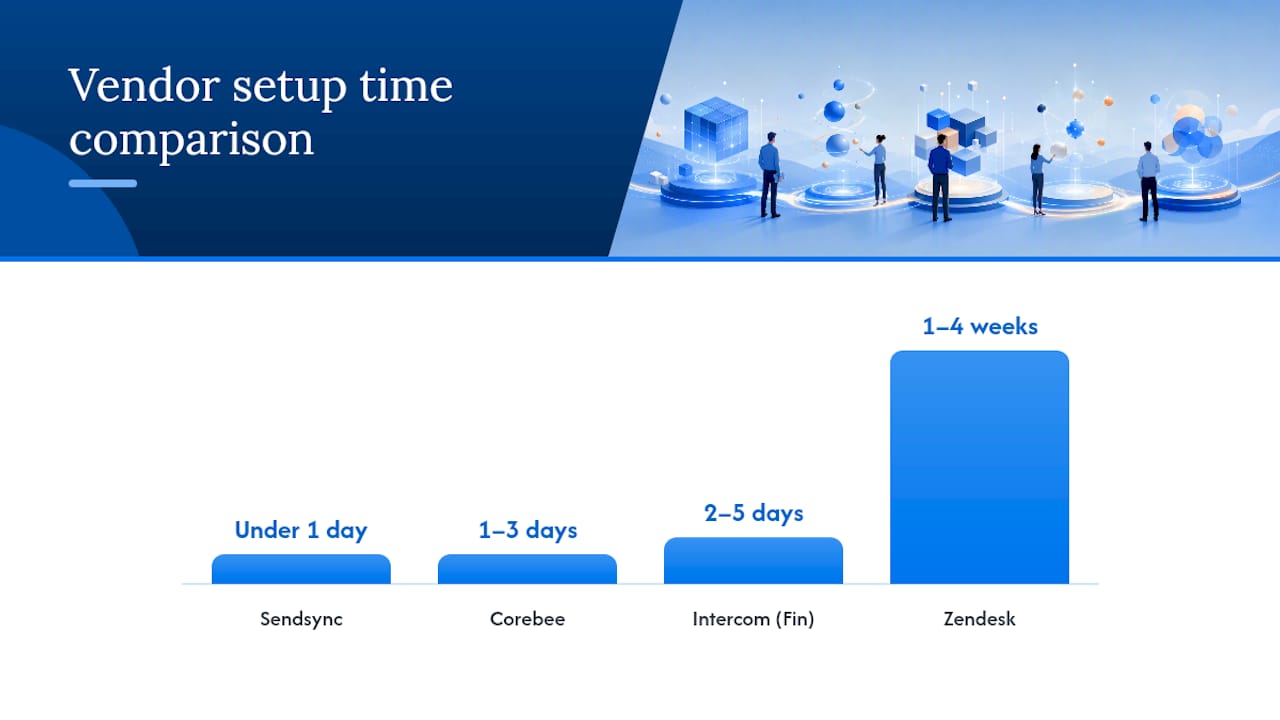
Pricing model matters more than feature lists. AI billing models vary sharply across these tools: Intercom’s Fin charges per resolution, Gorgias bills per ticket, and Tidio’s Lyro AI charges per conversation. A team handling 2,000 tickets a month can see wildly different costs depending on which model they pick. Model your expected volume before committing to any per-resolution or per-ticket tool.
For a deeper look at how flat pricing compares to per-seat models in practice, the Freshdesk alternatives analysis walks through the cost math for SMB teams.
Which Corebee.ai alternatives are searched most often?
These are the tools buyers compare most when evaluating similar tools to Corebee.ai:
- Intercom (Fin): The Fin AI agent handles a meaningful share of conversations without human intervention on higher-tier plans. Pricing is per-seat plus per-resolution for AI, which makes costs hard to predict at volume. Strong for SaaS teams; less natural for pure email support.
- Zendesk: Deep enterprise controls, SAML SSO, audit logs, and a large app marketplace. Pricing is per-seat and AI is an add-on. Setup can take weeks for complex configurations. Best when you genuinely need enterprise governance.
- Freshdesk: Free tier for up to 10 agents makes it easy to start. Freddy AI is available on paid plans with per-session billing. Modular add-ons let teams grow into features. A solid mid-market choice, though costs climb with agents.
- Help Scout: Clean, email-first interface with shared mailboxes, internal notes, and saved replies. AI drafts are included on paid plans. No steep learning curve. Pricing is per-seat, so it gets expensive as teams grow.
- Front: Shared inbox with strong routing rules and collaboration features. Per-seat pricing. Better fit for teams managing high-volume, multi-channel routing than for simple email support.
- Gorgias: Purpose-built for ecommerce. Pulls Shopify order data directly into tickets and can trigger refunds and cancellations. Billing is per-ticket, which rewards low-volume stores and punishes high-volume ones. Verify your monthly ticket count before signing.
- Crisp: One of the most affordable options on this list. Free plan covers basic chat; paid plans are flat and inexpensive. AI chatbot is included. Best for teams that want live chat without a large budget.
- Chatwoot: Open-source and self-hostable. Cloud version is available at flat pricing. Multi-channel support including WhatsApp. A good fit for technical teams that want data control or want to avoid SaaS fees entirely.
- Tidio: Chat and bot platform with Shopify integration and pre-built bot templates. Lyro AI handles common questions automatically. Per-conversation billing on AI features. Works well for small ecommerce stores.
- LiveChat: Mature live-chat product with strong analytics and multi-channel routing. Per-seat pricing. 24/7 support on paid plans. Better for teams where real-time chat volume is the primary workload.
- tawk.to: Free live chat with optional paid agent services. Minimal AI capability. The right call only when budget is the absolute constraint.
- Freshchat: Messaging-first product from Freshworks. Freddy AI available on paid tiers. Integrates natively with Freshdesk for teams already in the Freshworks ecosystem.
- Wati: WhatsApp-native platform. If your customers primarily contact you over WhatsApp, Wati’s template management and bot builder are purpose-built for that channel. Limited value outside WhatsApp-first workflows.
The Kayako alternatives guide covers additional selection criteria for professional services teams evaluating this category.
When does an enterprise platform make sense over Corebee?
Enterprise platforms like Zendesk and Intercom offer features that Corebee’s flat-rate SMB model does not: SAML SSO, role-based access control (RBAC) with granular permissions, audit logs for every AI action, custom SLA policies, and dedicated account management. For a team of 5 handling 500 tickets a month, none of that matters. For a team of 50 handling regulated customer data, it matters a lot.
- Zendesk: Enterprise plan includes SAML SSO, custom roles, audit logs, and sandbox environments. Pricing is not publicly listed at enterprise tier; expect negotiation. AI (Zendesk AI) is a separate add-on billed per resolution.
- Intercom: Advanced Workspaces plan adds SAML, custom roles, and SLA management. Fin AI resolution billing is separate from seat costs. Enterprise contracts typically include committed resolution volumes.
- Front: Enterprise tier adds SAML, advanced analytics, and dedicated support. Per-seat pricing continues at enterprise level.
The real question is whether you need AI governance features, not just AI features. Audit trails that log every AI-triggered action (a refund, a cancellation) are a compliance requirement for some industries, not a nice-to-have. If your team operates in financial services, healthcare-adjacent, or any regulated vertical, an audit trail is non-negotiable. Corebee does advertise a full audit trail on its flat plan, which is one reason it punches above its price point.
Pro Tip: When negotiating enterprise AI add-ons, ask vendors to cap per-resolution fees at a monthly ceiling. Most will agree to a committed-volume discount that converts variable AI billing into something closer to flat pricing.
Which tools work best for mid-market and SMB teams?
The right tool depends on your primary support channel and whether you sell online.
Email-first teams are best served by Sendsync, Help Scout, or Front. Sendsync connects directly to Gmail or Microsoft 365 with no DNS reconfiguration, supports unlimited users on a flat plan, and gets teams running in under a day. Help Scout offers a more traditional helpdesk experience with shared mailboxes and per-seat pricing. Front adds routing rules and collaboration features but costs more per seat as the team grows. For teams that want to understand the tradeoffs between a shared inbox and a full helpdesk, the structural differences come down to complexity versus speed.
Ecommerce teams should look at Gorgias first, then Tidio. Gorgias pulls live order data from Shopify into every ticket, which eliminates the tab-switching that slows agents down. Corebee is also listed on the Shopify App Store and supports order actions, but Gorgias has a deeper ecommerce automation layer. Tidio suits smaller stores that want affordable chat plus bot automation without Gorgias’s per-ticket billing model.
Blended support teams handling email, chat, and social should consider Freshdesk or Chatwoot. Freshdesk covers all major channels with a modular feature set. Chatwoot handles email, chat, and WhatsApp in one place and can be self-hosted if data residency matters.
Key tradeoffs to weigh:
- Cost predictability: Flat plans (Sendsync, Crisp, Chatwoot) are easier to budget than per-seat or per-resolution models.
- AI billing surprises: Per-resolution and per-conversation AI billing can spike during high-traffic periods. Always ask vendors for a worst-case monthly estimate based on your ticket volume.
- Agent experience: Tools built around email workflows (Sendsync, Help Scout) feel natural to agents already living in Gmail. Tools built around ticketing (Zendesk, Freshdesk) have steeper onboarding curves.
The benefits of a professional shared inbox for small teams include faster onboarding and lower per-agent cost, both of which matter when headcount changes frequently.
How do you choose the right alternative to Corebee.ai for your team?
Run through this checklist before you book a demo:
- Map your primary channel. Is most of your support volume email, live chat, WhatsApp, or a mix? The right tool is built around your dominant channel, not the one with the most impressive demo.
- Model AI billing at your actual volume. Take your last 30 days of ticket volume and multiply it by the per-resolution or per-conversation fee. Compare that number to a flat-plan alternative.
- Confirm integration depth. A Shopify App Store listing signals a connection exists. It does not confirm webhook support, order-action depth, or two-way sync. Ask for a live demo of the specific integration you need.
- Ask about migration. How long does it take to import historical tickets? Can you connect your existing mailbox without changing MX records?
- Check SLA and uptime commitments. Free and low-cost plans often carry no uptime SLA. If support downtime costs you customers, pay for a plan that includes one.
- Verify data controls. Where is your data stored? Can you export it? Is there an audit log for AI actions?
Questions to ask on every vendor demo:
- How is AI billed: per resolution, per session, or included flat?
- What happens when AI fails to resolve a ticket? Does it count as a resolution?
- Can I export all historical data in a standard format?
- What is the uptime SLA on this plan?
- How long does a typical migration take for a team our size?
Red flags to walk away from:
- No publicly listed pricing (forces a sales call before you can compare)
- Per-resolution AI fees with no monthly cap
- No audit log for AI-triggered actions
- Migration requires DNS changes with no self-serve option
- Contract lock-in longer than 12 months with no exit clause
When is Sendsync the right alternative to Corebee.ai?
Sendsync fits a specific profile well: an SMB support team that handles most of its volume over email, already uses Gmail or Microsoft 365, and wants to stop paying per-seat fees as the team grows.
The client profiles that benefit most:
- Email-first SMBs with 2–20 support agents who share a single support@ or help@ address
- Teams on Gmail or MS365 that want to manage support without migrating to a new email infrastructure
- Growing teams where per-seat pricing from tools like Help Scout or Front creates budget uncertainty as headcount changes
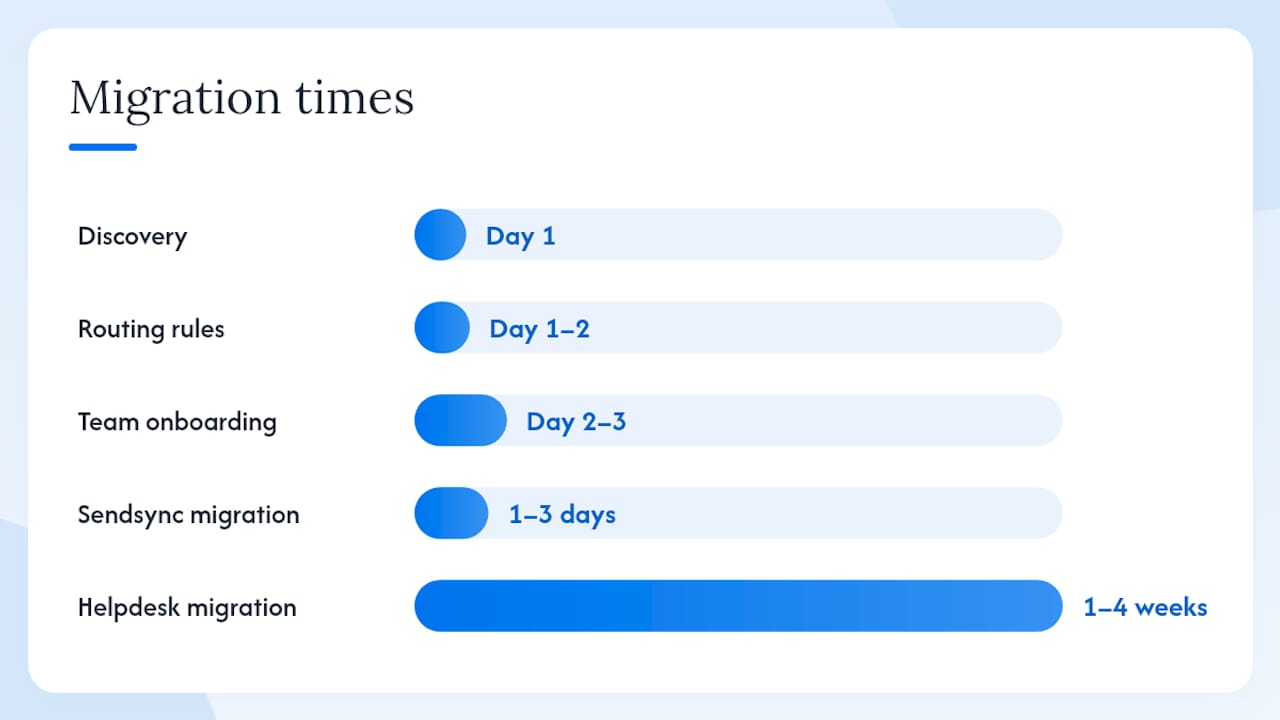
Migration steps and rough timeline:
- Discovery (Day 1): Identify the mailboxes you want to connect and the routing rules you need (assign by tag, by product line, by agent).
- Mailbox connection (Day 1): Connect Gmail or MS365 directly. No DNS changes required.
- Routing rules and saved views (Day 1–2): Set up assignment rules, tags, and saved views for your team’s workflow.
- Team onboarding (Day 2–3): Agents log in and start working. No new email client to learn.
- Historical data (optional): Import prior conversations if needed; most teams start fresh and archive the old inbox.
The full migration typically takes one to three days for a small team, compared to one to four weeks for a full helpdesk migration that involves DNS reconfiguration, ticket schema mapping, and agent training on a new interface. The support workflow guide for small teams covers these steps in more detail.
When to choose a full helpdesk instead: if you need AI that executes order actions (refunds, cancellations), deep ecommerce automations, or enterprise RBAC and audit logs, a full helpdesk or a platform like Corebee, Gorgias, or Zendesk is the better fit. Sendsync is purpose-built for email collaboration, not AI action workflows.
How we evaluated these alternatives
Criteria used:
- Pricing model transparency (publicly listed pricing vs. sales-gated)
- AI billing structure (flat, per-resolution, per-session, included)
- Integration coverage (Shopify, Gmail/MS365, Slack, Salesforce)
- Setup and migration time (self-reported and vendor-documented)
- Support quality and SLA availability by plan tier
- Scalability signals (enterprise features, SAML, RBAC, audit logs)
Sources: Vendor product pages, Shopify App Store listings, Toolify product profiles, 42voice’s AI customer service platform comparisons, and Sendsync’s own published comparison guides.
Limitations: Pricing changes frequently. Several vendors (Zendesk, Intercom, Front at enterprise tier) do not publish all pricing publicly, so figures here reflect publicly available information and may not reflect negotiated rates. AI feature rollouts are fast-moving; verify specific AI capabilities on a live demo before committing. Regional pricing and availability may differ from US list prices.
Why Sendsync is the right call for most email-first SMBs
The most common mistake support managers make when evaluating AI customer support tools is optimizing for AI capability before confirming that the basics work. A platform with impressive AI action features is worth nothing if agents spend 20 minutes a day navigating a clunky interface or if the per-resolution billing doubles your support budget during a busy season.
What I keep seeing with SMB teams is that the migration friction and the billing unpredictability are the two things that actually derail a tool switch, not the feature gap. Sendsync removes both: the mailbox connects in minutes, the pricing is flat, and agents work in a familiar email-style interface from day one. For teams that genuinely need AI to execute order actions, Corebee or Gorgias is the right answer. But for the majority of SMB support teams whose primary job is answering email quickly and consistently, a shared inbox with unlimited users and no per-seat fees solves the actual problem.
Sendsync: a fast, predictable alternative to Corebee.ai
If you have read this far and your team runs on email, the next step is straightforward. Sendsync connects to Gmail or Microsoft 365 in minutes, supports unlimited users on a flat plan, and requires no DNS changes or IT involvement to get started.

What the 14-day free trial includes:
- Full Gmail and Microsoft 365 mailbox connection
- Unlimited users from day one
- Assignment rules, tags, saved views, and internal notes
- No credit card required to start
Most teams are handling live support within the same day they sign up. No migration project, no DNS headaches, no per-seat surprise at the end of the month. Start your free trial at Sendsync and see how quickly your team can move.
Sources and further reading
- Sendsync — Shared inbox for support teams: Product page covering Gmail/MS365 integration, unlimited users, and trial details.
- Shared Inbox vs Helpdesk Software: 2026 Guide · Sendsync: Explains when a shared inbox outperforms a full helpdesk for SMB teams.
- Top 6 Freshdesk.com Alternatives 2026 · Sendsync: Pricing-shape tradeoffs between flat and per-seat models.
- Top 5 Kayako.com Alternatives for 2026 · Sendsync: Alternative selection criteria for professional services teams.
- Benefits of a Professional Client Inbox for Teams · Sendsync: Collaboration and cost advantages of shared inboxes for small teams.
- Support Workflow for Small Teams: 2026 Guide · Sendsync: Migration steps and workflow examples for small teams.
- 42voice.com — Best AI Customer Service Software: Independent comparison of AI billing models across major platforms.
- Corebee on Shopify App Store: Marketplace listing confirming Shopify integration and ecommerce presence.
- Vendor pricing pages for Zendesk, Intercom, Freshdesk, Help Scout, Front, Gorgias, Crisp, Chatwoot, Tidio, LiveChat, tawk.to, Freshchat, and Wati: confirm live pricing and trial availability directly, as rates change frequently.