
Best Client Email Management Tools for Freelancers
Best Client Email Management Tools for Freelancers ! Freelancer managing client emails on laptop Sendsync is the top pick for freelancers and small support teams who need a shared client inbox that connects to Gmail or Microsoft 365 without DNS headaches.

Sendsync is the top pick for freelancers and small support teams who need a shared client inbox that connects to Gmail or Microsoft 365 without DNS headaches. Professionals spend a significant portion of their workweek on email, consuming many hours every week — and a purpose-built shared inbox is the fastest way to claw that time back. Start a 14-day free trial and be up and running in minutes.
Table of Contents
- Why does a shared client inbox matter for freelancers?
- What features should you look for in client email tools?
- How does Sendsync address these freelancer needs?
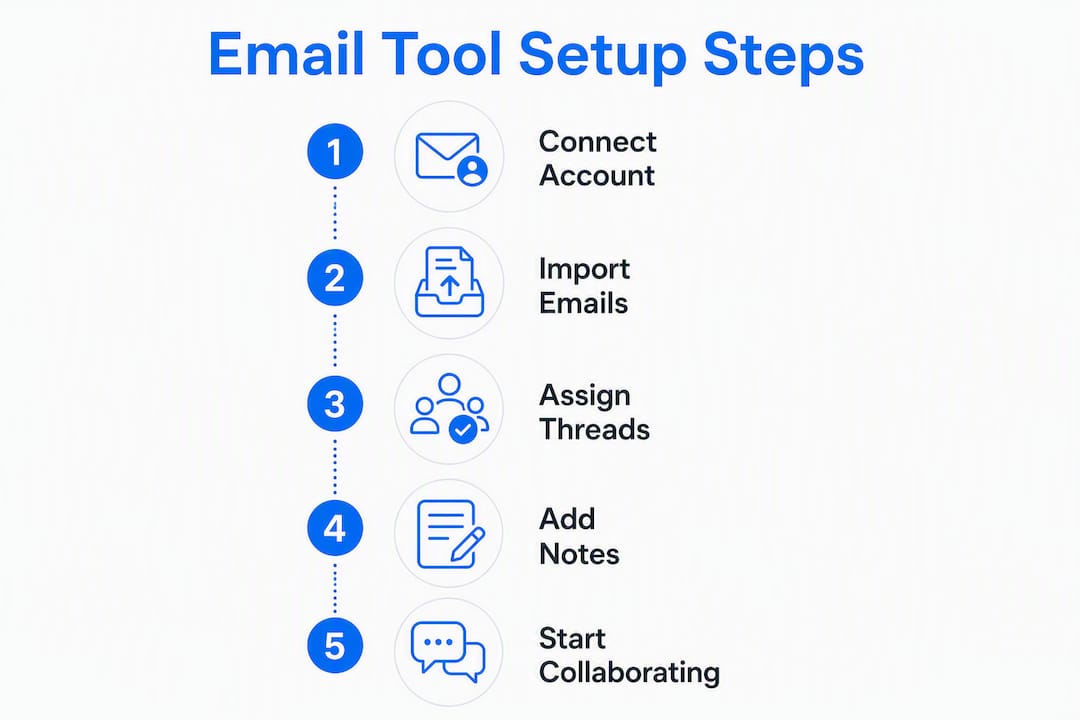
- How do you migrate client emails into a shared inbox in five steps?
- What does a shared inbox actually cost, and how do you calculate ROI?
- When is a lightweight shared inbox not the right fit?
- Key Takeaways
- What actually matters when choosing a shared inbox as a freelancer
- Sendsync: shared inbox built for freelancers and small support teams
- Sources and further reading
Why does a shared client inbox matter for freelancers?
A significant amount of daily business communication comes through email, which is the single biggest non-billable drain on a freelancer’s schedule. The problem compounds when you are a team of one to five: the same client thread gets read twice, replied to once, and then forgotten in a personal inbox nobody else can see.
A shared client inbox solves this by giving every message a visible owner. Common freelance scenarios where this pays off immediately:
- Onboarding new clients: intake questions land in one place, not scattered across three personal addresses.
- Billing queries: payment threads stay separate from project work so nothing slips.
- Support handoffs: a collaborator or VA can pick up a thread without you forwarding 12 emails.
One-click Gmail and Microsoft 365 connection means the inbox is live before your coffee cools.
Stat: The average professional spends 28% of their workweek managing email — time that could go to billable work.
What features should you look for in client email tools?
Not every feature list is equal. Prioritize these, in order of daily impact:
- Shared inbox with assignment: one owner per thread, visible to everyone. Eliminates duplicate replies instantly.
- Collision detection: shows when a teammate is already drafting a reply so you don’t send two answers.
- Internal notes: comment on a thread without the client seeing it. Saves a separate Slack message.
- Gmail and Microsoft 365 integration: one-click OAuth connect beats any setup that requires DNS changes or email forwarding.
- Automation and triage: auto-tag by keyword, route by sender domain, or assign by rule. Cuts manual sorting.
- Saved views and tags: a “waiting on client” view alone saves 20 minutes of inbox archaeology per day.
- Templates and snippets: canned replies for common questions (pricing, timelines, revision policy).
- Mobile access: client emails don’t wait for your desk.
- Metrics dashboard: response time and volume data tell you when you need help before you burn out.
Shared inbox collaboration features like assignments and internal notes are the core differentiator between a shared inbox tool and a plain email client. Everything else is secondary.
Pro Tip: During any trial, test assignment plus collision detection on day one. If two people can accidentally send competing replies, the tool has a fundamental gap that no other feature compensates for.
Integration quality is a make-or-break factor. A tool that requires MX record changes or email forwarding adds friction and risk. OAuth-based connection to Gmail or Microsoft 365 takes under two minutes and leaves your existing sending addresses intact.
How does Sendsync address these freelancer needs?
Sendsync maps directly to the checklist above. Connect your Gmail or Microsoft 365 account via OAuth — no DNS changes, no forwarding setup, no IT ticket. The inbox is live in minutes.
From there, the workflow is straightforward. Assign any thread to yourself or a collaborator with one click. Leave an internal note with context. Set an automation rule to tag every email from a specific domain as “billing” and route it to the right saved view. Scalable inbox workflows like these take five minutes to configure and run themselves after that.

The pricing model matters as much as the features. Sendsync charges per account, not per seat. A freelancer who brings in a part-time VA or a second collaborator pays the same rate. That predictability is rare among shared inbox tools, where per-seat fees can double your bill the moment you add one person.
Platforms that execute workflows rather than just organize messages consistently deliver larger time savings for small teams. Sendsync’s automation rules do exactly that: they create assignments, apply tags, and trigger saved views without manual intervention.
The 14-day free trial requires no credit card commitment. Connect your mailbox, run the trial against real client email, and decide with actual data.
How do you migrate client emails into a shared inbox in five steps?
The whole process takes under two hours for most freelancers.
- Sign up and start the trial (2 minutes): create your Sendsync account and confirm your email address.
- Connect Gmail or Microsoft 365 (under 5 minutes): authenticate via OAuth. Your existing inbox syncs immediately, no forwarding required.
- Import aliases and labels (15–30 minutes): bring over your existing client labels or folders as tags. Map each one to a saved view.
- Set up templates and automation rules (30–60 minutes): create canned replies for your five most common client questions. Add one triage rule per major client or topic.
- Invite collaborators and set ownership rules (10 minutes): add any VA or partner, assign default ownership by sender domain, and define who handles what.
Total time to productive use: roughly 90 minutes on the first day. For practical multi-client inbox tactics, the Sendsync blog covers common configurations in detail.
Pro Tip: Clients never notice the migration. Because Sendsync connects via OAuth rather than a forwarding address, every reply still comes from your original sending address. No announcement needed.
Common snag: labels from Gmail don’t always map cleanly to tags on import. Spend ten minutes cleaning up duplicates before you invite anyone else. It saves confusion later.
What does a shared inbox actually cost, and how do you calculate ROI?
Shared inbox tools generally fall into three pricing shapes: a free tier for individuals with limited seats or mailboxes, per-seat monthly billing (common in help desks), and unlimited-user plans billed per account. Sendsync uses the third model.
The ROI math is simple. If you bill a standard hourly rate and email consumes a significant portion of your weekly work hours, cutting that portion by even a modest percentage through automation, templates, and better triage frees up valuable billable time, which quickly recovers the cost of a shared inbox subscription.
High-volume users handling 100-plus emails per day recover the cost of a paid tier quickly. Free tiers cover basic needs, but automation rules and saved views — the features that actually change daily behavior — typically sit behind a paid plan.
| Metric | Figure |
|---|---|
| Average time on email | 28% of workweek |
| Daily message volume | ~121 business emails/day |
| Weekly hours spent on email | Over 11 hours |
Watch for these pricing red flags during trials: per-seat fees that scale with every collaborator, limits on the number of connected mailboxes, and integration costs charged separately from the base plan.
Pairing your shared inbox with solid invoicing software closes the loop on client billing threads so payment conversations and invoice records stay connected.
When is a lightweight shared inbox not the right fit?
Sendsync and tools like it are built for freelancers and teams of one to ten who need fast setup and clean collaboration. There are scenarios where you genuinely need something heavier.
Consider a full help desk or CRM-integrated solution when:
- Daily ticket volume exceeds 200–300 messages and you need SLA timers, escalation rules, and compliance reporting.
- You support multiple brands or domains with separate routing logic, branded portals, and distinct agent queues.
- Regulatory requirements demand audit trails, data residency controls, or HIPAA-compliant storage.
- Billing and support are tightly coupled and you need automation that triggers invoice actions from email events.
- Omnichannel routing (phone, chat, social, email in one queue) is a hard requirement.
The trade-off is real: bundled client management platforms that combine email, invoicing, and project records reduce context switching, but they take days to configure and cost significantly more. For most freelancers, that overhead is unnecessary until daily volume or compliance needs force the upgrade.
A useful rule: if you spend more time configuring the tool than using it in the first week, you’ve bought the wrong class of software. For a detailed breakdown of when to step up, the Freshdesk alternatives guide on the Sendsync blog maps the decision clearly.
Key Takeaways
Sendsync is the fastest path from a chaotic freelance inbox to a structured, collaborative client email workflow — connecting to Gmail or Microsoft 365 in minutes with no DNS changes required.
| Point | Details |
|---|---|
| Email time cost | Professionals spend 28% of their workweek on email, processing about 121 messages daily and over 11 hours each week. |
| First feature to test | Assignment and collision detection; these prevent duplicate replies from day one. |
| ROI calculation | A reduction in email time recovers billable capacity per week depending on your hourly rate. |
| When to upgrade | Move to a full help desk when daily volume exceeds 200–300 tickets or SLA compliance is required. |
| Sendsync advantage | Unlimited users, no DNS setup, Gmail and Microsoft 365 OAuth connection, live in under 90 minutes. |
What actually matters when choosing a shared inbox as a freelancer
Most freelancers overbuy. They see a feature list, assume more is better, and end up paying for SLA dashboards and omnichannel routing they will never touch. The tools that actually change daily behavior are boring: assignment, internal notes, one good automation rule, and a saved view for “waiting on client.” That’s it.
Speed of setup is underrated as a selection criterion. A tool you configure in 90 minutes and use on day one beats a powerful platform you spend two weeks onboarding. For solo operators and tiny support teams, adoption is the only metric that matters in month one.
Sendsync earns its place here because it makes the boring stuff frictionless: Gmail and Microsoft 365 connection via OAuth, unlimited users without per-seat billing surprises, and a trial long enough to test against real client volume. One caution: don’t add collaborators before you’ve set ownership rules. An unassigned shared inbox with three people watching it produces the same chaos as no shared inbox at all.
Sendsync: shared inbox built for freelancers and small support teams
Freelancers managing client email in a personal inbox are leaving money on the table. Sendsync gives you a shared inbox that connects to your existing Gmail or Microsoft 365 address in minutes, with no DNS changes and no per-seat fees as your team grows.

Assign threads, leave internal notes, set triage rules, and track response times from a single dashboard. The 14-day free trial is the fastest way to see whether a structured inbox changes how much time you spend on email versus billable work. Start your free trial at Sendsync and have your first client mailbox live before the end of the day.
Sources and further reading
- 12 Best Email Productivity Apps in 2026 — this+that — source for the 28% workweek and 121 messages/day figures, and workflow automation ROI analysis.
- 10 Best Email Productivity Tools for Gmail in 2026 — Mailtrack — shared inbox collaboration features and assignment/notes functionality.
- Best Client Management Software for Freelancers — Plutio — when bundled client management platforms make sense over a standalone shared inbox.
- SendSync — Shared inbox for support teams — product details, trial signup, Gmail and Microsoft 365 integration documentation.
- Multi-Client Email Management: A 2026 Team Guide — Sendsync Blog — hands-on configuration guidance for freelancers and small teams.
- Handle Multiple Clients in a Single Inbox — Sendsync Blog — practical migration tips and template setup.
- Best Invoicing Software for Freelancers — InvoiceLabs — complementary invoicing tools that pair with a shared inbox workflow.