
Why a Separate Client Inbox Matters for Teams
Why a Separate Client Inbox Matters for Teams ! Team collaborating on client inbox management A separate client inbox is a dedicated email space used exclusively for managing client communications, keeping those messages isolated from internal traffic, personal accounts, and unre

A separate client inbox is a dedicated email space used exclusively for managing client communications, keeping those messages isolated from internal traffic, personal accounts, and unrelated business correspondence. The importance of client inbox separation goes far beyond tidiness. It directly affects your team’s security posture, your brand’s email deliverability, and your ability to meet compliance requirements set by providers like Google and Microsoft. For customer support professionals, small business owners, and remote team leaders, mixing client emails with everything else is not just disorganized. It is a measurable operational risk.
Why separate client inbox matters for security and compliance
Credential sharing is the most common shortcut teams take with email access, and it violates both Google and Microsoft acceptable-use policies. Beyond the policy breach, shared credentials eliminate audit trails, making it nearly impossible to know who read what, when, or what actions they took. That gap becomes a serious problem the moment someone leaves your team.
Offboarding is where credential sharing causes the most damage. Changing a password is not enough to revoke access if a former team member set up forwarding rules or connected third-party app permissions before they left. Those access points persist silently, and your client data keeps flowing out. A separate client inbox managed through delegation features lets you remove access in one click and leaves a clear audit log behind.
The compliance case is equally strong. Enterprise clients and regulated industries expect their data to stay within defined boundaries. When client emails sit inside a general inbox alongside vendor invoices and internal Slack notifications forwarded to email, those boundaries collapse. Structural separation is the only reliable way to enforce them.
Delegation over password sharing. Use Gmail’s “Grant Access” or Microsoft 365’s shared mailbox feature instead of sharing login credentials.
Audit trail by default. Delegation tools log every action taken, giving you a clear record for compliance reviews.
One-click offboarding. Removing a delegate takes seconds and closes the access gap cleanly.
Forwarding rule audits. Review active forwarding rules and third-party app permissions every time a team member leaves.
Pro Tip: Run a quarterly audit of all active email delegates and connected third-party apps on your client inbox. Most access breaches happen through forgotten permissions, not direct attacks.
How does inbox separation improve workflow efficiency?
High email complexity, not volume, is the primary challenge for professionals managing multiple clients. A consultant handling five clients in one inbox does not struggle because they get too many emails. They struggle because every message requires a mental context switch to figure out which client it belongs to, what the priority is, and who should respond. That cognitive load compounds across a full workday.
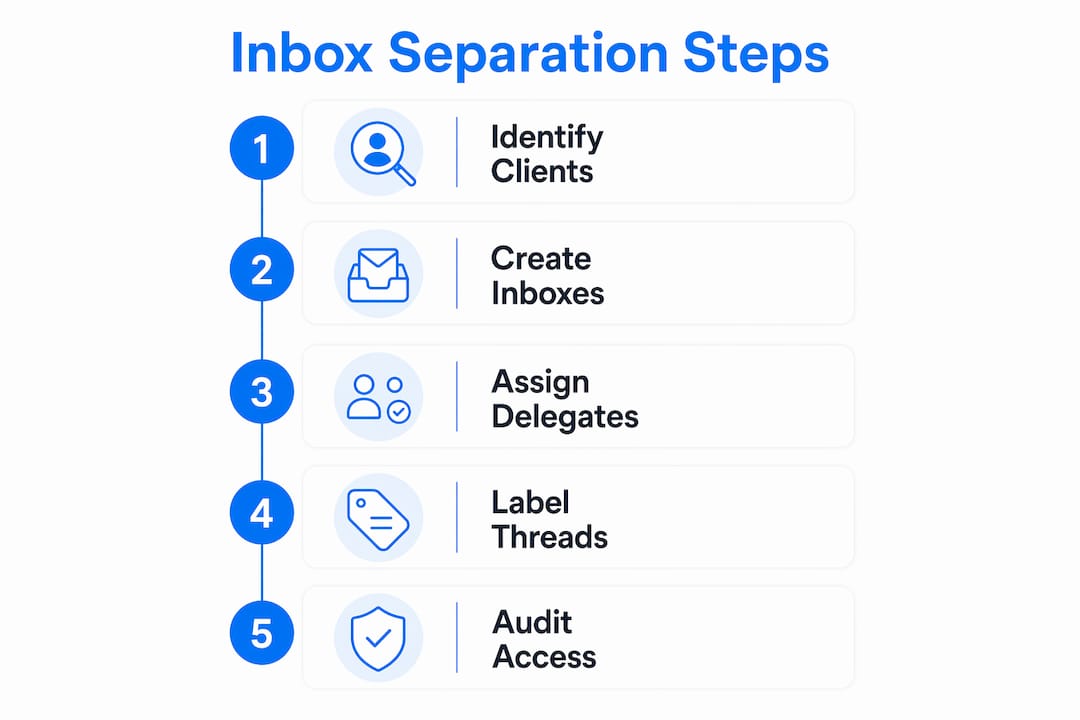
A dedicated client inbox removes that friction at the structural level. When client messages arrive in a space built only for them, prioritization becomes obvious. Your team does not need to scan subject lines and sender names to decide what matters. The inbox itself signals urgency by its purpose.

For solo business owners and small teams, department aliases routed into a single dashboard offer a practical middle ground. Role-based addresses like support@, billing@, and onboarding@ each carry a clear function. Automated filters sort incoming messages by alias before anyone reads them. The result is a professional structure that a one-person operation can maintain without hiring a dedicated inbox manager.
Misapplying inbox models creates the opposite effect. Unified inboxes suit individuals managing multiple identities; shared inboxes suit teams. When teams use a unified inbox model, duplicate replies and missed tasks follow. Choosing the wrong model does not just slow your team down. It erodes client trust when the same question gets two different answers from two different people.
Map your client volume first. Count active clients and estimate weekly email volume per client before choosing an inbox structure.
Assign ownership per client or per alias. Every client thread should have one named owner responsible for responses.
Set up automated filters immediately. Route emails by sender domain or alias to the correct folder or label before they hit the main view.
Review and close stale threads weekly. Unresolved threads in a client inbox are the clearest sign of a workflow gap.
Use multiple clients in one inbox only when isolation is maintained by labels or assignments, not just by memory.
Pro Tip: Label every client thread with the client name and a status tag (open, waiting, closed). This single habit cuts duplicate replies by making thread status visible at a glance.
Why inbox separation protects your brand reputation
Email deliverability depends on domain and inbox reputation scores maintained by receiving mail servers. When a shared or mixed inbox generates spam complaints, bounces, or low engagement, that reputation damage spreads across every address using the same domain or infrastructure. One poorly managed client campaign can suppress delivery for your entire business.
Agencies managing 10 or more clients are advised to isolate infrastructure by inbox, domain, and tracking to prevent this exact scenario. The logic is simple: if one client’s inbox develops a reputation problem, isolation contains the damage. Without separation, reputation bleed affects every client you serve.
The standby inbox pool strategy takes this further. Maintaining a reserve of inboxes equal to 15–20% of active accounts means you can swap out a degraded inbox immediately without disrupting client communication. That kind of operational resilience is only possible when each client has their own isolated infrastructure.
Risk factor | Mixed inbox | Separate inbox |
|---|---|---|
Reputation bleed | High. One bad sender affects all. | Contained. Damage stays isolated. |
Spam complaint impact | Spreads across all clients. | Limited to one client’s inbox. |
Recovery time | Slow. Requires full domain review. | Fast. Swap or warm up one inbox. |
Deliverability control | Low. No per-client visibility. | High. Track metrics per inbox. |
Isolate by domain when possible. Separate client-facing domains from your primary business domain.
Monitor reputation per inbox. Use tools like Google Postmaster to track domain reputation at the inbox level.
Warm up new inboxes gradually. Sudden volume spikes from a new address trigger spam filters regardless of content quality.
Keep a standby pool ready. Pre-warmed replacement inboxes cut recovery time from days to hours.
How to implement separate client inboxes effectively
The right setup depends on your team size and client volume, but the core principles apply across every scenario. Start with access control. True inbox separation requires structural means, not just filters inside one account. Filters help organize. They do not create the security and compliance boundaries that separate accounts or shared mailboxes provide.
For teams, shared mailboxes in Microsoft 365 or delegated access in Gmail give multiple people access to a client inbox without sharing credentials. Each team member logs in with their own account. Actions are logged individually. Removing access for one person does not affect anyone else. This is the standard that enterprise clients expect, and it is the baseline for any team handling sensitive client data.
For solo operators, automated filtering combined with department aliases creates a professional structure without the overhead of managing multiple full accounts. A single Gmail or Microsoft 365 account can receive mail for support@, billing@, and hello@ simultaneously, with filters routing each alias to its own label or folder automatically.
Use delegation, not password sharing. Set up Gmail delegation or Microsoft 365 shared mailboxes for team access.
Create role-based aliases. Assign support@, billing@, and onboarding@ addresses to route client emails by function.
Automate with filters and tags. Build filter rules that apply labels, assign folders, and flag priority senders on arrival.
Document your inbox structure. Write down which aliases exist, who owns them, and what filters apply. This documentation saves hours during onboarding and offboarding.
Review the structure quarterly. Client rosters change. Your inbox architecture should reflect the current state of your business, not the one you had 18 months ago.
Sendsync connects directly to Gmail and Microsoft 365 mailboxes without DNS configuration, making it one of the fastest ways to give a team shared access to a professional client inbox without the credential-sharing risks described above.
Key Takeaways
A separate client inbox is the single most effective structural change a team can make to protect security, maintain compliance, and deliver consistent client communication.
Point | Details |
|---|---|
Security requires structure | Delegation tools replace password sharing and create audit trails that protect client data. |
Complexity beats volume | Inbox separation reduces cognitive load by removing the need to context-switch between clients. |
Reputation stays contained | Isolated inboxes prevent one client’s deliverability problem from spreading to your entire domain. |
Aliases work for solo teams | Role-based email aliases with automated filters give solo operators a professional inbox structure. |
Offboarding becomes clean | Separate inboxes with delegation allow one-click access removal with no residual data exposure. |
What I’ve learned from watching teams skip inbox separation
The teams that resist separating their client inboxes almost always cite the same reason: it feels like extra work upfront. They are right that setup takes time. What they underestimate is the cost of not doing it.
I have seen small support teams lose client contracts because a former contractor retained access to a shared inbox through a forwarding rule nobody knew existed. The client found out during a routine security review. No amount of apologizing recovered that relationship. The fix would have taken 20 minutes to set up correctly from the start.
The subtler cost is the daily drag. When your team works from a mixed inbox, every person who touches it carries the mental overhead of sorting context before they can act. That overhead does not show up on a time sheet. It shows up in slower response times, more mistakes, and higher staff frustration over time.
The benefits of a unified team inbox are real, but only when the inbox is purpose-built for a specific function. A general inbox that tries to serve every purpose serves none of them well. Separation is not a luxury for teams with complex client rosters. It is the minimum viable structure for doing the job properly.
— Nick
Sendsync makes client inbox management straightforward
Managing separate client inboxes does not have to mean juggling multiple logins or spending hours on configuration.

Sendsync connects your Gmail or Microsoft 365 mailbox in minutes, with no DNS setup required. Your team gets a shared inbox for support teams where conversations can be assigned, replied to, and tracked without credential sharing or audit trail gaps. Unlimited users, no per-seat fees, and a structure built for the way support teams actually work. If your team is ready to stop managing client emails from a general inbox, Sendsync gives you the structure to do it right from day one.
FAQ
What is a separate client inbox?
A separate client inbox is a dedicated email account or mailbox used exclusively for client communications, kept apart from internal, personal, or general business email. This structure improves clarity, security, and compliance.
Why does inbox separation matter for small teams?
Inbox separation prevents duplicate replies, missed messages, and credential-sharing risks that are common when small teams use a single general inbox. It also makes offboarding former team members clean and auditable.
How does a dedicated client inbox protect email deliverability?
A dedicated inbox isolates your domain reputation so that one client’s spam complaints or bounce rates do not affect delivery for your other clients or your primary business domain.
Can a solo business owner benefit from a separate client inbox?
A solo operator can use role-based email aliases like support@ and billing@ with automated filters to create the structure of a separate client inbox without managing multiple full accounts.
What is the biggest security risk of not separating client inboxes?
The biggest risk is the offboarding gap. When teams share credentials, changing a password does not revoke access if forwarding rules or third-party app permissions remain active, leaving client data exposed indefinitely.