
Asynchronous Team Communication: A Manager's Guide
Asynchronous Team Communication: A Manager's Guide ! Hand plugging Ethernet cable at home office desk Asynchronous team communication is any exchange, an email, a recorded video, a project comment, that doesn't require both people online at the same moment, unlike synchronous com

Asynchronous team communication is any exchange, an email, a recorded video, a project comment, that doesn’t require both people online at the same moment, unlike synchronous communication such as a live call or in-person meeting. For remote and hybrid teams, async should be the default for most coordination: status updates, documentation, handoffs, and anything that benefits from a written record. Microsoft’s own guidance frames it exactly this way, recommending async to cut scheduling friction while reserving live meetings for urgent or sensitive conversations. Research on workplace interruptions backs this up: Mark and colleagues at UC Irvine found that constant interruptions fragment attention and stretch out how long tasks take to finish.
Reach for async when the work involves:
- Daily or weekly status updates that don’t need real-time discussion
- Documentation and decisions that future team members will need to find later
- Handoffs between time zones or shifts
- Recorded walkthroughs of a process, bug, or design instead of a live screen share
A tool like Sendsync shows this in practice: teams using a shared inbox instead of scattered personal emails keep every handoff visible, so nobody has to interrupt a colleague just to ask “did you see this yet?”
Key Takeaways
Asynchronous communication works best as the default for routine coordination, while synchronous conversation stays reserved for urgent, sensitive, or highly collaborative moments.
| Point | Details |
|---|---|
| Define async clearly | It means communication that doesn’t require both people online simultaneously, unlike a live call. |
| Default to async for routine work | Status updates, documentation, and handoffs rarely need a live meeting. |
| Protect focus time | Interruption research links fragmented attention to longer task completion times. |
| Set SLAs before rolling out | Define acknowledgment and full-response windows so async doesn’t stall decisions. |
| Escalate when needed | Move a topic to a live call after three unresolved back-and-forth messages. |
| Centralize visibility | Tools like Sendsync keep handoffs in a shared inbox instead of one person’s private email. |
Table of Contents
- What Does Asynchronous Communication Actually Look Like?
- Why Teams Are Shifting to Asynchronous Work
- When Asynchronous Communication Breaks Down
- Choosing Between Asynchronous and Synchronous Communication
- How to Roll Out Asynchronous Communication on Your Team
- Tools That Actually Support Async Workflows
- What the Research Actually Shows
- Sources
What Does Asynchronous Communication Actually Look Like?
Async isn’t one format, it’s a habit applied across several channels. A written email thread, a Slack message posted at 11 PM for someone to read at 8 AM, a two-minute Loom recording, a comment on an Asana task, a shared Google Drive doc with tracked edits, all count.
Here’s what a good async update looks like in each format:
- Email: “Client contract signed (attached). Owner: Priya. Next step: onboarding call by Friday.”
- Slack/Teams thread: “Deploy is blocked on the API key issue from yesterday. @Marcus, can you confirm access by end of day?”
- Loom video: A 90 second screen recording walking through a confusing bug, narrated, so the recipient sees exactly what happened instead of reading three paragraphs.
- Asana comment: “Design draft uploaded, feedback needed by Wednesday. Tagging @design-team.”
- Notion or Google Drive doc: A living meeting-notes page that replaces “can we hop on a call to recap?”
The real difference between these isn’t just tone, it’s visibility. Email and Slack DMs sit in private inboxes unless someone thinks to forward them. A shared doc or task board is searchable by anyone on the team months later.
Why Teams Are Shifting to Asynchronous Work
The appeal isn’t just convenience, it’s cognitive. Fewer live meetings means more uninterrupted blocks for deep work, and Harvard Business Review has argued that a large share of meetings on most calendars are avoidable in the first place.
- Protected focus time. Fewer synchronous check-ins mean fewer context switches during the day.
- Flexibility across schedules. A parent working 7 AM to 3 PM and a night-shift developer can collaborate without either one adjusting their hours.
- Inclusivity for different working styles. Introverts and non-native speakers often write clearer, more considered messages than they’d manage live on a call.
- A searchable record. Decisions live in a doc or thread instead of evaporating after a meeting ends.
Interruptions carry a real cost. The foundational UC Irvine study on attention fragmentation found that once someone is interrupted, it takes meaningfully longer to return to the original task and regain the same depth of focus.
For remote and hybrid teams spread across time zones, async isn’t a nice extra, it’s often the only way to keep a team of eight people across four time zones actually coordinated without someone joining a call at 2 AM.
When Asynchronous Communication Breaks Down
Async fails when teams treat it as a replacement for judgment rather than a default setting. Watch for:
- Delayed decisions that stall a project because nobody set a response deadline
- Misinterpretation of tone in short written messages, especially across cultures or languages
- Information fragmentation when updates get scattered across five different tools instead of one system of record
- Channel overload, where employees have to check Slack, email, and three project tools just to feel caught up
- Slower crisis response when a server is down and nobody’s watching the async channel
Managers should treat repeated clarification threads, missed deadlines, or a quiet drop in morale as red flags that a topic needs a live conversation instead.
Pro Tip: Set a rule that anything requiring more than three back-and-forth messages to resolve gets escalated to a five-minute call. It saves hours of typing and prevents misread tone from turning into real tension.
Choosing Between Asynchronous and Synchronous Communication
Not every conversation belongs in a doc. Use this quick framework:
- Is it urgent? A production outage or client emergency needs a synchronous call, not a Slack message someone might see in two hours.
- Is it sensitive? Performance feedback, conflict resolution, and layoffs call for a live conversation, tone gets lost in text.
- Does it need real-time back-and-forth? Brainstorming and complex negotiation move faster live.
- Is it a routine update? Weekly status reports, project handoffs, and documentation belong async by default.
Microsoft’s guidance makes the same point: async should be the default, but synchronous meetings remain essential for high-urgency tasks and relationship-building. When comparing the two, look at four dimensions: best-fit use case, format (text, audio, video, or structured task), whether it’s searchable and documented, and how fast a response is actually expected.
How to Roll Out Asynchronous Communication on Your Team
Start with an audit, not a mandate. Spend a week tracking where messages actually live: how many tools does your team check daily, and which ones duplicate each other?
- Audit your channels. List every place messages currently land (email, Slack, Teams, task comments) and cut anything redundant.
- Set response-time SLAs. Define acknowledgment windows separately from full-reply windows, for example, acknowledge within 4 hours, respond fully within 24.
- Standardize documentation. Every decision gets written down somewhere searchable, not buried in a DM.
- Define escalation paths. State clearly when a topic graduates from async thread to live call.
- Train the team. Run a short session on how to write a complete async update instead of assuming people will figure it out.
- Pilot with one team first. Choose a group of 4 to 8 people, run it for three weeks, and track meeting hours saved and response-time compliance as your success metrics.
Give your team a message template so nobody has to guess what belongs in an update. A solid one includes:
- Background: what’s the context in one sentence
- Owner: who is responsible for the next action
- Deadline: when it’s needed by
- Next step: the specific action required
HubSpot recommends exactly this kind of structured async update through project platforms and shared docs, letting teams post on their own schedule instead of waiting for a status meeting. A shared inbox setup does the same job for email specifically, keeping handoffs and response expectations visible instead of buried in one person’s personal inbox.
Declare urgency explicitly. If something is time-sensitive, say so in the subject line or first sentence, “URGENT” or “Needed by 3 PM” beats a vague message sitting unread for six hours.

Tools That Actually Support Async Workflows
The right stack matters less than how consistently your team uses it. A few categories cover almost every async need:
- Slack or Microsoft Teams for threaded async chat, used with the expectation that replies aren’t instant.
- Loom for recorded video walkthroughs, especially for design feedback or bug reports where tone and visuals matter. Forbes notes that recorded messages preserve vocal inflection in ways terse text can’t.
- Google Drive and Notion for living documentation and decision logs.
- Asana for task ownership, deadlines, and comment threads tied directly to the work.
- Email, still the default for external communication and formal handoffs, especially with clients or vendors outside your workspace.
One workflow that works well: a weekly written update posted in a shared doc, followed by task assignments in Asana, followed by a Loom recording for anything too complex to explain in text. Another: client requests routed through a shared inbox so any team member can pick up a thread without waiting on the one person who originally answered it. The common thread across both is visibility, nothing lives in a single person’s head or personal inbox.
What the Research Actually Shows
The case for async isn’t just anecdotal. HBR’s 2023 research found that async work can fuel creativity precisely because it gives people time to reflect instead of reacting under pressure. Interruption research from UC Irrvine’s Mark and colleagues found that fragmented attention lengthens task completion, a direct argument for fewer real-time interruptions during focused work.
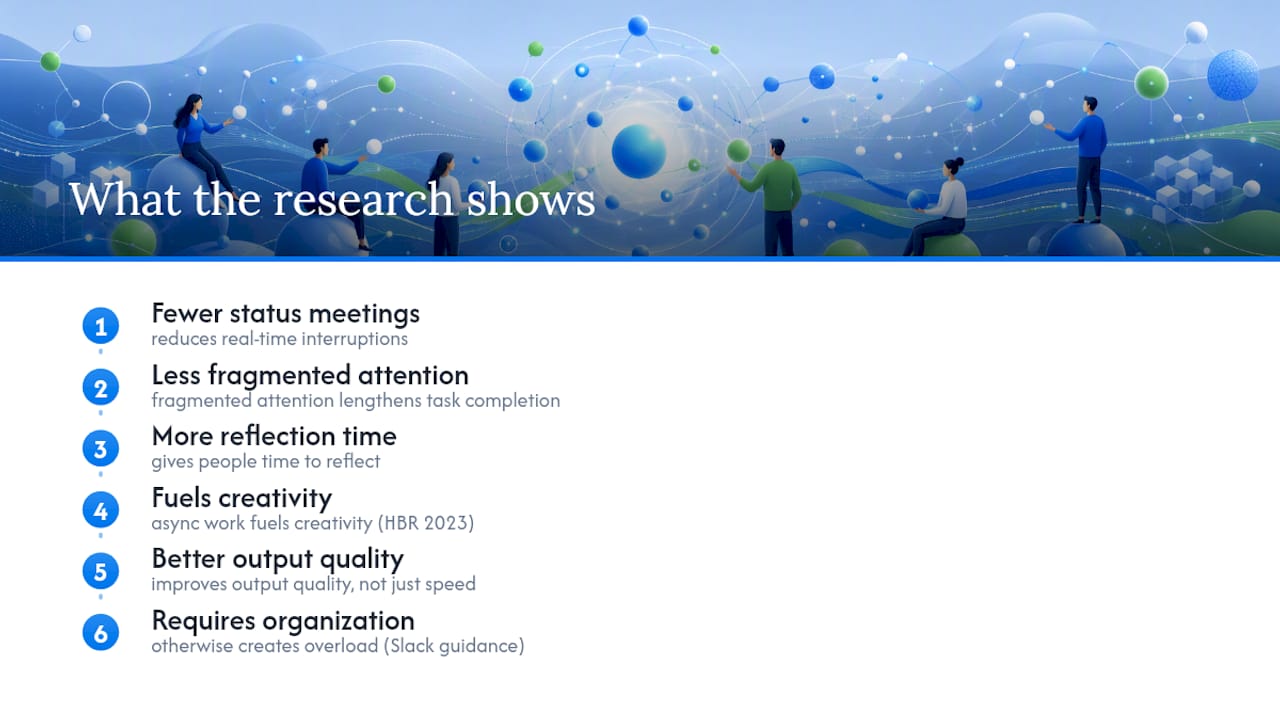
The practical translation: fewer status meetings, more structured async updates, and creative work protected from live interruptions all tend to improve output quality, not just speed. Slack’s own guidance adds an important caveat: async only delivers these benefits when teams impose real organization and channel norms, otherwise it just creates a different kind of overload.
A Manager’s Take on Making Async Actually Work
Start small: pick one recurring status meeting and replace it with a written update template for two weeks before rolling out anything bigger. One distributed support team I’ve seen described in case studies cut a daily 30 minute sync to a five-minute async doc update, freeing roughly two and a half hours a week per person, time that went straight back into focused work.
Sources
- Asynchronous communication - Microsoft Teams
- Mark et al., study on attention fragmentation and interruptions
- Stop the meeting madness - HBR
- Team communication - HubSpot blog
- 9 ways asynchronous communication can improve team productivity - Forbes