
What Does Inbox Zero Mean for Support Teams?
What Does Inbox Zero Mean for Support Teams? !

Inbox Zero is defined as the practice of achieving zero cognitive load from your email inbox by making a clear decision on every message, not by keeping an empty inbox at all times. Merlin Mann coined the term in 2007, and his original intent was never about an empty inbox. It was about removing email from what he called the “ambient attention field,” freeing mental energy for real work. For support teams handling dozens or hundreds of messages daily, understanding what inbox zero actually means in a support context changes how you manage email entirely.
What does inbox zero mean in support environments?
Inbox Zero, in a support context, means every email in your queue has been processed and assigned a clear next action. No message sits in limbo. No ticket gets re-read three times without a decision. The inbox functions as a processing pipeline, not a storage system, and that distinction matters enormously for teams under response-time pressure.
Support teams face a specific version of this challenge. A personal inbox might hold newsletters and receipts. A support inbox holds customer problems, escalations, billing disputes, and feature requests, all arriving at once. Treating the inbox as a pipeline rather than a holding area is the core habit that separates high-performing support teams from those constantly playing catch-up.

The cognitive cost of an unprocessed inbox is real. UC Irvine research shows that after a single interruption, it takes about 23 minutes to regain deep focus. Every unresolved email in your inbox is a low-grade interruption, pulling attention even when you are not actively reading it. Inbox Zero eliminates that drain by requiring a decision on every message the moment you open it.
What are the core actions behind the inbox zero method?
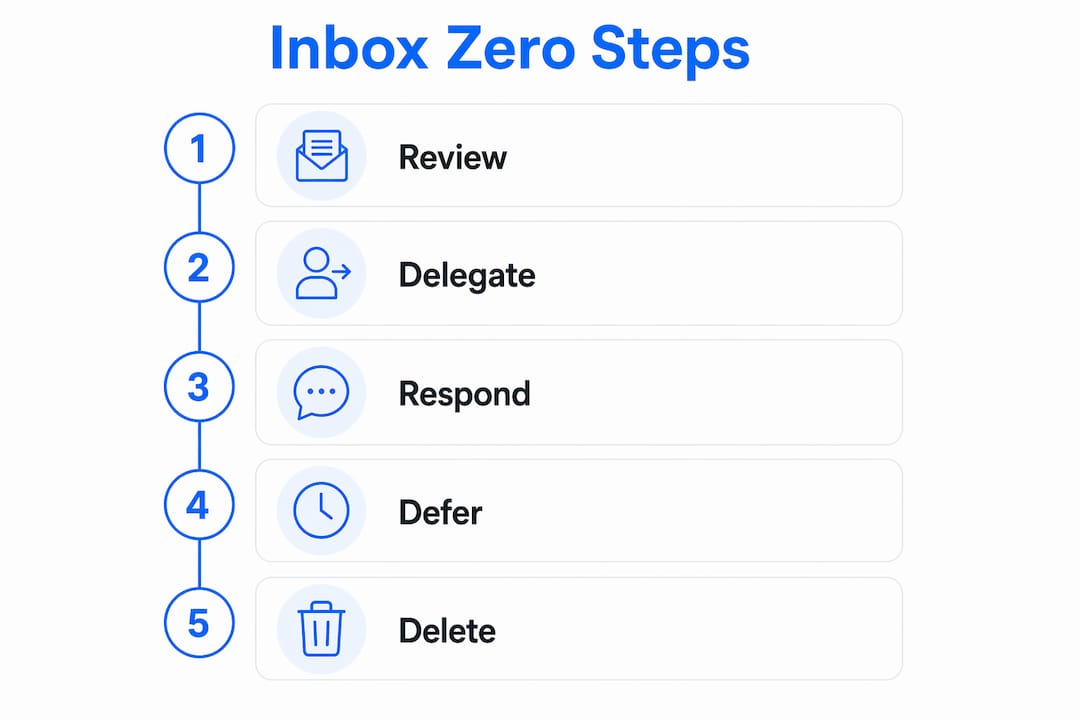
Merlin Mann’s framework gives every email exactly five possible fates. Each email gets one of five actions: Delete, Delegate, Respond, Defer, or Do. Processing email in a single pass using these five verbs prevents the habit of re-reading the same message multiple times without acting on it.
Here is how each action works in a support context:
Delete: Remove any email that requires no action and holds no reference value. Automated notifications, resolved thread copies, and internal FYI messages qualify. Most informational emails should be deleted after you extract the relevant detail.
Delegate: Assign the email to the right team member immediately. In a shared inbox, this means tagging or assigning the conversation before you move on. Do not hold it in your personal queue.
Respond: If a reply takes under two minutes, write it now. Deferring a two-minute task creates more overhead than completing it.
Defer: Move the email out of the inbox and into a trusted task system with a specific follow-up date. The inbox is not the place to store work in progress.
Do: If the email requires action you can complete immediately, do it and archive the message.
Pro Tip: Set a visible timer for each email processing session. Knowing you have 30 minutes to triage forces faster decisions and prevents the habit of re-reading without acting.
The power of this method is that it converts email from an open question into a closed decision. Support teams that apply these five verbs consistently report fewer missed tickets and cleaner handoffs between team members.
Why inbox zero is about decisions, not an empty inbox
The most damaging misconception about inbox zero is that success means reaching zero emails. That reading causes burnout. Teams chase an empty count, archive messages without processing them, and then wonder why they still feel behind.
The popular misconception is that inbox zero means an empty inbox. The real definition is an inbox with zero unprocessed decisions. Those are fundamentally different goals. An inbox can hold 200 archived messages and still be at “zero” if every message has been acted on. Conversely, an inbox with three emails is not at zero if all three are sitting there unresolved.
Merlin Mann put it plainly:
“Inbox Zero is not about the number of emails in your inbox. It is about the amount of mental energy you give to those emails. The goal is zero attention spent on email that has already been processed.”
This reframe changes everything for support teams. The question shifts from “How many emails are in the inbox?” to “Does every email in this inbox have a clear next action?” That second question is the one worth answering every day.
The practical consequences of the misconception include:
Teams archiving emails without assigning them, creating invisible backlogs
Agents marking tickets as “read” without responding, giving false signals to managers
Managers measuring inbox count instead of resolution rate
Individuals feeling guilty about a full inbox even when all messages are being handled
How to implement inbox zero in support team workflows
Effective inbox zero in a support team requires structure at both the individual and team level. The method does not work if each agent applies it differently.
Batch processing over constant monitoring. Handling email in 2–3 dedicated sessions per day is standard practice for teams that sustain inbox zero. Constant inbox monitoring creates the exact interruption pattern that inbox zero is designed to eliminate. Set defined triage windows, such as 9:00 AM, 1:00 PM, and 4:00 PM, and close the inbox between sessions.
Automation reduces the manual load. For moderate-volume teams, automated filters reduce emails needing manual attention by 50–70%. That means routing order confirmations to a separate folder, auto-tagging messages by topic, and sending acknowledgment replies without human intervention. Automation handles the volume; the team handles the decisions.
Shared inbox practices make delegation visible. A personal inbox hides delegation. A shared inbox makes it explicit. When one agent assigns a conversation to another, the entire team sees the handoff. This visibility is what makes the Delegate action from Mann’s framework actually work at scale. Tools that support team inbox collaboration make this possible without the confusion of CC chains and forwarded threads.
Here is a practical workflow structure for support teams:
Step | Action | Tool type |
|---|---|---|
Triage session opens | Review all new messages | Shared inbox |
Apply five-verb decision | Delete, delegate, respond, defer, or do | Shared inbox |
Deferred items | Move to task system with due date | Task manager |
Automated routing | Pre-sort by tag, topic, or sender | Filter rules |
End-of-session check | Inbox should show zero unprocessed items | Shared inbox |
Support teams that follow this structure consistently report faster response times and fewer dropped tickets. The organization strategies for support inboxes that work best combine automation with clear human decision points, not one or the other.
Common challenges in sustaining inbox zero over time
The hardest part of inbox zero is not the initial cleanup. It is the second week. Transitioning to inbox zero triggers anxiety, and discipline requires 2–3 weeks of daily triage before the habit stabilizes. Most teams quit before they reach that point.
The most common failure points include:
Deferral without trust: The Defer action only works if agents trust their task system to surface deferred items reliably. When users do not trust their external task system, deferred emails drift back into the inbox or get forgotten entirely. The task system must be reliable before deferral becomes a viable action.
Obsessing over the count: Teams that treat inbox zero as a vanity metric start gaming it. They archive without processing, mark as read without responding, and hit zero on paper while the real backlog grows elsewhere.
Skipping batch windows: One missed triage session creates a backlog that feels impossible to clear. Teams need a shared agreement on triage schedules, not just individual intentions.
No shared protocol: If one agent uses the five-verb method and another does not, the shared inbox becomes inconsistent. Inbox zero requires a team-level agreement, not just personal discipline.
Pro Tip: Build a “deferred” label or folder inside your shared inbox and review it every morning before the first triage session. This keeps deferred items visible without cluttering the main queue.
Sustained inbox zero practice requires changing the relationship with email from continuous background monitoring to focused batch processing. That shift is cultural as much as it is operational. Teams that make it stick treat triage sessions as protected time, not optional habits.
Key Takeaways
Inbox Zero is a discipline of decision-making, not a count of emails, and support teams that apply it consistently reduce cognitive load, improve response times, and avoid the invisible backlogs that kill service quality.
Point | Details |
|---|---|
True inbox zero meaning | Zero unprocessed decisions, not zero emails in the inbox. |
Five-verb framework | Every email gets one action: Delete, Delegate, Respond, Defer, or Do. |
Batch processing | Triage email in 2–3 daily sessions to protect focus time between sessions. |
Deferral requires trust | The Defer action only works when agents trust their task system to follow through. |
Team-level commitment | Inbox zero fails without a shared protocol across the entire support team. |
Why support teams get inbox zero wrong, and what actually works
Support teams are the hardest environment to apply inbox zero correctly. The volume is high, the stakes are real, and the pressure to respond immediately fights directly against the batch-processing discipline the method requires.
What I have seen consistently is that teams adopt the vocabulary of inbox zero without changing the underlying behavior. They call it inbox zero, but they are still monitoring email constantly, still re-reading messages without deciding, and still using the inbox as a to-do list. The label changes; the habit does not.
The teams that actually benefit are the ones that treat inbox zero as a workflow agreement, not a personal productivity hack. They agree on triage windows. They agree on what “delegated” means in their shared inbox. They agree on which task system holds deferred items. Without that agreement, one person’s inbox zero is another person’s missed ticket.
The other thing worth saying plainly: inbox zero is not the goal. Serving customers well is the goal. Inbox zero is one method that makes that easier by reducing the cognitive noise that gets in the way. Teams that lose sight of that start optimizing for an empty count instead of a resolved customer. Those are very different outcomes.
For small and growing support teams, the best practices for shared inboxes that support inbox zero are not complicated. They require consistency, a shared tool, and the discipline to process rather than accumulate. Start there before adding any automation layer.
— Nick
Sendsync makes inbox zero practical for support teams
Inbox zero works best when your tools match your workflow. Sendsync is built specifically for support teams that need a shared inbox without the setup overhead of a traditional help desk.

Sendsync connects directly to Gmail or Microsoft 365 mailboxes in minutes, with no DNS configuration required. Teams can assign conversations, reply collaboratively, and move messages through a clear workflow without CC chains or forwarded threads cluttering the queue. The assignment and delegation features map directly to Mann’s five-verb framework, making the Delegate and Defer actions visible across the whole team. Explore Sendsync’s shared inbox platform to see how it fits the inbox zero method your team is building.
FAQ
What does inbox zero mean in a support context?
Inbox zero means every email in your support queue has been processed and assigned a clear next action. No message sits unresolved, regardless of the total email count.
Is inbox zero about having no emails in your inbox?
No. Inbox zero means zero unprocessed decisions, not zero emails. An inbox can hold archived messages and still be at zero if every message has been acted on.
What are the five actions in the inbox zero method?
Merlin Mann’s framework assigns every email one of five actions: Delete, Delegate, Respond, Defer, or Do. Processing each email once using these five verbs prevents repeated re-reading and decision fatigue.
Why do most teams fail to sustain inbox zero?
Transitioning to inbox zero triggers anxiety, and most teams quit before the 2–3 week habit formation period is complete. The most common failure is deferring emails without a trusted task system to hold them.
How does a shared inbox support inbox zero for teams?
A shared inbox makes delegation visible across the whole team, which is what makes the Delegate action from the inbox zero framework work at scale. It replaces CC chains with explicit assignment and clear ownership of every conversation.