
4 Layers of Spam Control for Support Teams: A Ticket System Playbook
4 Layers of Spam Control for Support Teams: A Ticket System Playbook ! Support agent reviewing quarantined ticket Effective spam control for support relies on four layers working together: sender authentication, server-side filters, ticket-system rules, and a quarantine queue wit

Effective spam control for support relies on four layers working together: sender authentication, server-side filters, ticket-system rules, and a quarantine queue with regular human review. No single layer stops everything, and the system needs ongoing tuning as spam tactics shift. Tools like Rspamd or SpamAssassin handle the technical filtering, but a shared inbox platform can simplify how flagged messages get routed and reviewed.
TL;DR:
- Effective spam control requires ongoing tuning of multiple layers, including sender authentication, server filters, ticket rules, and regular human review.
- Combining SPF, DKIM, and DMARC verification with keyword filters and sender blocklists sharply reduces spam, but continuous adjustment is necessary as tactics evolve.
- Integrating AI-assisted filtering with human oversight improves detection of nuanced or well-crafted spam, provided transparency and correction mechanisms are in place.
- Regular review of quarantine metrics, quick response to false positives, and speed of review are critical to minimizing customer disruption and maintaining trust.
- Using shared inbox platforms like Sendsync simplifies enforcement, ensures visibility, and prevents the pitfalls of disconnected filtering systems, especially during spam surges.
Table of Contents
- How Standard Spam Controls Work: Blocklists, Keywords, and Authentication
- Step-by-Step Checklist to Implement Spam Control in Your Ticket System
- Automation and AI-Assisted Filtering: What It Adds and What It Risks
- Keeping Filters Effective: Review Cadence and Metrics That Matter
- How a Shared Inbox Like Sendsync Enforces These Controls Day to Day
- Fitting Spam Control Into Your Existing Support Ticket System
- Handling Bulk or Attack Spam Scenarios
- Training Your Team to Spot and Report Spam
- Regulatory Considerations for Spam Filtering
- Minimizing Disruption to Customer Experience
- Treat Spam Control as an Ongoing Part of Support Operations
- Simplify Spam Routing With Sendsync
- Sources
- FAQ
How Standard Spam Controls Work: Blocklists, Keywords, and Authentication
Every spam-control stack rests on a handful of proven mechanisms, and knowing when to use each one keeps your filters sharp instead of sloppy.
A blocklist stops a specific sender or domain outright, useful once you’ve confirmed a source is bad news. An allowlist does the opposite: it guarantees delivery from senders you trust, which matters because aggressive filters routinely misfire on legitimate customers whose messages happen to trip a keyword rule.
Keyword and phrase filters scan the subject line and body for known spam markers. Most systems treat these matches as case-insensitive, so “FREE MONEY” and “free money” get caught the same way.
Prefix-based filtering comes from engines like Apache SpamAssassin, which scores incoming mail and can tag flagged subjects with something like “[SPAM]” before delivery. That tag needs to map cleanly into your ticket system’s rules, or you risk duplicate tickets and misrouted threads.
Sender authentication rounds out the technical layer:
- SPF verifies a message came from a server authorized to send for that domain.
- DKIM attaches a cryptographic signature confirming the message wasn’t altered in transit.
- DMARC tells receiving servers what to do when SPF or DKIM checks fail (quarantine or reject).
- CAPTCHA and honeypot fields on contact forms catch bots before they ever generate a ticket, a tactic Denver County Web Design covers well for site owners fighting form-based spam.
Step-by-Step Checklist to Implement Spam Control in Your Ticket System
Rolling out spam control in the right order saves you from breaking legitimate ticket flow halfway through setup.
- Inventory inbound paths. List every way tickets reach you, email, contact form, chat widget, and decide whether filtering happens at the mail server, a gateway, or inside the ticket system itself.
- Configure SPF, DKIM, and DMARC. Verify each record with your DNS provider, then start DMARC in monitoring mode before moving to quarantine or reject once you trust the results.
- Enable a filtering engine. Turn on SpamAssassin, Rspamd, or an equivalent, and map any subject prefixes it adds directly into your ticket routing rules so flagged mail lands in the right queue automatically.
- Build ticket-level rules. Set up sender blocks, keyword filters, and auto-assignment so anything flagged goes to a quarantine folder instead of the general queue.
- Assign a quarantine review cadence. Decide who checks the quarantine folder, how often, and what happens when they find a real customer message stuck there.
- Document your allowlist policy. Write down who can add addresses to the allowlist and why, so the list doesn’t quietly balloon into an unmanaged mess.
- Test on a subset first. Apply new rules to one inbox or team before rolling them out company-wide, and watch for false positives over a few days.
Pro Tip: Run new filter rules in “log only” mode for 48 hours before you let them actually block or quarantine anything. You’ll catch the rule that would have swallowed your biggest client’s renewal email before it happens.
Setting up a dedicated support email address with clean routing from day one makes every later step in this checklist easier to enforce.
Automation and AI-Assisted Filtering: What It Adds and What It Risks
Rule-based engines like SpamAssassin score messages against known patterns: specific words, sender reputation, formatting quirks. They’re fast and predictable, but spammers know the patterns too and adjust around them.
Machine-learning and heuristic tools go further. Rspamd layers reputation scoring, authentication checks, and neural or Bayesian models on top of content analysis, adapting as new spam patterns emerge instead of relying only on a static rule list. AI-assisted filtering can catch something rule-based systems consistently miss: realistic, well-written cold outreach that reads like a normal customer message. Tools built for this, like Email Ferret, score sender behavior and domain signals rather than just scanning for obvious red flags.
That power comes with a real risk: false positives that bury an actual customer complaint in a quarantine folder nobody checks. Before adding any AI layer, confirm it offers:
- Human-in-the-loop review for anything scored above a threshold you set, not full automation.
- Adjustable sensitivity so you can loosen rules during a known spam wave and tighten them after.
- Transparent reasons for flags, so your team can see why a message got caught, not just that it did.
- One-click corrections that instantly restore a wrongly flagged ticket and, ideally, feed that correction back into the model.
When evaluating any vendor, judge them on scoring transparency, quarantine interface quality, and reporting depth, not just detection rate.
Keeping Filters Effective: Review Cadence and Metrics That Matter
Spam control degrades fast without maintenance. A rule set that worked well in January can start missing new attack patterns by March, which is why Rspamd’s own documentation frames this as continuous tuning, not a one-time setup.
Review the quarantine queue weekly at minimum, and set up an incident path for anyone who finds a real customer email trapped there. When that happens, use the correction to adjust the rule or retrain the model, and log the change so you know what shifted and when.
Four numbers tell you whether your system is actually working:
- Spam hit rate — how much junk your filters catch before it reaches an agent.
- False-positive rate — how often legitimate messages get flagged.
- Missed-ticket incidents — real customer messages that slipped into quarantine and sat unanswered.
- Time-to-review — how long flagged messages wait before a human looks at them.
| Metric | What it tells you | Healthy signal |
|---|---|---|
| Spam hit rate | Filter effectiveness | Rising or stable |
| False-positive rate | Customer impact risk | Falling over time |
| Missed-ticket incidents | Real cost of over-filtering | Near zero |
| Time-to-review | Quarantine backlog health | Same-day or next-day |
Keep searchable logs of every rule change and quarantine decision. When a customer complains they emailed three times and got nothing back, you need to trace exactly what happened, not guess.
How a Shared Inbox Like Sendsync Enforces These Controls Day to Day
Spam control works better when there’s one clear place messages land and get sorted, instead of scattered inboxes with inconsistent rules. A shared inbox that connects directly to Gmail or Microsoft 365 without DNS reconfiguration can cut the setup friction that normally slows down getting authentication and routing rules in place.
With unlimited users at flat pricing, teams can give everyone visibility into tagging and saved views instead of restricting access to save on per-seat costs. That matters for quarantine review specifically: a dedicated saved view with an assigned owner and a review SLA cuts down on missed real tickets without adding extra work for the team. Allowlist management gets simpler too, since tagging suspected outreach separately from confirmed customer threads means agents aren’t second-guessing every flagged message that lands in the main queue.
Fitting Spam Control Into Your Existing Support Ticket System
Bolting a spam filter onto a ticket system that wasn’t built to handle it usually creates more problems than it solves. The goal is for filtering decisions and ticket routing to work off the same logic, not two disconnected systems fighting each other.
Start by checking whether your filtering happens before or after tickets get created. If your mail server or gateway filters first, flagged messages should never generate a ticket at all, they go straight to a quarantine folder outside the normal queue. If filtering happens inside the ticket system itself, you need rules that fire immediately on ticket creation, before an agent ever sees the item in their queue.
Subject prefixes are the most common integration snag. When SpamAssassin or a similar engine tags a subject with something like “[SPAM],” your ticket system needs a rule that recognizes that tag and routes accordingly, rather than treating it as a new keyword to search for manually every time.
Automation rules also need clear priority ordering. If a sender block and a keyword filter both apply to the same message, decide which rule wins so you don’t get contradictory outcomes, one rule quarantining a ticket while another auto-assigns it to an agent. Most ticket platforms let you set rule order explicitly; use that instead of hoping the system picks correctly.
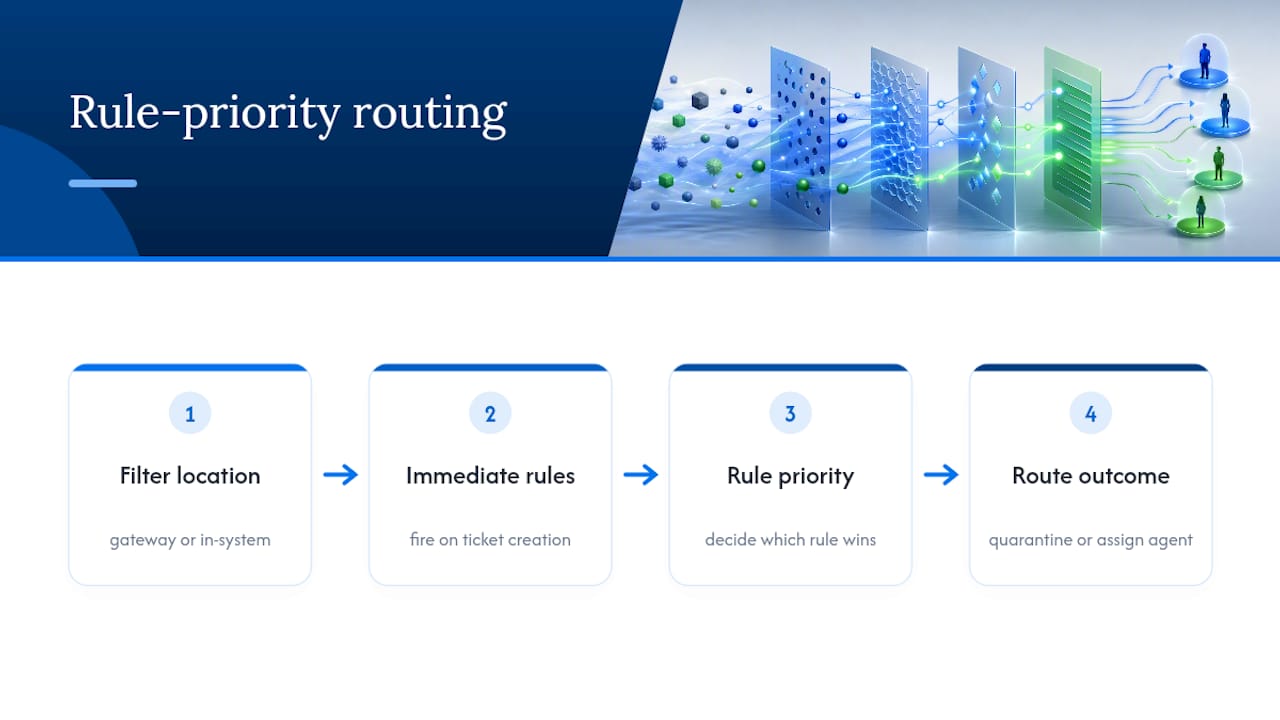
Finally, make sure your quarantine folder is a genuine part of the ticket system, not a separate mailbox nobody checks. If quarantined items live outside the platform your team already uses daily, they get forgotten. Folding it into an existing saved view or dedicated queue keeps it in front of the people responsible for reviewing it.
Handling Bulk or Attack Spam Scenarios
A sudden spike of hundreds of near-identical tickets within minutes is a different problem than routine daily spam, and it needs a different response.
The first move is rate limiting: cap how many tickets a single sender or IP address can generate in a short window. Most gateway and ticket-system filters support this natively, and it stops a flood before it clogs your queue rather than after.
Temporary sensitivity increases help too. If you’re mid-attack, raise your filter thresholds across the board for a few hours rather than trying to write a perfect rule for the exact pattern you’re seeing. You can loosen those thresholds back down once the wave passes, which is exactly the kind of adjustable sensitivity that AI-assisted tools handle well.
Bulk attacks often share a signature, the same subject template, a similar sender domain pattern, or identical body text with minor variations. Once you spot that signature, a single blocklist or keyword rule can catch the entire batch at once instead of handling each ticket individually.
Communicate internally during an active spam wave. Let your team know filters are running hotter than usual, so they don’t panic if legitimate-looking tickets take longer to clear quarantine. And once the attack subsides, review what came through: did the surge reveal a gap in your authentication setup, a missing keyword pattern, or a sender you should now permanently blocklist? Treat every bulk attack as free intelligence for tightening the next layer of defense.
Training Your Team to Spot and Report Spam
Filters catch most junk automatically, but your frontline agents are still the last line of defense for anything that slips through, and they need to know what to do when it does.
Start with a simple internal reporting path: a single button, folder, or tag that lets any agent flag a suspicious ticket in seconds. If reporting spam takes more effort than just deleting it, agents will delete it, and you’ll lose the data you need to improve your filters.
Teach the team to recognize the patterns that automated systems sometimes miss: mismatched reply-to addresses, urgent language pushing immediate action, links that don’t match the sender’s claimed domain, or a “customer” asking oddly generic questions with no order number or account reference. AI-generated cold outreach, the kind tools built for scaling personalized emails can produce, often reads more naturally than old-school spam, so agents need to look at behavior and intent, not just obvious red flags like typos.
Make reporting a two-way loop. When an agent flags something as spam, that flag should feed back into your filter tuning, not disappear into a log nobody reads. And when an agent rescues a real customer message from quarantine, that correction matters just as much: it’s the signal that tells you a rule is too aggressive.
Run a short refresher every few months. Spam tactics shift constantly, and a team trained on last year’s patterns will miss this year’s tricks.
Regulatory Considerations for Spam Filtering
Spam filtering intersects with a few compliance areas support teams shouldn’t overlook, even though most of the technical burden sits with your email provider or filtering vendor.
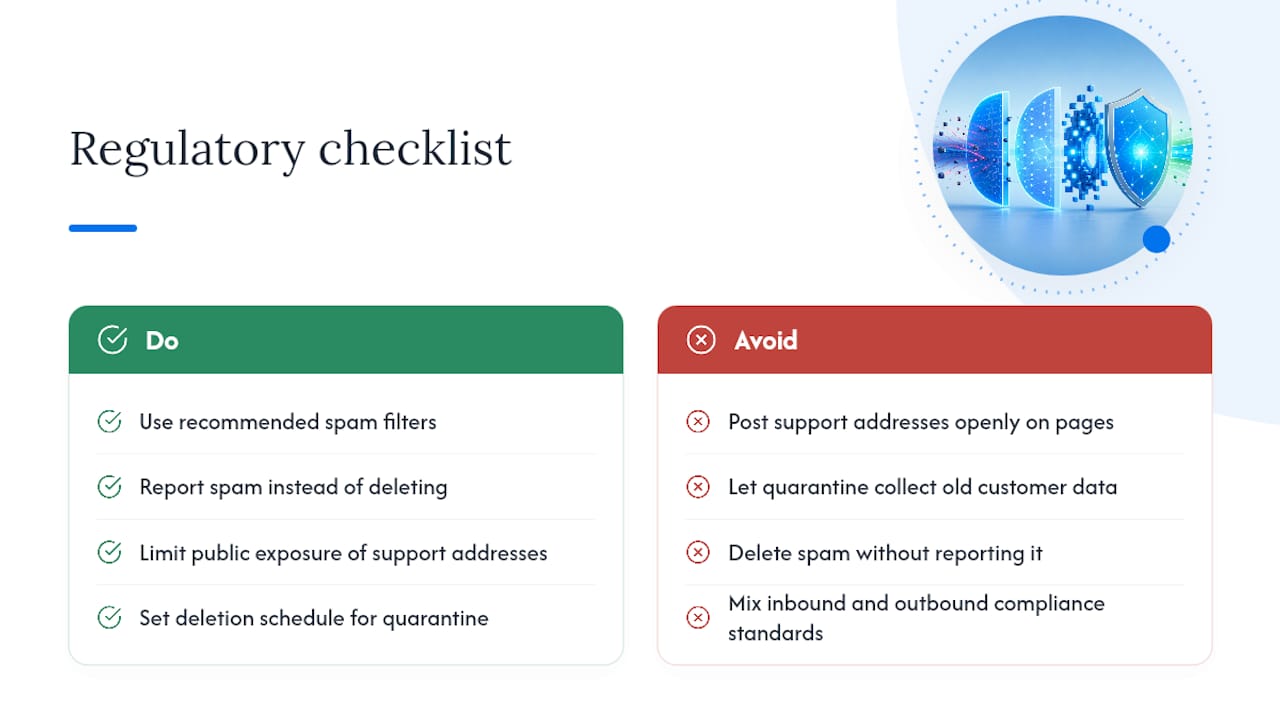
The Federal Trade Commission recommends using filters, reporting spam rather than just deleting it, and being cautious about how publicly you expose support email addresses, since scraped addresses feed directly into spam lists. That last point matters more than it sounds: a support address posted openly on a public page collects spam faster than one shared only through a contact form with CAPTCHA protection.
If your support system stores customer data, retention policies apply to quarantined tickets too. A quarantine folder full of old messages, some containing customer information, isn’t exempt from whatever data-retention rules govern your other records. Set a deletion schedule for quarantine, just as you would for resolved tickets.
Outbound email also carries obligations. If your support system sends any bulk or marketing-adjacent communication, laws requiring clear sender identification and opt-out mechanisms apply, separate from the spam filtering you run on inbound mail. Keep those two systems, inbound filtering and outbound compliance, mentally and operationally distinct so you don’t accidentally apply the wrong standard to the wrong direction of traffic.
None of this requires a legal team parsing statutes for every rule change, but it does mean documenting your data retention and address-exposure practices alongside your filter configuration, so you can answer for them if asked.
Minimizing Disruption to Customer Experience
Every spam filter carries a hidden cost: the legitimate customer who gets caught in it.
Speed matters more than people expect. A customer whose first message vanishes into quarantine for three days doesn’t usually send an angry follow-up, they just leave and tell a competitor’s support team instead. That’s why same-day quarantine review beats a technically lower false-positive rate paired with a slow review cycle.
Set expectations where you can. An autoresponder confirming receipt gives customers proof their message went somewhere, even if a human hasn’t seen it yet, reducing the anxiety that drives duplicate tickets and “did you get my email” follow-ups.
Watch for patterns tied to specific customer segments. If a particular domain, region, or account type keeps tripping your filters, that’s not random, it’s a rule that needs adjusting, not a coincidence to shrug off. Aggressive keyword filters are frequent offenders here, since legitimate complaint language (“refund,” “urgent,” “cancel”) overlaps heavily with spam vocabulary.
Finally, give customers an easy way to signal a message got lost. A visible “didn’t hear back?” link or a status page that shows ticket receipt independent of your inbox gives frustrated customers a path that doesn’t route through the same filtered system that might have swallowed their first attempt.
Treat Spam Control as an Ongoing Part of Support Operations
Spam tactics keep evolving, and any system built once and left alone will degrade. Rspamd’s own approach, layering reputation, authentication, and adaptive models, exists precisely because static rule lists lose ground to attackers over time. The bigger mistake I see teams make isn’t under-filtering. It’s over-blocking out of anxiety, burying real customers in quarantine because a keyword filter got too aggressive and nobody dialed it back. Transparent scoring and a documented owner for every rule change beat a “set it and forget it” mentality every time.
— Nick
Simplify Spam Routing With Sendsync
This platform offers an alternative to wrestling with DNS records and complicated mail-server rules just to get basic spam separation working. Connect your Gmail or Microsoft 365 mailbox in minutes, tag suspected outreach separately from real customer threads, and give your whole team visibility into the quarantine queue without paying per seat for the privilege.

Plans start with an entry-level tier priced reasonably, scaling through additional tiers as your team grows, all with unlimited users included. If quarantine review currently means digging through a mailbox nobody owns, start a free trial at Sendsync and see how a shared inbox handles it instead.
Sources
- Apache SpamAssassin: Welcome
- Rspamd — Email security system
- Email Ferret — Block spam & organize Gmail with AI
FAQ
How Do I Stop Spam Emails Permanently?
No single fix is permanent since spammers constantly adapt, but combining SPF/DKIM/DMARC authentication with active filters and consistent reporting gets you closest, per the FTC’s guidance.
Where Do I Find My Spam Blocker Settings?
Spam controls typically live in your email provider’s settings (Gmail, Microsoft 365) or in your ticket system’s automation rules; a shared inbox platform like Sendsync consolidates these into one dashboard instead of several separate settings menus.
Why Should I Never Delete Spam Emails Outright?
Reporting spam instead of deleting it helps your filter learn and improves detection for everyone relying on the same blocklists and reputation systems; outright deletion throws away that signal.
Why Do I Keep Getting Spam Even After Blocking a Sender?
Blocking one address rarely stops a determined spammer, since they rotate domains and IPs constantly; a layered system with authentication checks and reputation scoring, like what Rspamd offers, catches the pattern even when the sender address changes.