
Slash Reply Time: 10–20 Canned Responses for Support Teams
Slash Reply Time: 10–20 Canned Responses for Support Teams ! Agent selecting a saved support reply Canned responses are prewritten, editable reply templates that support teams use across chat, email, and ticketing to answer common questions faster.

Canned responses are prewritten, editable reply templates that support teams use across chat, email, and ticketing to answer common questions faster. They work as adaptable skeletons, not finished messages. An agent still fills in the specifics every time. Used well, they cut response time and keep answers consistent across a team; used carelessly, they produce the robotic, copy-pasted feel customers notice immediately.
TL;DR:
- Using a small, well-labeled template library of 10 to 20 responses improves both speed and accuracy without sounding robotic.
- Templates should be personalized by including the customer’s name, restating their issue, and providing a specific next step to avoid sounding canned.
- Automating policy-bound responses like order statuses and refunds can increase efficiency, but emotionally charged or ambiguous issues require human intervention.
- Regular review, owner assignment, and retirement of outdated templates are essential to maintaining an effective canned response library.
- Storing templates in a shared inbox enhances usage, reduces duplicate replies, and ensures consistency across support agents.
Table of Contents
- Why Use Canned Responses for Support Teams?
- Categorized Templates: Ready-To-Adapt Canned Responses By Use Case
- How Do You Build a Usable Canned Response Library?
- How Do You Personalize Templates Without Sounding Canned?
- When Should You Automate Canned Replies With AI?
- How Do You Govern a Canned Response Library Over Time?
- How SendSync Fits Into a Canned-Response Workflow
- What I’ve Learned Running Support Inboxes
- A Shared Inbox Built For Canned Responses That Actually Get Used
- Sources
Why Use Canned Responses for Support Teams?
The case for canned responses comes down to two numbers: how fast you reply and how consistent that reply sounds coming from ten different agents. Neither is optional anymore. Customers increasingly expect a response within minutes on chat and same-day on email, and many support guides point to a 10-minute window as the benchmark for what people now consider “immediate.”
Canned responses close that gap because an agent isn’t drafting from a blank screen for the fortieth password reset question of the day. That speed also does something less obvious: it standardizes quality. New hires answer billing questions with the same accuracy as a three-year veteran because the correct information is already written down, reviewed, and ready to personalize.
Pro Tip: Track how long it takes a new agent to handle their first 20 tickets with and without a template library. The difference usually shows up in accuracy, not just speed.
The benefits are real, but so are the failure modes:
- Sounding scripted: pasting a template verbatim, with no acknowledgment of what the customer actually said, is the fastest way to trigger a complaint about “robotic” support.
- Stale or wrong information: a refund policy template that hasn’t been updated since a pricing change will actively mislead customers.
- Overuse on complex issues: forcing a templated reply onto an angry, multi-part complaint usually escalates the situation instead of resolving it.
- Ignoring channel norms: a five-paragraph canned response feels appropriate in email and completely wrong in live chat, where customers expect short, immediate answers.
That last point matters more than most teams realize. Live chat responses should read like a quick, competent human typing fast: short sentences, one idea at a time. Email and ticketing responses can carry more context, full explanations, and a proper closing, because the customer isn’t watching a typing indicator.
Categorized Templates: Ready-To-Adapt Canned Responses By Use Case
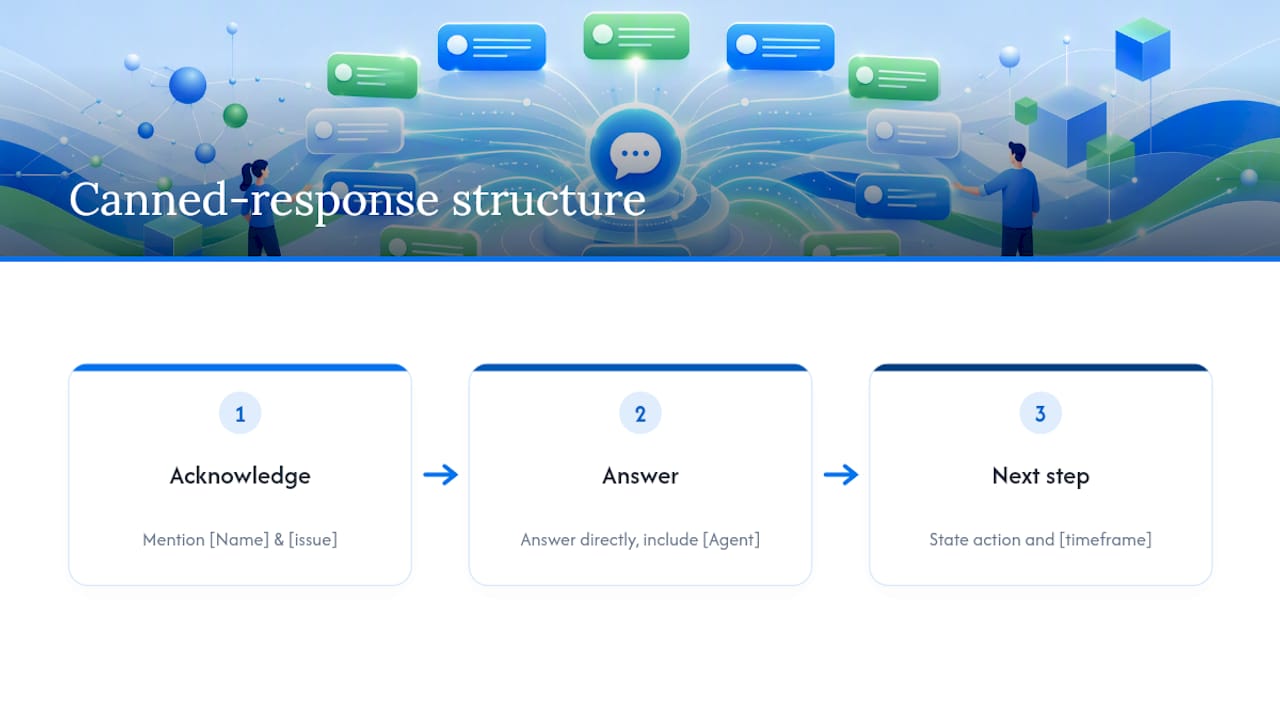
Every template below follows the same underlying shape recommended across customer service response guides: acknowledge what the customer said, answer it directly, and state the next step. Treat these as starting skeletons. The bracketed sections are exactly where personalization needs to happen.
1. Live chat greeting
“Hi [Name], thanks for reaching out! I’m [Agent], and I’ll help you with this today. Can you tell me a bit more about [issue]?”
Keep chat greetings under two sentences. Anything longer and the customer starts typing before you finish.
2. Quick acknowledgment (chat or email)
“Got it, [Name] — I can see you’re dealing with [issue]. Give me just a moment to check on that.”
This buys time without leaving the customer wondering if anyone read their message.
3. Hold or transfer notice
“I need to loop in our [team/specialist] to get this resolved correctly. I’ll stay on this conversation and update you within [timeframe].”
Never transfer silently. A one-line heads-up prevents the “why do I have to repeat myself” complaint.
4. Short troubleshooting step (chat)
“Try [specific action] and let me know what happens. If that doesn’t fix it, we’ll move to the next step.”
One step at a time in chat. Dumping five troubleshooting steps into a single chat bubble guarantees the customer only reads the first one.
5. Full troubleshooting request (email/ticket)
“To pin down what’s happening with [issue], could you send over: 1) the steps that led to this, 2) any error message you saw, and 3) a screenshot if possible? Once I have those, I’ll get you a fix or a clear next step within [timeframe].”
Asking for reproduce steps and logs upfront, in one message, avoids the frustrating back-and-forth where you request one piece of information at a time.
6. Billing or refund confirmation
“Your refund of [amount] has been processed and should appear on your [payment method] within [timeframe]. You’ll also get a confirmation email from our billing system.”
Always name the exact amount and timeframe. Vague refund language (“shortly,” “soon”) generates more follow-up tickets than the original issue.
7. Escalation notice
“I want to make sure this gets the attention it deserves, so I’m escalating it to [team/person]. You won’t need to explain this again. Expect an update by [timeframe].”
8. SLA breach communication
“I know we said you’d hear back by [original timeframe], and we missed that. I’m sorry for the delay. Here’s where things stand: [status]. I’m personally tracking this until it’s resolved.”
Owning the miss directly, without corporate hedging, defuses far more anger than a generic apology.
9. Resolution confirmation
“This should be all set now — [brief summary of fix]. Can you confirm it’s working on your end?”
10. CSAT request
“Glad we could sort that out, [Name]. If you have thirty seconds, this quick survey helps us know how we’re doing: [link].”
11. Ticket closure
“I’m going to close this out since we haven’t heard back, but just reply here anytime if it comes back up — this thread stays open on our end.”
Tone and length should flex by scenario. A billing confirmation can be brief and transactional. An SLA breach message needs more warmth and ownership, even if it’s only two sentences longer. The structure stays organized by channel and use case, but the emotional register shifts with the situation.
How Do You Build a Usable Canned Response Library?
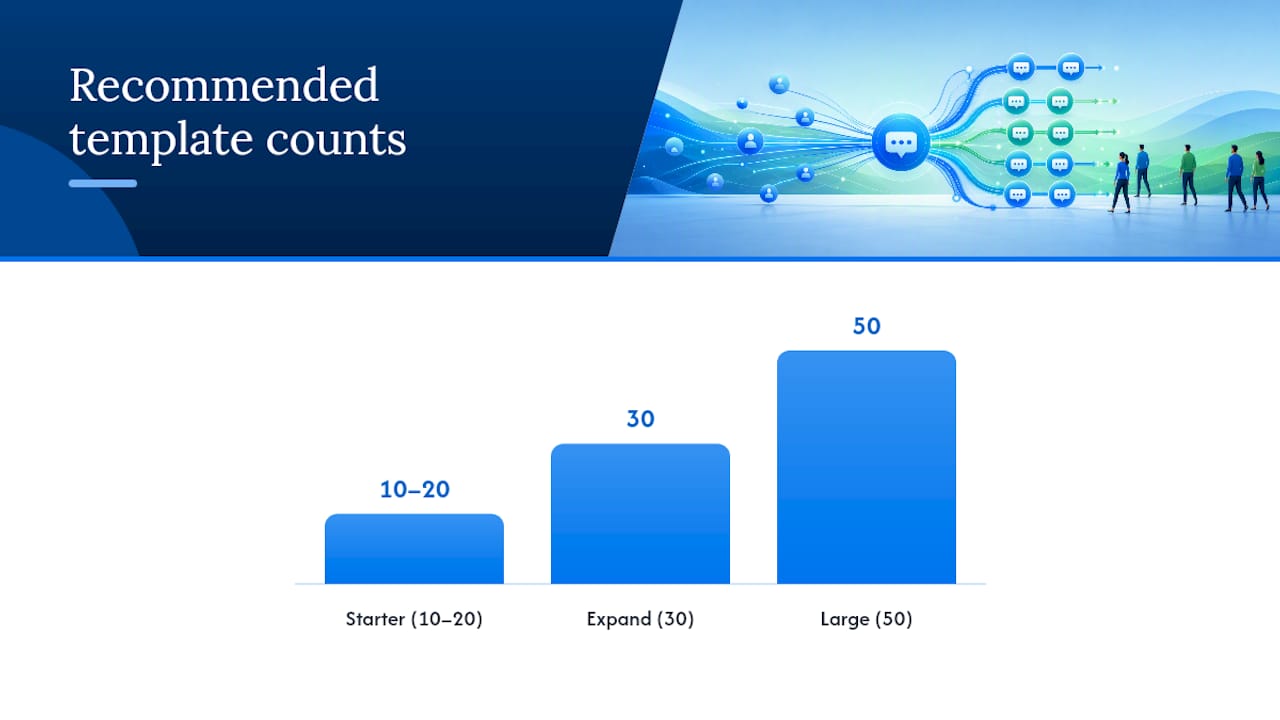
Most teams overbuild their first library, then wonder why agents ignore it. Start with 10 to 20 templates covering your highest-volume, lowest-ambiguity scenarios: greetings, acknowledgments, order status, password resets, refund confirmations, escalation notices, and closure messages. Practitioner guidance consistently backs this range for teams just starting out, expanding to 30 or 50 only once new repeat scenarios actually surface.
Naming and tagging decide whether that library gets used at all. A template called “Response 14” gets ignored. A template tagged billing_refund_confirmed or chat_greeting_standard gets found in three seconds during a live conversation. Build tags around the customer’s problem, not your internal team structure.
Where you store templates matters just as much as how you name them:
- Help desk saved replies: fast to insert during a ticket, but often invisible until someone opens that specific tool.
- Shared inbox snippets: live where agents already work, which tends to drive higher actual usage, though it requires the inbox tool to support tagging and search well.
- Shared documents: easy to edit collaboratively but slow to search under pressure and easy to let go stale.
Pro Tip: Assign one steward per template category (billing, technical, account) rather than one person owning the entire library. A single owner becomes a bottleneck the moment they go on vacation.
Ownership needs a rhythm: someone reviews each category on a set cadence, retires templates tied to discontinued policies, and flags anything customers keep reacting badly to. A well-organized shared inbox makes this upkeep visible instead of buried in a tool nobody opens.
How Do You Personalize Templates Without Sounding Canned?
The single change that fixes most robotic-sounding replies is a one-sentence restatement of what the customer actually said. Guides on response templating call this out specifically: before you deliver the templated answer, prove you read the message.
A reliable pattern covers three slots: the customer’s name, a one-sentence restatement of their specific problem, and a concrete next step with a timeframe attached. Skip any one of the three and the reply starts to feel generic again.
Structure every response the same way regardless of which slots you fill: acknowledge, answer, next step. That order matters. Leading with the answer before acknowledging the problem reads as dismissive, especially with an upset customer.
Here’s the same template shown two ways:
| Version | Text |
|---|---|
| Verbatim template | “Your refund has been processed and should appear within 5 to 7 business days.” |
| Personalized final message | “Hi Maria, I can see the charge for your canceled subscription caught you off guard. Good news: your refund of $49.00 is processed and should land back on your card by Thursday. I’ll check back in if it hasn’t shown up by then.” |
The information is identical. The second version names the person, restates the actual frustration in one line, and gives a specific date instead of a range. Tools that build templates with clearly marked personalization slots make this easier to enforce across an entire team, because the placeholder itself reminds the agent what to fill in before sending.
Tone needs to flex with emotion, too. A routine order-status question can stay brief and efficient. An angry billing complaint needs the acknowledgment sentence to work harder, sometimes taking a full sentence just to validate the frustration before the answer even starts.
When Should You Automate Canned Replies With AI?
Automation belongs on a staged path, not an on/off switch. The safest sequence moves from AI drafting a reply for a human to review, to supervised auto-send with spot checks, to full autonomy only once error rates prove low enough to trust. Rollout guidance for support automation is consistent on this point: confidence gates and simulation against historical tickets catch mistakes before they reach a real customer.
Some ticket types are genuinely safe to automate early:
- Order status lookups tied to a system of record.
- Password resets that follow a fixed, policy-bound flow.
- Refunds that fall clearly within a stated policy window.
Others should stay human for a lot longer:
- Anything emotionally charged, where tone matters more than facts.
- Ambiguous requests that don’t map cleanly to one category.
- Edge cases the model hasn’t seen enough of to handle reliably.
Practical guidance on what to automate first draws this same line: automate the repetitive and policy-bound, keep humans on the emotional and ambiguous. AI performs noticeably better when it draws from a maintained knowledge base and real resolved-ticket history. Without that grounding, it tends to invent plausible-sounding but wrong answers, which is worse than a slow human reply.
Watch three metrics once automation goes live: error rate against a manually reviewed sample, customer complaint volume tied to automated replies, and a defined rollback trigger, a threshold that pulls a template or flow back to human review the moment it misbehaves. Teams handling high ticket volume can find useful patterns for routing and response-time management that apply directly to where automation should sit in the workflow.
How Do You Govern a Canned Response Library Over Time?
A template library without ownership decays fast. Policies change, prices update, and nobody remembers to touch the refund template from eight months ago.
- Set a quarterly review cadence. Someone checks every template against current policy and pricing, with a lightweight change log tracking what got edited and why.
- Assign stewards per category. Billing, technical, account, and onboarding each get an owner who fields agent feedback and updates content.
- Build a retirement process. Templates tied to discontinued features or old policies get archived, not left live to confuse new agents.
- Track KPIs tied to template health, including first reply time, first-contact resolution rate, the CSAT shift after any template change, and a misuse rate, meaning how often agents send a template that clearly didn’t fit.
- Run a quick audit on a rolling basis: search for templates nobody has used in 90 days, and check high-use templates for outdated links or numbers.
A shared inbox with built-in visibility makes step five far easier, since usage patterns show up naturally instead of requiring a separate audit tool.
How SendSync Fits Into a Canned-Response Workflow
Templates only help if agents can find and use them where they already work. Sendsync connects directly to Gmail or Microsoft 365 without DNS configuration, so a shared inbox is running in minutes rather than days.
That matters for canned responses specifically: when snippets and saved replies live inside the same inbox agents use to answer tickets, adoption goes up because there’s no second tool to open. Shared ownership also cuts down on duplicate replies, since everyone sees the same conversation history and the same template set instead of maintaining personal copies. A shared inbox built for team collaboration solves exactly the storage and visibility problems that make template libraries fall apart in scattered tools.
What I’ve Learned Running Support Inboxes
The biggest mistake I’ve seen teams make isn’t writing bad templates. It’s writing too many of them. One team I studied had over 200 saved replies, and agents defaulted to typing from scratch because searching felt slower than just writing the answer.
Cutting that library down to around 25 well-labeled, stewarded templates did more for consistency than any amount of additional content would have. Fewer duplicate replies, faster onboarding for new agents, and a noticeably smaller gap between how a rookie and a veteran answered the same question.
The lesson holds everywhere: a small, maintained library beats a sprawling, ignored one. Ownership of templates is more important than having a large volume.
— Nick
A Shared Inbox Built For Canned Responses That Actually Get Used
Sendsync gives support teams a place to store templates where the replying actually happens, instead of a separate tool nobody remembers to check.

Connect your mailbox quickly without complex setup, and your whole team shares one inbox with visible ticket history, assignment, and snippets built in. That shared visibility is what keeps a small template library working the way it’s supposed to: agents see what’s already been sent, so duplicate replies and conflicting answers drop off almost immediately. Pricing supports unlimited users without per-seat fees, which helps as teams grow and add agents faster than a template library can keep up. If your team is managing canned responses across scattered docs, personal folders, or a help desk nobody opens fast enough, try Sendsync and see how a shared inbox changes the way your templates actually get used.
Sources
For deeper guidance on building and maintaining a template library, the customer service response template guide covers the acknowledge-answer-next-step structure in more detail. On automation, the practical guide to email response automation lays out confidence gating and staged rollout. For channel-specific examples and library sizing, see the canned responses collection and its companion template set organized by channel.
- Customer Service Response Templates: 15 Examples
- Email response automation: a practical guide for support | eesel AI
- 50+ Canned Responses for Customer Service, Email, and Live Chat
- Canned Response Generator — Free Support Reply Templates