
Get Round Robin Assignment Right in Two Weeks for Support Managers
Get Round Robin Assignment Right in Two Weeks for Support Managers ! Hands passing round robin assignment token Round robin assignment automatically rotates new tickets, leads, or tasks to the next person in a set order, so each teammate gets one before the cycle repeats.

Round robin assignment automatically rotates new tickets, leads, or tasks to the next person in a set order, so each teammate gets one before the cycle repeats. It works best when inbound volume is high and reps are genuinely interchangeable. The catch: without availability or capacity rules layered on top, it will happily hand a fresh lead to someone who clocked out an hour ago.
TL;DR:
- Round robin assignment only rotates among available and filtered team members, making availability rules essential to prevent assigns to offline or exhausted reps.
- It assigns tasks once at creation and does not reevaluate workload later, so uneven distributions may persist if capacity or skill mismatches exist.
- Setting up properly involves defining eligible team members, establishing capacity limits, and testing on a small scale before full deployment.
- The main pitfalls include marker resets after edits and unawareness of offline or overloaded agents, which can cause uneven or missed assignments.
- For high-volume, nondifferentiated work, round robin works best, but it falls short when managing strategic accounts or skill-specific tasks.
Table of Contents
- What Is Round Robin Assignment and How Does the Rotation Work?
- What Are the Benefits of Round Robin Assignment for Teams?
- Round Robin vs. Load Balancing: What’s the Difference?
- How Do You Set Up Round Robin Assignment?
- What Are the Common Pitfalls of Round Robin Assignment?
- How Do You Measure Whether Round Robin Assignment Is Working?
- How Sendsync Handles Round Robin Assignment in a Shared Inbox
- When Should You Actually Use Round Robin Assignment?
- Get Round Robin Assignment Running Without the Setup Headache
- Sources
What Is Round Robin Assignment and How Does the Rotation Work?
The mechanics are simpler than most people expect. A system keeps an ordered list of agents and a position marker that points to whoever’s turn is next. When a new ticket, lead, or task arrives, it goes to that person, and the marker advances one slot. Dynamics 365 describes this as assigning the record to whoever has waited longest since their last pickup, which is really the same rotation logic described from a different angle.
Three details separate a system that works reliably from one that causes constant confusion:
- Atomic advances. MyLiveChat documents that the pointer moves in a single, uninterruptible step, which stops two tickets arriving at the same second from landing on the same agent twice.
- Qualifiers shrink the pool before rotation runs. Availability status, skill tags, and group membership all filter the list first; the rotation only spins through whoever passes those filters.
- Assignment fires once, at creation. Round robin doesn’t revisit or rebalance tickets later. If someone goes offline mid-shift, only the next incoming item skips them, not the ones already assigned.
That last point trips people up constantly. Round robin is a routing decision, not an ongoing load-balancing process, and treating it as the latter is where most “why is this so uneven” complaints come from.
What Are the Benefits of Round Robin Assignment for Teams?
The appeal is that it removes a decision nobody wants to keep making manually. Instead of a manager eyeballing who’s free, the system just hands work out in order.
- Fair workload distribution. Every rep gets an equal shot at inbound volume, which cuts down on the “why does she always get the easy ones” grumbling that manual assignment tends to generate.
- Faster speed-to-first-touch. There’s no lag while someone decides who should take a ticket. It’s assigned the moment it lands.
- Predictable behavior at scale. AMW’s glossary on the method notes it holds up well precisely because the rule never changes based on judgment calls, which makes it easy to explain to a new hire in one sentence.
It fits support ticket queues, demo request forms, and SDR inbound lists best, anywhere volume is steady and the people receiving work are roughly equally equipped to handle it.
Pro Tip: If your team has a mix of senior and junior reps handling the same queue, round robin alone will eventually create a quality gap. Pair it with a skill filter or reserve your most complex ticket type for a separate rule.
Round Robin vs. Load Balancing: What’s the Difference?
Round robin and load balancing solve the same basic problem, fair distribution, but they answer a different question. Round robin asks “whose turn is it?” Load balancing asks “who has the most room right now?”
- Round robin rotates strictly by order. It assigns to the next eligible person regardless of how many open items they’re already carrying.
- Load balancing weighs current capacity. Front’s help documentation contrasts the two directly: round robin assigns sequentially to whoever’s online and does not queue anything for later, while load balancing actively considers workload before assigning.
- Availability checks make round robin behave better, but they don’t turn it into load balancing. Skipping offline teammates prevents cold assignments, but it still won’t notice that one rep has 40 open tickets and another has four.
- Weighted or skill-based routing wins when reps aren’t interchangeable. If certain agents handle enterprise accounts, technical escalations, or a specific language, pure rotation will eventually assign the wrong ticket to the wrong person.
If your team’s open ticket counts vary wildly from person to person, that’s usually the sign you’ve outgrown round robin alone.
How Do You Set Up Round Robin Assignment?
Getting this right the first time saves weeks of second-guessing later. Treat it as a pilot, not a permanent decision made on day one.
- Define the rep pool and qualifying filters. Decide who’s actually eligible, by territory, language, or product line, before you touch the rotation order itself.
- Set availability and capacity rules. Gmelius’s setup documentation covers toggles for excluding offline teammates from the rotation entirely, which is the single most useful guardrail you can add.
- Add daily caps and out-of-office behavior. Decide what happens when someone hits a cap or goes on leave, ideally before it happens rather than after a customer complains.
- Test on one lead source first. Turn it on for a single queue or form, not your entire pipeline, and watch it for a few days.
- Monitor the unassigned queue daily during the pilot. Deskpro’s setup guide recommends configuring a fallback trigger that routes to a default owner or team when nobody in the rotation is available.
Before you scale it, write down what should happen in edge cases:
- What happens when everyone in the rotation is offline at once?
- What happens when you add or remove a teammate mid week?
- Who owns tickets that land in the unassigned queue?
Answering these on paper, before a customer forces the answer, is the difference between a smooth rollout and a fire drill.
What Are the Common Pitfalls of Round Robin Assignment?
Most complaints about round robin being “broken” trace back to a handful of repeatable causes, not a flaw in the concept itself.
- Saving rotation settings resets the pointer. MyLiveChat notes that any edit to the rotation list sends the marker back to the top, which on a small team means the same one or two people can get hit repeatedly if you tweak settings often.
- Assigned tickets sit untouched when the assignee is away. Round robin assigns once; it doesn’t notice someone went dark. Check your unassigned and stale-assignment views daily, not weekly.
- Skill filters aren’t guarantees. When no one matches the skill tag, most systems fall back to the full rotation rather than leaving the item unassigned, so don’t assume a skill filter is airtight.
- Small, current lists work better than big, stale ones. MyLiveChat’s operational advice is to pair rotation with a default owner for edge cases and to prune the list the moment someone leaves or goes on extended leave.
Pro Tip: Set a standing weekly ten-minute check: open counts per agent, anyone stuck in “assigned but untouched” for more than a few hours, and confirm nobody left the company still sits in the rotation.
How Do You Measure Whether Round Robin Assignment Is Working?
Three numbers tell you almost everything: speed-to-first-touch, SLA compliance, and distribution variance across agents. If one rep consistently ends up with double the open tickets of another, availability rules or capacity caps probably need adjusting, not the rotation order itself.
- Speed-to-first-touch. How long between ticket creation and the first reply, on average and at the outlier end.
- SLA compliance rate. Percentage of tickets answered or resolved within your target window.
- Distribution variance. The spread between your busiest and quietest agent’s ticket count over the same period.
- Conversion or resolution differences by assignee. If one person consistently converts or resolves more, that’s a coaching signal, not a routing flaw.
Run a two-week baseline before judging anything. Operational guidance on round-robin rollouts points out that ticket-size variance and rotation resets during the first fortnight tend to produce uneven counts that smooth out once the system settles, so judge by pickup speed early on, not raw volume.
How Sendsync Handles Round Robin Assignment in a Shared Inbox
Sendsync connects a Gmail or Microsoft 365 mailbox in minutes, no DNS records, no waiting on IT, so assignment rules can go live the same day you set them up.
- Assignment and internal notes live in one thread, so a teammate picking up a rotated ticket sees the full context immediately.
- Unlimited users with no per-seat fees means adding someone to the rotation pool doesn’t change your bill.
- Monitoring views make it straightforward to spot unassigned or stale tickets before a customer notices the silence.
That combination, fast setup plus visible monitoring, is what keeps a rotation from quietly breaking down after month one.
When Should You Actually Use Round Robin Assignment?
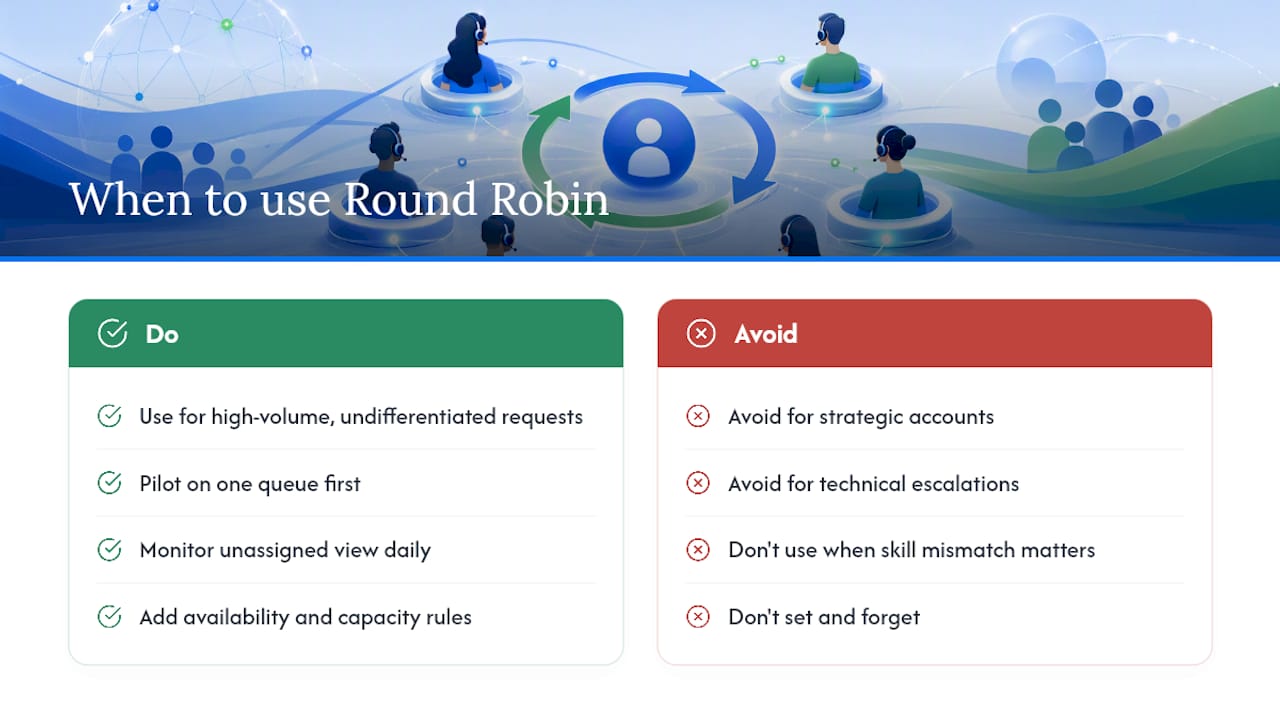
Round robin earns its keep when inbound work is high-volume and undifferentiated, support tickets, demo requests, SDR lead lists, anywhere one qualified rep is about as good as the next for the first touch. It falls apart fast for strategic accounts, technical escalations, or anything where skill mismatch actually costs you the deal or the customer.
My honest recommendation: don’t launch it and walk away. Pilot it on one queue, watch the unassigned view daily for the first two weeks, then layer in availability and capacity rules once you’ve seen where the gaps show up. The teams that get burned by round robin are almost never the ones who chose it wrong, they’re the ones who set it and forgot it.
— Nick
Get Round Robin Assignment Running Without the Setup Headache
Most routing platforms make you configure DNS records, wait on IT approval, or pay per seat before your team can even test a rotation. Sendsync skips all of that: connect your existing Gmail or Microsoft 365 inbox in a few minutes and start assigning tickets the same day.

Every plan includes unlimited users, so growing your rotation pool from three reps to fifteen doesn’t change your invoice. You get assignment, internal notes, tagging, and monitoring views built to catch exactly the stale-ticket and unassigned-queue problems this article just walked through, without a separate tool bolted on top. If your rotation currently lives in a spreadsheet or a shared label system, see how teams handle multiple clients in a single inbox with the same setup. Start a free trial at Sendsync and have your first rotation live before your coffee gets cold.
Sources
For deeper configuration detail, see Dynamics 365’s assignment rules documentation, Deskpro’s round robin setup guide, and tips on assigning emails to teammates effectively.
- Understand lead distributions and assignment rules - Dynamics 365 Sales
- How Round Robin Ticket Assignment Picks an Agent
- How to automatically distribute emails using Round-Robin and Load balancing Assignments - Gmelius