
IT Leaders: Cut Help Desk Costs 20–45% in 6–12 Months With Five Levers
IT Leaders: Cut Help Desk Costs 20–45% in 6–12 Months With Five Levers ! Support agent reviewing a ticket queue The fastest savings come from stacking five levers together: AI deflection, self-serve content, agent assist, shift-left engineering fixes, and tooling consolidation.

The fastest savings come from stacking five levers together: AI deflection, self-serve content, agent assist, shift-left engineering fixes, and tooling consolidation. Run them in sequence rather than picking one, and most teams see cumulative cost reductions of 20 to 45 percent within 6 to 12 months, with payback often landing between 3 and 12 months. Start by calculating your cost per ticket. Everything else follows from that number.
TL;DR:
- Combining AI deflection, self-serve content, agent assist, shift-left engineering, and tooling consolidation can reduce help desk costs by up to 45 percent within a year.
- Most budget increases stem from people costs, with fully loaded agents costing around $50,000 annually, making payroll the primary expense driver.
- Deflection methods can realistically lower volume by 30 to 60 percent, with self-serve quality heavily dependent on search relevance and article organization.
- AI triage and agent assist tools can cut the time spent on each ticket, especially effective for teams with high agent turnover or high-volume repetitive queries.
- A hybrid support model usually offers the best balance, with automation handling Tier 1 issues while escalation and sensitive tickets stay in-house, and predictable pricing models are crucial for cost control.
Table of Contents
- Where Help Desk Costs Actually Come From
- The Five Levers That Actually Move Your Cost Per Ticket
- How Do You Calculate Cost Per Ticket?
- Should You Outsource, Keep Support In-House, or Go Hybrid?
- Why Pricing Models Matter as Much as the Tools Themselves
- A 90-Day to 12-Month Plan for Cutting Help Desk Costs
- Pitfalls Practitioners Run Into When Cutting Support Costs
- A Simpler Starting Point for Email-Heavy Support Teams
- Sources
- FAQ
Where Help Desk Costs Actually Come From
Most budget reviews focus on software line items and miss the real story. People costs dominate almost every help desk budget, usually by a wide margin over tooling.
The Bureau of Labor Statistics’ May 2024 data puts median annual pay for a customer service representative at $40,130. Add benefits, training, management overhead, and workspace costs, a common multiplier is 25 percent, and a single fully loaded agent runs close to $50,000 a year. Multiply that by a team of eight or ten, and payroll alone explains why help desk budgets balloon faster than headcount plans anticipated.
Tooling costs come next, and they creep in quietly. Teams accumulate a ticketing platform, a separate knowledge base tool, a chat widget, a survey add on, and an integration layer, each billed separately and each renewed on a different cycle. License sprawl like this rarely gets audited until a budget crunch forces the question.
The third bucket, inefficiency, is the one leaders underestimate most:
- Reopened tickets that require a second agent to relearn the context
- Escalations that could have been resolved at Tier 1 with better triage
- Manual approval steps that stall resolution and inflate handle time
- Poor asset or account data that forces agents to hunt for basic facts
Every one of these feeds directly into your per ticket cost. A ticket that gets reopened twice does not cost the same as one closed cleanly the first time. It costs three times as much in agent hours, even though it shows up as “one ticket” in most reporting dashboards.
The Five Levers That Actually Move Your Cost Per Ticket
Picking one lever produces a blip. Combining several produces a trend line that keeps bending down. The levers compound because each one removes a different kind of friction, deflection removes volume, agent assist removes time, and shift-left removes the ticket entirely.
Deflection through bots and a genuinely useful knowledge base. Realistic deflection for small and midsize teams runs 30 to 60 percent, depending heavily on how repetitive your ticket mix is. A team fielding mostly password resets and billing questions will land at the high end. A team fielding bespoke technical troubleshooting will land closer to 30 percent, and that is fine. Deflection quality matters more than deflection volume.
Self-service that people can actually find. This is not just “publish more articles.” Search relevance, article structure, and in-product help widgets determine whether deflection tools work at all. A bot pointed at a disorganized knowledge base just fails faster and more visibly than a human would.
AI triage for routing, tagging, and draft replies. This is where Gartner’s forecast on agentic AI becomes relevant. Gartner projects a growing share of common service issues being resolved autonomously in the coming years, which is exactly the workload triage tools are built to intercept. Automated tagging alone often cuts a meaningful chunk of the manual sorting time agents currently absorb.
Agent assist, or copilot tooling. Real-time suggestions during a live ticket reduce average handle time and cut the rate at which junior agents escalate issues they could resolve with the right prompt. This lever pays off fastest for teams with high agent turnover, since new hires ramp up against a safety net instead of guesswork.
Shift-left through product fixes. This is the highest-ROI lever and the hardest to execute, because it requires engineering time, not just support team time. If 15 percent of your ticket volume traces back to one confusing onboarding screen, fixing that screen eliminates the tickets permanently rather than making them cheaper to handle.
- Deflection and self-serve tackle volume
- AI triage and agent assist tackle time per ticket
- Shift-left tackles root cause
Pro Tip: Track CSAT separately for bot-resolved versus human-resolved tickets. If bot-resolved satisfaction trails human-resolved by more than about 8 points, your deflection is quietly damaging the experience even while your cost chart looks great.
How Do You Calculate Cost Per Ticket?
Cost per ticket, or CPT, is the single number that tells you whether a lever is actually working. The formula is straightforward: total support spend, including salaries, overhead, tooling, escalation costs, and reopen cost, divided by resolved tickets for the period.
Using the BLS median of $40,130 with a 25 percent overhead multiplier gives you roughly $50,000 per fully loaded agent per year as a benchmark. Layer in your tooling spend and divide by annual resolved ticket volume, and you get a number you can actually compare month over month. Many US small and midsize businesses report $5 to $15 per resolved ticket once everything is fully loaded, with enterprise environments running higher due to more complex escalation paths.
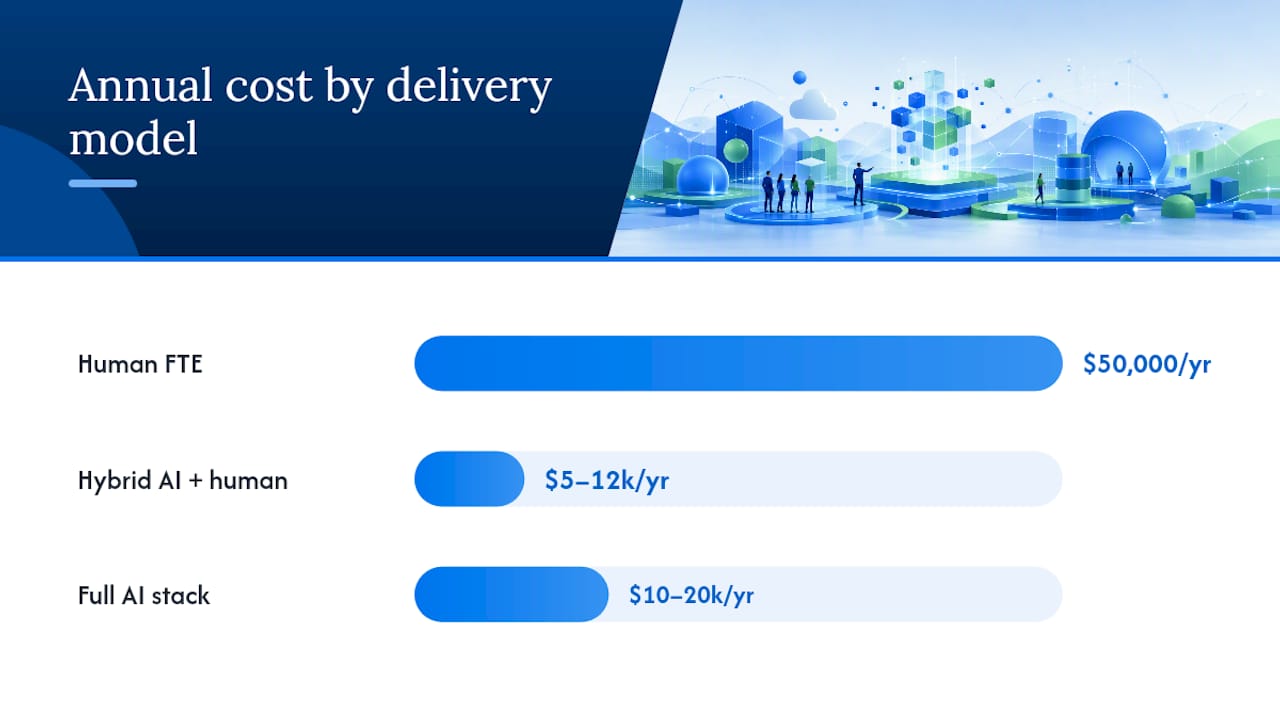
Here is how the three common delivery models compare on annual cost:
| Model | Approximate annual cost | Best fit |
|---|---|---|
| Human FTE (fully loaded) | ~$50,000 per agent | Complex, high-touch, or sensitive tickets |
| Hybrid AI plus human | $5,000 to $12,000 per year | Mixed ticket volume with Tier 1 automation |
| Full AI stack | $10,000 to $20,000 per year | High-volume, repetitive Tier 1 queries |
Run the break-even math on your own numbers. If a hybrid deployment costs $8,000 a year and deflects 40 percent of tickets that would otherwise require a $50,000 agent’s time, the payback window frequently lands in 3 to 5 months. That is a fast return by almost any capital planning standard, which explains why AI-assisted Tier 1 support has become the first stop for most cost reduction initiatives rather than the last.
Should You Outsource, Keep Support In-House, or Go Hybrid?
The right delivery model depends on ticket predictability, not on which option sounds more modern. Outsourcing works best when your ticket types are repetitive, your volume is high enough to justify a vendor relationship, and the labor cost differential is real. Password resets, order status checks, and basic account questions outsource cleanly.
Keeping support in-house makes more sense when tickets involve sensitive customer data, deep product expertise, or judgment calls about when to escalate. A vendor agent who has never touched your codebase cannot troubleshoot a complex integration issue as fast as someone who built the feature.
Most mature organizations land on a hybrid model: AI or outsourced partners handle Tier 1 triage and routine resolution, while escalations, technical edge cases, and anything touching sensitive data stay internal. Before you sign with any outsourcing vendor or redesign your internal team, run through this checklist:
- Confirm the SLA covers both response time and resolution quality, not just speed
- Ask how onboarding works for new agents learning your product
- Test how the vendor’s pricing and staffing behave during a volume surge
- Understand exactly how the vendor bills, since pricing structure affects your total cost more than headline rates suggest
Why Pricing Models Matter as Much as the Tools Themselves
Vendor pricing shape determines whether a cost reduction plan survives contact with real-world traffic. Per-resolution or per-message pricing looks attractive on a sales deck, until your ticket volume spikes during a product outage or a seasonal rush and your bill spikes right along with it.
Predictable flat or unlimited pricing tends to serve teams with variable volume far better, because it removes the risk of a surprise invoice the same month you are already dealing with a support crisis. Per-agent pricing sits in between: predictable at steady headcount, but it punishes growth since every new hire adds a line item regardless of how many tickets they actually touch.
License sprawl is the quieter cost driver here. Teams often run a ticketing tool, a separate live chat widget, a knowledge base platform, and a handful of point solutions that each solve one narrow problem.
- Audit every active license against actual usage logs, not assumed usage
- Consolidate overlapping tools into fewer platforms with broader feature sets
- Negotiate multi-year terms only after confirming the vendor’s pricing model fits your volume pattern, not before
A 90-Day to 12-Month Plan for Cutting Help Desk Costs
Sequencing matters more than speed. Move too fast on automation before you understand your ticket drivers, and you automate a broken process instead of fixing it.
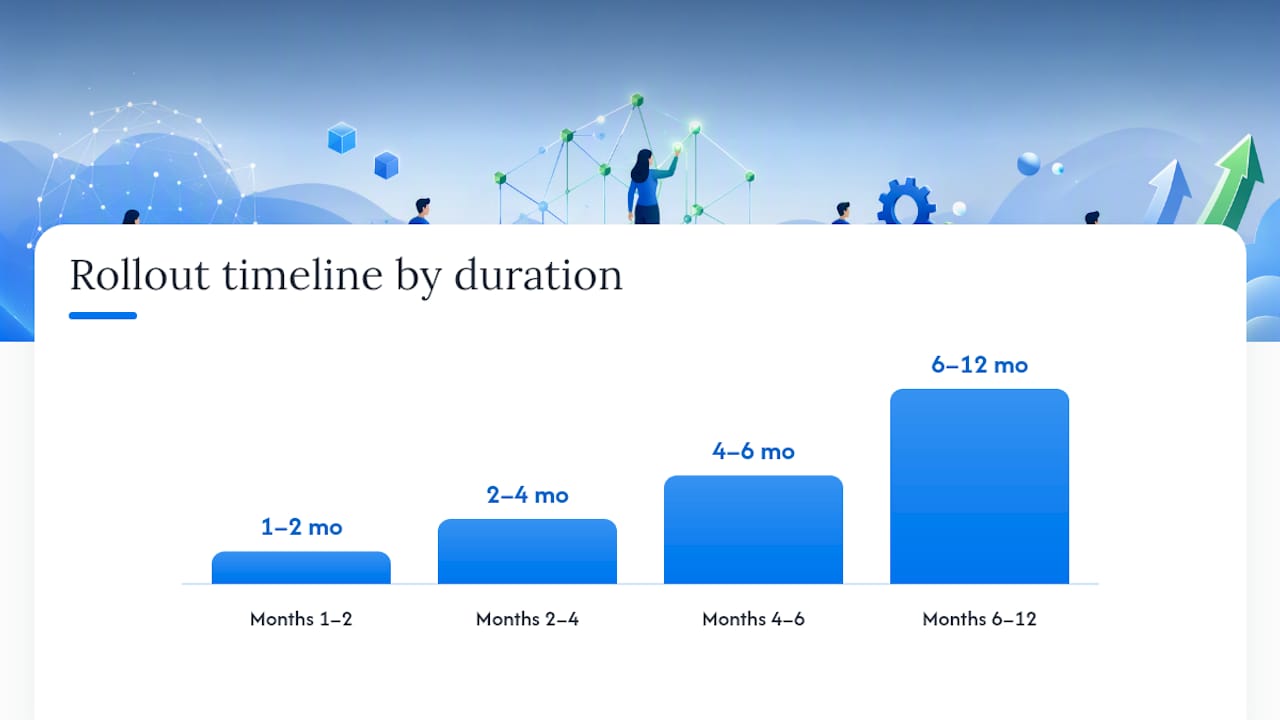
- Months 1 to 2: Establish your baseline CPT, first response time, and resolution time. Refresh your worst-performing knowledge base articles and identify your top 10 ticket drivers by volume.
- Months 2 to 4: Launch AI triage and a targeted bot aimed only at your highest-volume intents. Start tracking knowledge base search analytics to see what people actually search for versus what you assumed they would search for.
- Months 4 to 6: Roll out agent assist tooling, consolidate overlapping licenses identified in your audit, and ship your first product fixes targeting the top ticket drivers.
- Months 6 to 12: Expand deflection to secondary intents, track your CPT decline monthly, and adjust staffing gradually through attrition and retraining rather than layoffs.
Run any new automation as a controlled experiment first. A/B test a new bot flow against a control group, or simulate it against six months of historical tickets before pushing it live to every customer.
Pro Tip: Give every automated workflow a two-week “watch” period where a human reviews a sample of its outputs before you trust it unsupervised. This one habit catches most bad deflection decisions before they hit your CSAT scores.
Pitfalls Practitioners Run Into When Cutting Support Costs
Automating a broken workflow just makes the breakage faster and harder to trace. Fix the process first, then automate it, not the other way around.
Be skeptical of any vendor promising 80 to 90 percent deflection immediately. Real deflection ramps gradually as your knowledge base improves and your bot learns your actual intent patterns, and a vendor claiming instant results at that scale is usually counting deflection attempts, not successful resolutions.
Per-resolution pricing looks cheap until your traffic spikes, and spiky traffic is the norm for most support teams, not the exception. Lock in predictable pricing before volume forces your hand.
Resizing a team to match new automation savings deserves real care. Cutting headcount too aggressively right after a deflection win tends to backfire the next time ticket volume climbs unexpectedly. Lean on attrition and retraining toward higher-value work instead of reactive layoffs, both for morale and for retaining institutional knowledge your bots have not learned yet.
— Nick
A Simpler Starting Point for Email-Heavy Support Teams
If your help desk costs are inflated by coordination overhead rather than ticket volume alone, the fix might be simpler than a full automation stack. A shared inbox product exists for teams juggling Gmail or Microsoft 365 mailboxes where assignment, replies, and internal notes currently happen through forwarded emails and Slack pings instead of a real workflow.

Setup can take minutes, not weeks, with a solution that connects directly to Gmail or Microsoft 365 mailboxes with no DNS configuration required. This approach reduces common early-stage licensing headaches teams experience when consolidating tools during a cost review, as covered in this shared inbox versus helpdesk software comparison. Some pricing models offer flat rates across tiers with unlimited users on every plan, avoiding per-agent billing that can inflate costs as teams grow. Plans may start at a low monthly price per tier and scale up to higher-priced tiers, some without per-seat fees.
For a team still relying on manual email threading, better auto-reply workflows and shared assignment can cut average handle time before you ever touch a bot. If that sounds like your bottleneck, check current plans and start a trial to see where a shared inbox fits into your own cost reduction roadmap.
Sources
- Gartner press release — agentic AI forecast
- How to Reduce Customer Support Costs with AI (2026) | Hyperleap
- How to reduce support costs with AI: a step-by-step guide (2026) | eesel AI
FAQ
What Is a Typical Cost Per Ticket for Help Desk Support?
Fully loaded cost per ticket for US small and midsize businesses commonly falls between $5 and $15, with enterprise environments often running higher due to more complex escalation chains. Your own number depends on salaries, tooling, reopen rates, and escalation frequency, so calculate it directly rather than relying on industry averages alone.
What Is a Good Low-Cost Ticketing Tool for Small Teams?
For teams whose support runs mostly through email, a shared inbox like Sendsync often costs less and takes less setup time than a full ticketing platform, with plans starting at $10 a month and no per-seat fees. Teams with more complex multichannel needs may still need a dedicated helpdesk platform alongside it.
What Is the Going Rate for IT Support per Hour?
Hourly IT support rates vary widely by scope and location, but they map roughly to the fully loaded FTE benchmark of about $50,000 a year once benefits and overhead are included. Outsourced hourly rates depend heavily on the vendor’s location and the complexity of the tickets being handled.
Does Microsoft Have a Help Desk Ticketing System?
Microsoft offers ticketing and service management capabilities through products like Microsoft 365 and its broader service management tools, though many teams pair those with a dedicated shared inbox or helpdesk layer for day-to-day email support. Sendsync connects directly to Microsoft 365 mailboxes without requiring separate DNS setup, which makes it a common add-on for teams that already run Microsoft’s ecosystem.