
Skip weeks of setup: Queue-based routing for support managers
Skip weeks of setup: Queue-based routing for support managers ! Manager reviewing shared inbox queue routing Queue-based routing sends work to a team-level queue instead of a specific person, so requests get distributed to whichever available agent fits the group's rules.

Queue-based routing sends work to a team-level queue instead of a specific person, so requests get distributed to whichever available agent fits the group’s rules. It’s the right foundation for high-volume, uniform request streams like billing or general inquiries, and it makes capacity planning far more predictable than agent-by-agent assignment. Tools exist that mirror the same logic in a lightweight form using shared-inbox tags and assignment rules.
TL;DR:
- Queue routing is ideal for high-volume, uniform request streams and offers more predictable capacity planning compared to agent-by-agent assignment.
- Most routing engines apply a sequence of rules, such as priority, wait time, or idle time, to determine which agent will handle a request, with time-based escalations to prevent delays.
- Starting with simple queue setups and only adding skill attributes as performance gaps emerge ensures manageability and avoids excessive complexity.
- Monitoring metrics like average handle time, wait time, abandonment rate, and agent occupancy helps identify and resolve queue and routing issues early.
- For small teams, shared inbox tools with tagging and assignment rules can emulate queue logic effectively without full system configuration, but larger volumes warrant dedicated ACD setups.
Table of Contents
- What Is Queue Routing and How Does It Work?
- Queue-Based vs. Skills-Based Routing: Which Fits Your Team?
- Setting Up Queue-Based Routing: A Step-by-Step Checklist
- Best Practices for Monitoring and Fixing Queue Problems
- How We Apply Queue Logic to a Shared Inbox
- Get Queue-Like Routing Running Without an Admin Project
- Sources
What Is Queue Routing and How Does It Work?
A queue is a virtual holding area, not a physical line and not tied to any single agent’s skill set. A billing queue, a technical support queue, and a general inquiries queue can exist side by side, each pulling from distinct agent pools. This separation matters because it lets you expand or shrink an agent pool without reorganizing your entire team.
Every conversation belongs to only one queue at a time. When a new request lands, the routing engine works through a sequence: check for a preferred agent, check skill or language requirements, then apply a distribution rule to pick who actually gets the work.
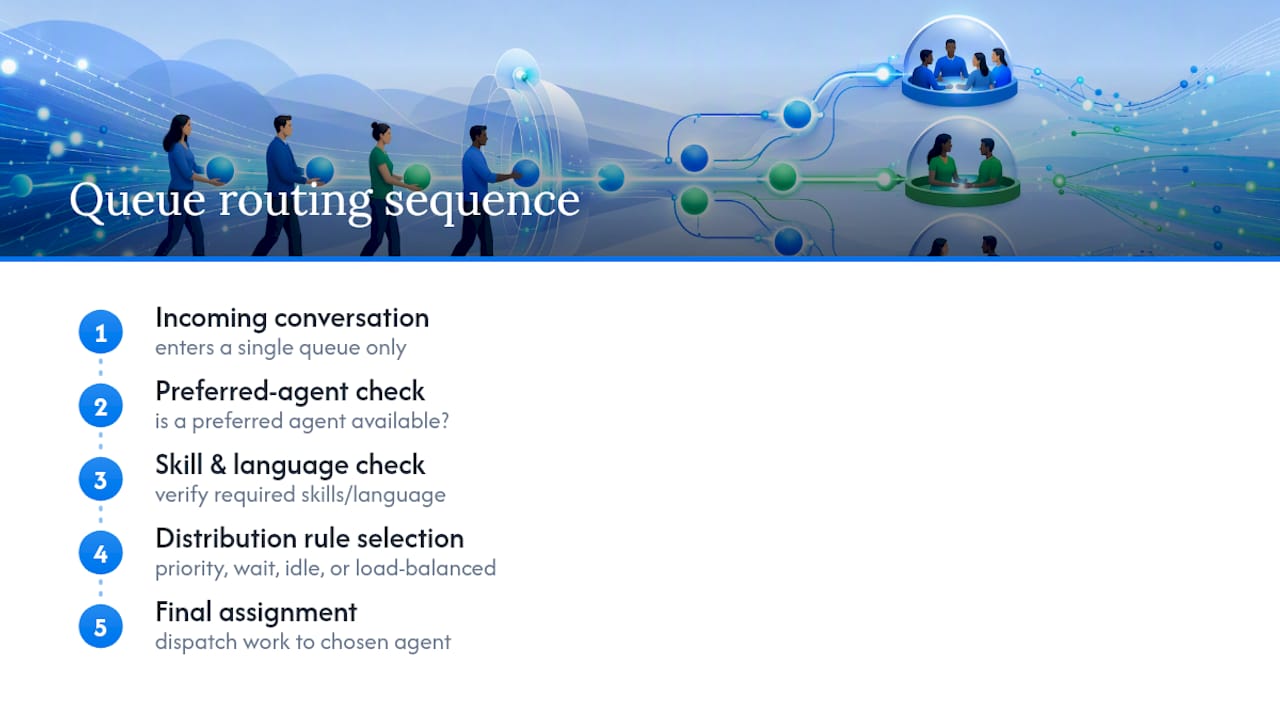
The distribution rule is where most of the tuning happens. Common distribution methods include priority-based routing where higher priority interactions get served first; longest waiting which serves the customer who has waited the longest; longest idle dispatching to the agent idle the longest; and load-balanced routing that distributes work evenly based on last-assignment time, ignoring skill weighting.
Pro Tip: When combining rules, apply priority first then use wait-time or idle-time to break ties, as stacking multiple time-based rules without a clear order harms predictability.
Attributes like priority, skill, and language layer on top of the base queue. A queue can require Spanish fluency and still use longest-waiting distribution underneath it. Five9’s routing documentation notes that strategies can also be time-based, automatically escalating priority when an interaction sits unanswered too long, which keeps a slow queue from silently falling behind.
Queue-Based vs. Skills-Based Routing: Which Fits Your Team?
Queue-based routing assigns work to a group; skills-based routing evaluates individual agent capabilities and matches the request to whoever is best qualified. Kore.ai’s documentation frames it plainly: queues suit high-volume, uniform workloads, while skills-based matching wins when support requests are specialized and complex.
The trade-offs come down to a few operational realities:
- Reporting simplicity: queue-based setups produce clean, easy-to-read volume and SLA reports per team.
- Manageability: adding an agent to a queue takes minutes; building out a full skills matrix takes ongoing maintenance.
- Handle time: skills-based routing often improves average handle time on complex issues because the right expert gets it first.
- Complexity risk: more skill attributes mean more edge cases where nobody matches, and tickets stall.
A practical approach is to start with queues and only add skill attributes after observing real performance gaps, such as specific ticket types taking longer or bouncing among agents. Hybrid patterns work well, like having a queue fall back to a preferred agent and then expand to the general pool if that agent is unavailable, providing skill-level precision without the full overhead of skills-based routing.
Setting Up Queue-Based Routing: A Step-by-Step Checklist
Getting queue-based routing right is mostly about sequencing. Skip a step and you’ll end up debugging live traffic instead of testing it beforehand.
- Map your queue taxonomy first. Name queues after business functions, not internal jargon. “Billing,” “Technical,” and “Onboarding” beat “Tier 2 Escalations Group B” every time.
- Create the queues and build routing profiles. Five9’s setup process involves defining which agents can pull from each queue and what their concurrency limits are.
- Assign agents and set capacity rules. Decide how many simultaneous conversations one agent can handle per queue, especially if the same agent covers more than one.
- Pick a distribution method per queue. Use longest-waiting distribution for general queues and consider load-balanced distribution for queues where balancing workload among agents is important.
- Configure priority tiers and wait-time escalation. Set the threshold where an unanswered ticket automatically jumps priority or triggers an alert.
- Set preferred-agent timeouts. If a preferred-agent check is part of your flow, define exactly how long to wait before falling back to the general pool.
- Build overflow or buffer queues. These absorb spikes so your primary queue doesn’t collapse under a sudden surge.
- Test with simulated traffic before going live. Run staged rollouts that mirror your real volume, then validate the results against expected KPIs.
Pro Tip: Run your test simulation with worst-case volume, not average volume. A queue that performs fine at typical load can fall apart the first time you hit a Monday-morning spike, and you want to find that out before your customers do.
Best Practices for Monitoring and Fixing Queue Problems
The most common mistake is building too many queues too fast. Kore.ai recommends starting with a standard queue-based setup for general inquiries and migrating to skills-based routing only when the data justifies it. A dozen narrow queues built on day one usually means agents sitting idle in some queues while others drown.
Watch these metrics closely:
- Average handle time (AHT): rising AHT in one queue often signals a skill mismatch, not a staffing problem.
- Estimated wait time (EWT) and service level: if EWT climbs past your target, that’s your trigger to open an overflow queue.
- Abandonment rate: a spike here almost always traces back to an understaffed queue or a broken escalation rule.
- Agent occupancy: consistently high occupancy on a few agents while others sit low is a load-balancing failure, not a coincidence.
Longest-wait routing can create what’s sometimes called a productivity penalty, where your fastest agents get slammed because they clear tickets quickly and become “next available” constantly. Mitigate that with concurrency limits or by switching that queue to load-balanced distribution, which intentionally spreads work by last-assignment time rather than pure availability.
Buffer queues combined with conditional expansion, which opens the agent pool when estimated wait time exceeds a threshold, help handle traffic surges without needing a full system redesign.
How We Apply Queue Logic to a Shared Inbox
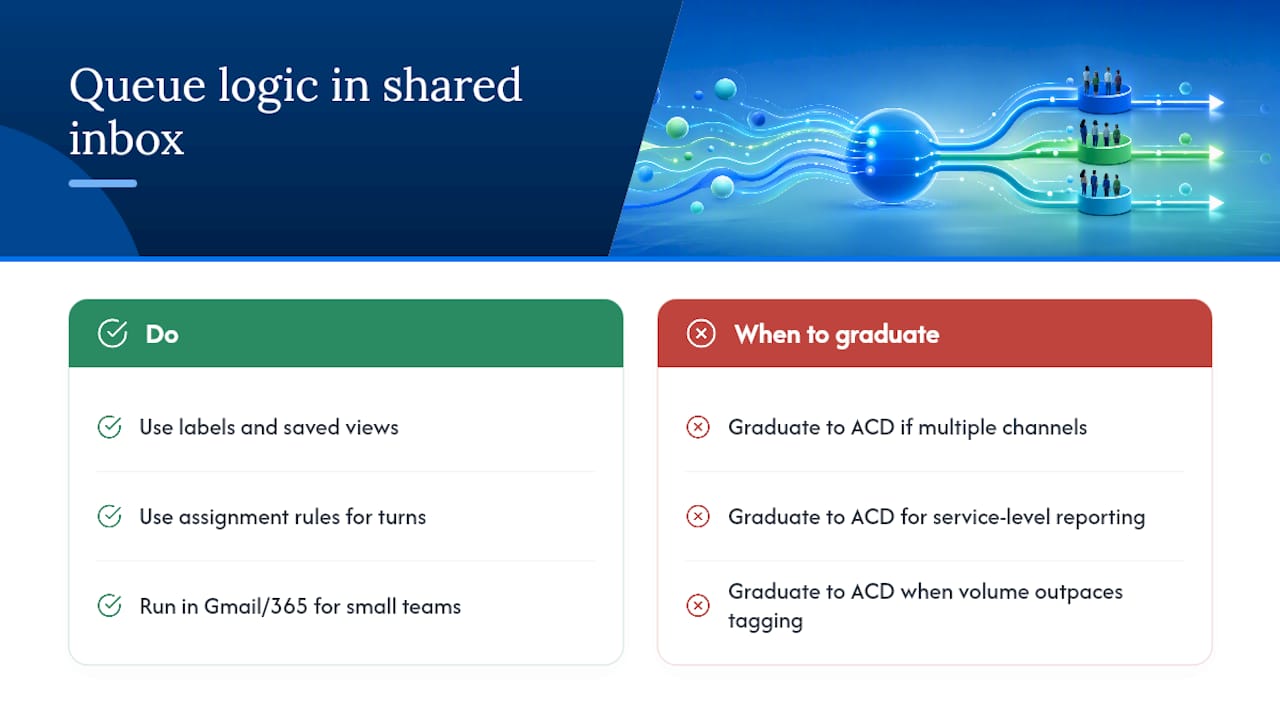
Some shared inbox tools don’t build formal ACD queues, but the same logic applies at a smaller scale. Labels and saved views function like queues: a “Billing” tag pulls conversations into a filtered view that specific agents monitor, and assignment rules move messages to whoever’s turn it is next. For a five-person support team running Gmail or Microsoft 365, that’s often enough structure without the overhead of configuring routing profiles and distribution rules in a full platform.
The honest advice: graduate to a dedicated ACD once you’re running multiple simultaneous channels, need service-level reporting across dozens of agents, or your volume outpaces what tagging and assignment workflows can reasonably track.
— Nick
Get Queue-Like Routing Running Without an Admin Project
Traditional ACD setup means weeks of configuring routing profiles, distribution rules, and DNS records before a single ticket flows correctly. Some shared inbox solutions allow connecting your Gmail or Microsoft 365 mailbox to get assignment workflows, tagging, and saved views quickly, without DNS changes or per-seat pricing.

For a small or mid-size support team, that covers most of what a formal queue setup delivers: clear ownership of conversations, visibility into who’s handling what, and a way to split volume by department without reorganizing your whole team. If you’re weighing whether to build a taxonomy across multiple client accounts or just need faster triage on shared support email, start a free trial on Sendsync and see how much of your routing problem disappears with tagging and assignment rules alone.
Sources
For platform-specific setup details, consult Kore.ai’s routing, queues, and skills documentation and Five9’s routing queue guide for admin-console specifics. Teams integrating message-driven components may also find Celery’s routing task documentation useful as a technical reference for queue bindings and router functions, and Alytics’ guide to scalable SaaS workflows offers broader design patterns worth reviewing before you finalize a queue taxonomy.