
Low-Cost Multi-Agent Inbox for Support Teams in 2026
Low-Cost Multi-Agent Inbox for Support Teams in 2026 ! Support team collaborating around shared inbox What is a low-cost multi-agent inbox, and why does it matter?

What is a low-cost multi-agent inbox, and why does it matter?
A low-cost multi-agent inbox is a shared email environment where multiple support agents collaborate on the same mailbox without each paying a separate seat fee. Instead of forwarding emails between personal accounts or buying individual help desk licenses per agent, the whole team works from one unified inbox. Assignments, replies, and conversation threads stay visible to everyone, so nothing slips through.
The cost difference is real. Traditional help desk platforms charge per seat, which means a 10-person team can easily spend hundreds of dollars monthly before touching a single advanced feature. A shared inbox built for multi-agent use collapses that overhead significantly, especially for small and mid-sized support teams.
Core advantages at a glance:
- No per-seat fees: Flat pricing lets you add agents without budget anxiety.
- Faster response times: Agents see open conversations instantly and claim them before duplicating effort.
- Reduced inbox chaos: Shared labels, assignment rules, and threading replace the “did anyone reply to this?” problem.
- Minimal setup: Most solutions connect to Gmail or Microsoft 365 in minutes, not days.
- Scalability without pricing cliffs: Add team members as volume grows without triggering a new pricing tier.
Table of Contents
- Affordable approaches for Gmail and Microsoft 365 teams
- Key factors to evaluate before you commit
- How to set up a shared inbox without the headaches
- Why Sendsync is the right call for budget-conscious support teams
- What cost savings actually look like in practice
- Shared inboxes vs. help desk software: where each one fits
- Sendsync gives your team a better starting point
- Key Takeaways
Affordable approaches for Gmail and Microsoft 365 teams
Not every team needs the same solution. The right fit depends on volume, technical comfort, and how much you want to spend before you’ve proven the workflow.
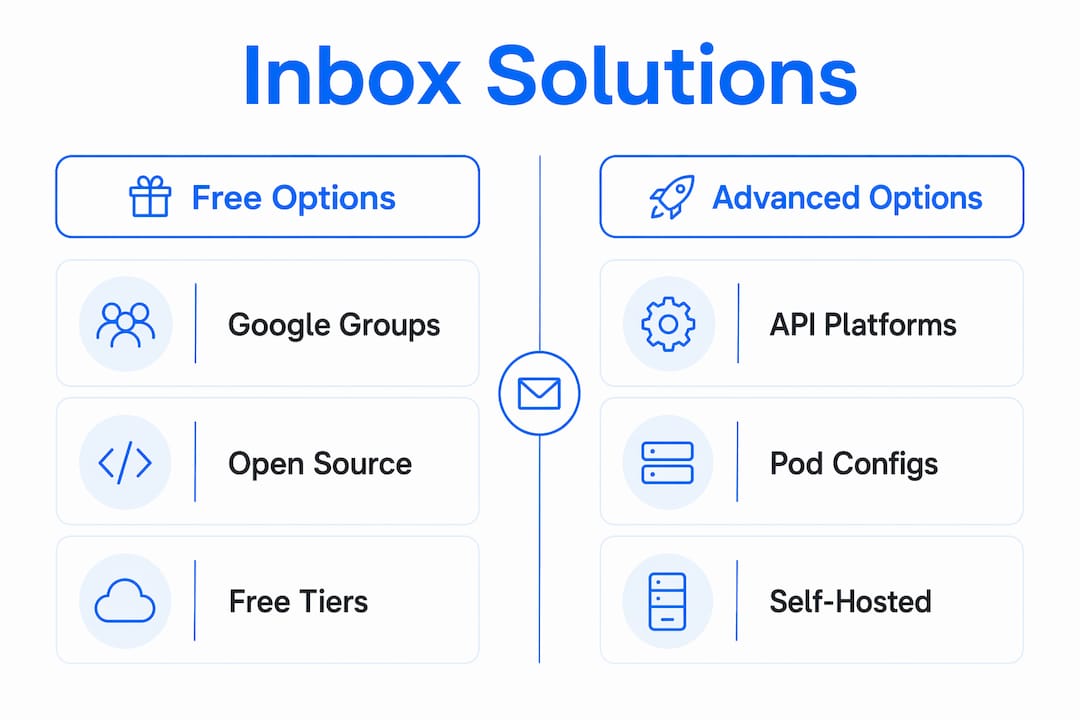
1. Google Groups collaborative inbox
Google Groups is free and works natively inside Gmail. Any team member can be added as a manager, and conversations can be assigned or marked resolved. It’s genuinely zero-cost, though it lacks threading depth and assignment tracking that growing teams need.
2. Free tiers from shared inbox providers
Several shared inbox platforms offer free-forever tiers capped at 2–5 users. These work well for very small teams testing the workflow before committing to a paid plan. The ceiling hits fast, but the onboarding cost is zero.

3. Self-hosted open-source agents
For tech-savvy teams, open-source inbox agents eliminate licensing fees entirely. The trade-off is real: someone on your team needs to manage Postgres databases, Docker containers, and API key rotations. Engineering time is a cost too, even when the software is free.
4. API-driven inbox platforms
Platforms that use REST API authentication instead of OAuth avoid the bot account suspension risk that Gmail and Outlook actively enforce. This approach also reduces OAuth complexity and simplifies migration if you ever switch providers.
5. Multi-tenant pod configurations
Some platforms let you segment customer inboxes into separate pods within one account. This matters for agencies or teams managing multiple client brands without paying for separate accounts per client.
Key factors to evaluate before you commit
Picking the wrong tool costs more than the monthly fee. These are the considerations that actually separate good decisions from regrettable ones.
- Workflow depth: A shared inbox handles email collaboration well. It does not replace help desk software when you need multi-layer routing, SLA tracking, or deep CRM integration. Know which one you actually need.
- Integration fit: Confirm the platform connects cleanly to Gmail or Microsoft 365 without requiring OAuth bot accounts that risk suspension.
- Team size trajectory: Free tiers cap at 2–5 users. If you’re hiring, map out when you’d hit that ceiling and what the next tier costs.
- Security posture: Sandboxed REST API access reduces attack surface compared to granting full mailbox OAuth permissions to an agent or third-party app.
- Hidden cost risks: Platforms with unmonitored API token usage can generate unexpected charges during high-volume periods. Look for built-in per-agent budget enforcement.
- Vendor reliability: Check whether support is responsive and whether pricing is transparent. A cheap tool with slow support costs you in agent hours.
Pro Tip: Pick a tool whose pricing you can predict at 2x your current team size. A solution that’s affordable today but doubles in cost when you add five agents isn’t actually budget-friendly.
For a deeper comparison of shared inboxes versus full help desk platforms, the shared inbox vs helpdesk guide from Sendsync lays out the trade-offs clearly.
How to set up a shared inbox without the headaches
Getting a multi-agent inbox running doesn’t require a week of configuration. Here’s how to do it without creating new problems.
- Start with what’s built in. Google Groups works for Gmail teams right now, at no cost. Use it to validate your workflow before paying for anything.
- Configure roles and permissions first. Decide who can assign conversations, who can close them, and who has admin access. Locking this down early prevents permission sprawl.
- Use shared labels or folders. In Gmail, shared labels let agents filter by status or client. In Microsoft 365, shared folders serve the same purpose. Set these up before the team starts using the inbox.
- Choose API key auth over OAuth where possible. OAuth requires significant boilerplate and creates bot accounts that Gmail and Outlook actively suspend. API key authentication is simpler and more stable.
- Isolate access tokens per agent or role. Don’t share one API key across the whole team. Scoped tokens limit damage if one is compromised.
- Document the workflow before onboarding. A one-page guide on how to claim, reply, and close a conversation cuts onboarding time dramatically.
Pro Tip: Start on a free tier with two or three agents. Once the workflow is proven, migrate to a paid plan. You’ll know exactly which features you actually use and won’t pay for ones you don’t.
For practical implementation guidance, Sendsync’s shared inbox best practices covers the specifics teams miss on first setup.
Why Sendsync is the right call for budget-conscious support teams
Sendsync is built specifically for what this article describes: a low-cost multi-agent inbox that connects to Gmail or Microsoft 365 without OAuth complexity, bot accounts, or per-seat pricing.
The numbers make the case plainly. Sendsync offers 100 inboxes for a flat low monthly fee with no per-seat fees, full webhooks, dashboards, threading, and integrations included. Competing platforms charge significantly more for equivalent mailbox counts. That’s not a marginal difference.
Key advantages:
- Flat pricing, unlimited agents: Add team members without recalculating your budget.
- API key authentication: No OAuth boilerplate, no bot account suspension risk from Gmail or Outlook.
- Multi-tenant pod support: Segment client inboxes within one account without paying for separate plans.
- Full features on every plan: Webhooks, custom domains, threading, and templates aren’t locked behind premium tiers.
- Fast setup: Connect your mailbox in minutes, not days.
Teams managing multiple client inboxes in one place will find Sendsync’s pod structure particularly useful.
What cost savings actually look like in practice
A 10-person support team switching from a per-seat help desk to a flat-rate shared inbox can eliminate per-agent licensing costs entirely. At typical per-seat rates, monthly per-agent licensing fees can accumulate significantly, representing a substantial cost recovered by switching to a flat-rate shared inbox, before accounting for setup time saved.
Teams that previously relied on OAuth-based integrations also avoid the hidden cost of suspended bot accounts. Rebuilding access after a suspension, reconfiguring permissions, and managing the downtime adds engineering hours that don’t show up on the software invoice but absolutely show up in payroll.
For agencies managing multiple client brands, multi-tenant pod configurations eliminate the need for separate accounts per client. One flat-rate plan covers the entire client roster, which changes the unit economics of support operations meaningfully. Small teams that need guidance on structuring roles and collaboration workflows can also reference resources like HR software guides for small teams when thinking through how to organize agent responsibilities.
Shared inboxes vs. help desk software: where each one fits
Shared inboxes and help desk platforms solve different problems. Conflating them leads to either overpaying for features you don’t use or under-equipping your team for the volume you’re handling.
A shared inbox excels at email collaboration for teams that need to assign, reply, and track conversations without bureaucratic overhead. Setup is fast, cost is low, and the learning curve is minimal. The limitation is real: shared inboxes lack multi-layer routing, SLA management, and the deep CRM integration that enterprise support operations require.
Help desk software is the right call when your team handles thousands of tickets weekly, needs automated escalation paths, or must report SLA compliance to clients. The cost and configuration complexity are justified at that scale. Below it, they’re friction without payoff.
The honest answer for most small and mid-sized support teams: start with a shared inbox, measure what breaks, and upgrade only when a specific gap forces the decision.
Sendsync gives your team a better starting point
Most support teams overpay for inbox tools they barely use. Sendsync cuts that out. For $29/month, your team gets 100 inboxes, no per-seat fees, API key authentication that sidesteps Gmail and Outlook suspension risk, and every feature included from day one.

There’s no lengthy configuration, no DNS headache, and no per-agent pricing that punishes you for growing. Connect your Gmail or Microsoft 365 mailbox, set up your team, and start handling conversations the same day. If you’re managing multiple clients, the multi-tenant pod structure keeps everything segmented without requiring separate accounts.
Start with Sendsync and see how quickly a support inbox can actually work.
Key Takeaways
A flat-rate, API-authenticated shared inbox is the most cost-effective multi-agent email solution for support teams using Gmail or Microsoft 365.
| Point | Details |
|---|---|
| Flat pricing beats per-seat | Shared inboxes with no per-seat fees scale affordably as teams grow. |
| API auth over OAuth | REST API key authentication avoids bot account suspensions from Gmail and Outlook. |
| Free tiers have real limits | Most free shared inbox tiers cap at 2–5 users before requiring a paid upgrade. |
| Shared inbox vs. help desk | Shared inboxes fit collaborative email management; help desks suit complex SLA and routing needs. |
| Sendsync’s value | Sendsync offers 100 inboxes at $29/month with no per-seat fees, full features, and fast setup. |