
Help Scout Alternatives: Best Choices for SMB Support Teams
Help Scout Alternatives: Best Choices for SMB Support Teams ! Hands connecting network cable to switch For most small-to-medium support teams, the best Help Scout alternatives in 2026 come down to three categories: a low-friction shared inbox (Sendsync), a full-featured ticketing

For most small-to-medium support teams, the best Help Scout alternatives in 2026 come down to three categories: a low-friction shared inbox (Sendsync), a full-featured ticketing upgrade (Zendesk or Freshdesk), or a CRM-native or commerce-first platform (Intercom, Front, or Gorgias). If your team runs on Gmail or Microsoft 365 and wants to be live in minutes without touching DNS records, Sendsync is the recommended starting point. If your pain is AI billing surprises or reporting depth, G2 reviews of Help Scout show those are the two most common triggers that push teams to evaluate alternatives.
Quick shortlist by use case:
- Low-friction shared inbox (no migration): Sendsync — Gmail/Microsoft 365 native, unlimited users, no DNS setup
- Enterprise ticketing with deep reporting: Zendesk — large app marketplace, SLA management, scales to hundreds of agents
- Bundled AI at SMB prices: Freshdesk — AI included in mid-tier plans, solid knowledge base
- CRM-native collaboration: Front or Intercom — best when sales and support share the same inbox
- Commerce-first (Shopify/DTC): Gorgias — order context inside every ticket
- Autonomous support at scale: Kayako — structured self-service workflows
One representative Help Scout user review on G2 captures the pattern well: teams hit a wall when AI features arrive as an add-on cost rather than a bundled tier, and reporting feels thin as teams grow larger. That is the moment most managers open a browser tab and start comparing.
Table of Contents
- What do the top helpscout.com alternatives look like side by side?
- Per-alternative breakdowns: when to pick each, where it falls short
- How do you choose the right Help Scout replacement for your team?
- Why lightweight shared inboxes and AI overlays are gaining ground
- Key Takeaways
- The case for keeping it simple
- Sendsync is the fastest path from Help Scout to a working inbox
- Sources and further reading
What do the top helpscout.com alternatives look like side by side?
The table below maps each platform against the dimensions that matter most to SMB support managers: pricing model, channels, core features, integrations, setup complexity, and AI capabilities.
| Platform | Best for | Pricing model | Channels | Core features | Gmail / M365 | Setup complexity | AI / automation |
|---|---|---|---|---|---|---|---|
| Sendsync | Low-friction shared inbox, Gmail/M365 teams | Unlimited users, flat subscription | Shared inbox, assignment, automation, tagging, metrics | Native, no DNS | Minutes | Automation rules, saved views | |
| Zendesk | Enterprise scale, deep reporting | Per-seat, tiered | Email, chat, social, voice | Ticketing, SLA, knowledge base, marketplace | Via integration | Days to weeks | AI agents, intent detection |
| Freshdesk | SMB upgrade with bundled AI | Per-seat (free tier available) | Email, chat, social, phone | Ticketing, knowledge base, automation, AI bundled | Via integration | Hours to days | Freddy AI, auto-triage |
| Intercom | CRM-native, sales + support overlap | Per-seat + AI resolution billing | Email, chat, in-app | Shared inbox, CRM, chatbot, product tours | Via integration | Hours | Fin AI agent, per-resolution pricing |
| Front | Cross-team ops, omnichannel | Per-seat, tiered | Email, SMS, social, chat | Shared inbox, CRM lite, analytics | Native Gmail/M365 | Hours | AI drafts, routing |
| Hiver | Gmail-first teams, no migration | Per-seat, tiered | Email, chat | Gmail-native shared inbox, SLAs, analytics | Gmail native | Minutes | AI summaries, auto-assign |
| Kayako | Autonomous support, structured self-service | Per-seat | Email, chat, social | Ticketing, knowledge base, customer journey | Via integration | Days | Rule-based automation |
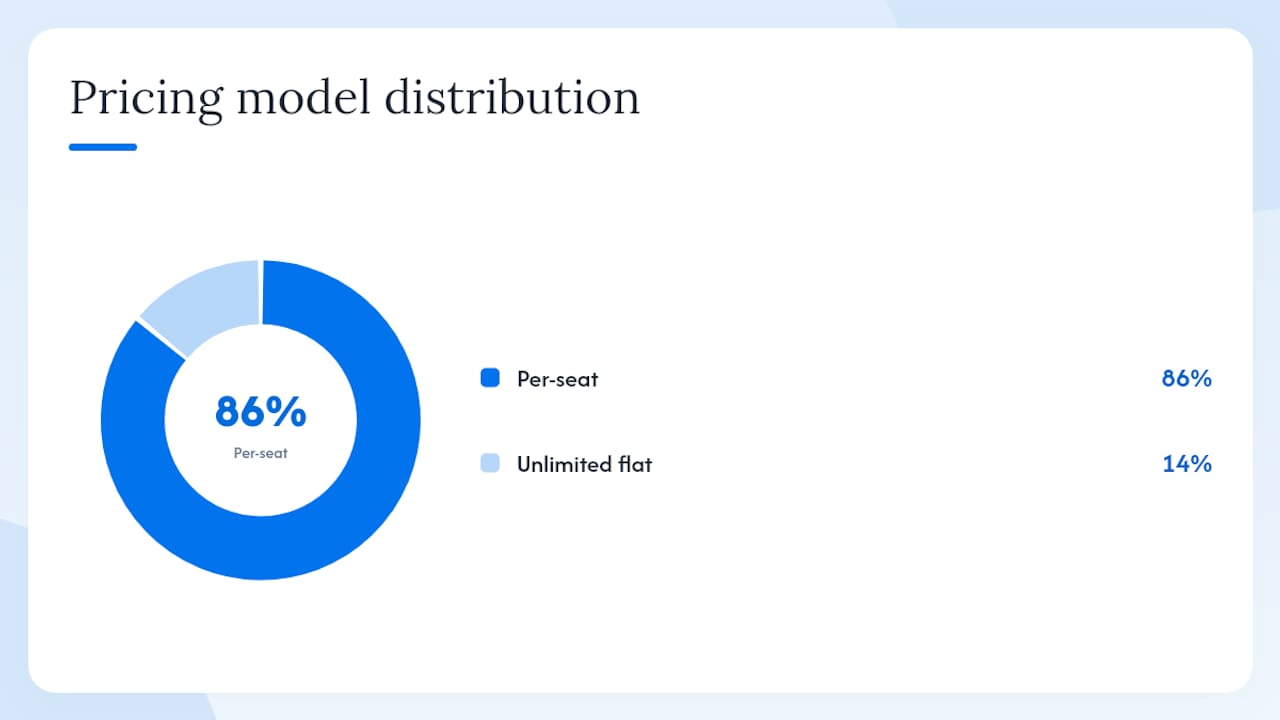
Pricing model note: Sendsync’s unlimited-user flat pricing is a structural advantage for growing teams. Per-seat models (Zendesk, Freshdesk, Intercom, Front, Hiver, Kayako) compound quickly once headcount rises. Intercom’s per-resolution AI billing adds a second variable cost that can surprise teams mid-month. Freshdesk offers a free tier for small teams, which G2’s Freshdesk vs Help Scout comparison notes as a meaningful differentiator for budget-conscious SMBs.
Free trials are available across all seven platforms. G2 and Capterra aggregates are the fastest way to validate community satisfaction before committing to a trial. The Saashub alternatives list cross-references community filters (open-source, EU-based, API-first) if your team has niche requirements beyond the core shortlist.
Statistic callout: G2 reviews for Help Scout consistently surface two pain points above all others: AI feature costs arriving as surprise add-ons, and reporting that feels thin as teams grow larger.
Per-alternative breakdowns: when to pick each, where it falls short
Sendsync
When to pick it: Your team already lives in Gmail or Microsoft 365 and wants a shared inbox running today, not next week. Sendsync connects directly to existing mailboxes without DNS changes, supports unlimited users on a flat subscription, and gives agents assignment workflows, internal notes, tagging, automation rules, and a metrics dashboard out of the box. The shared inbox vs helpdesk software guide on Sendsync’s blog explains the trade-offs clearly for teams deciding whether a full ticketing migration is even necessary.
Where it falls short: Sendsync is purpose-built for email. Teams that need native live chat, voice, or social channel management alongside email will need to evaluate whether email is genuinely their primary channel before committing.
Pricing snapshot: Flat subscription, unlimited users, 14-day free trial. No per-seat escalation.
Migration and onboarding: Connect your Gmail or Microsoft 365 mailbox, invite the team, and start triaging. No DNS records to update, no MX changes, no waiting period.
Zendesk
When to pick it: Your team is growing past 20 agents, you need SLA management, and you want access to a large app marketplace. Zendesk’s G2 reviews highlight enterprise reporting depth and the breadth of its integration catalog as the two features that justify the cost for larger teams. The G2 comparison of Help Scout vs Zendesk shows Zendesk pulling ahead on workflow customization and analytics once ticket volume climbs.
Where it falls short: Setup takes days to weeks for a proper configuration. Per-seat pricing escalates fast. For a team of five, the cost-to-value ratio rarely beats simpler alternatives.
Pricing snapshot: Per-seat, tiered plans. AI agents available at higher tiers.
Migration and onboarding: Expect a structured implementation: mailbox routing via email forwarding or MX records, trigger and automation configuration, and agent training. Budget at least a week for a clean cutover.
Freshdesk
When to pick it: You want a full ticketing platform with AI bundled into mid-tier plans rather than bolted on as a separate line item. Freshdesk’s G2 reviews consistently call out Freddy AI (auto-triage, suggested replies, summarization) as a genuine differentiator at the price point. The free tier for up to 10 agents makes it a low-risk starting point for small teams.
Where it falls short: The interface carries more complexity than Help Scout or Sendsync. Teams migrating from a simple shared inbox sometimes find the configuration overhead surprising. Reporting is strong but takes time to set up correctly.
Pricing snapshot: Free tier (up to 10 agents), paid tiers per seat with AI bundled at Growth and above.
Migration and onboarding: Email forwarding or MX-based routing. Freshdesk’s onboarding wizard is well-documented, and most teams are operational within a day or two. Check the Freshdesk alternatives guide on Sendsync’s blog for a broader view of where Freshdesk fits in the market.
Intercom
When to pick it: Sales and support overlap in your team, and you need a CRM-native inbox with in-app messaging, product tours, and a chatbot that handles tier-1 queries automatically. Intercom’s Fin AI agent is one of the more capable conversational AI tools in the category.
Where it falls short: Pricing is the most common complaint. Per-seat fees plus per-resolution AI billing create two unpredictable cost variables. A team that scales its AI usage mid-quarter can see bills jump significantly. This is one of the clearest switching triggers documented in Help Scout’s G2 review corpus.
Pricing snapshot: Per-seat base plus per-resolution fees for Fin AI. No free tier; trial available.
Migration and onboarding: Intercom’s setup involves JavaScript snippet installation for in-app messaging and email routing configuration. Teams focused purely on email support often find the full setup more than they need.
Front
When to pick it: Your team handles email, SMS, and social channels and needs a shared inbox that feels like a collaborative email client rather than a ticketing system. Front’s Gmail and Microsoft 365 native integration is a genuine strength, and its analytics go deeper than most shared inbox tools.
Where it falls short: Per-seat pricing at Front’s mid and upper tiers is not cheap. Teams that only need email and want minimal overhead will pay for channel breadth they may not use.
Pricing snapshot: Per-seat, tiered. AI drafts and routing available at higher tiers.
Migration and onboarding: Front connects to Gmail and Microsoft 365 natively, which keeps setup relatively fast. Most teams are operational within a few hours.
Hiver
When to pick it: Your entire team is on Gmail and you want a shared inbox that lives inside the Gmail interface rather than a separate tool. Hiver adds shared labels, assignment, SLAs, and AI summaries directly inside Gmail, so there is no context-switching for agents.
Where it falls short: Hiver is Gmail-only. Microsoft 365 teams are out. And because it layers on top of Gmail, any Gmail outage or change affects Hiver directly.
Pricing snapshot: Per-seat, tiered. AI features available at higher tiers.
Migration and onboarding: Install the Chrome extension, connect the Google Workspace account, and configure shared labels. One of the fastest setups in the category.
Kayako
When to pick it: Your team needs structured self-service workflows and a customer journey view that connects conversations across channels over time. Kayako’s G2 reviews position it well for teams that want autonomous support pathways rather than a simple inbox. The Kayako alternatives guide on Sendsync’s blog is worth reading if you are evaluating Kayako against lighter-weight options.
Where it falls short: Kayako’s interface feels dated compared to newer entrants. Setup complexity is closer to Zendesk than to Hiver or Sendsync. Teams that want a quick win will find the onboarding curve steeper than expected.
Pricing snapshot: Per-seat. Trial available.
Migration and onboarding: Email routing via MX or forwarding, knowledge base configuration, and workflow setup. Budget several days for a complete implementation.
Commerce-first note: For Shopify and DTC teams, Gorgias deserves a look. Gorgias reviews on G2 consistently highlight order context inside tickets and one-click refund/cancel actions as the features that make it worth the switch for e-commerce support teams. It is not a general-purpose tool, but for commerce-first workflows it is hard to beat. HappyFox is another option that Capterra reviewers recommend for teams that need structured ticket queues with strong SLA enforcement.
| Platform | Free tier / trial | Starting price (paid) | AI included at base? |
|---|---|---|---|
| Sendsync | 14-day free trial | Flat, unlimited users | Automation rules |
| Zendesk | Trial | Per-seat | Higher tiers only |
| Freshdesk | Free (up to 10 agents) | Per-seat | Growth tier and above |
| Intercom | Trial | Per-seat + per-resolution | Fin AI at extra cost |
| Front | Trial | Per-seat | Higher tiers only |
| Hiver | Trial | Per-seat | Higher tiers only |
| Kayako | Trial | Per-seat | Rule-based only |
How do you choose the right Help Scout replacement for your team?
The decision is cleaner when you start with your switching trigger rather than a feature checklist. Three triggers cover most SMB cases: AI cost surprises, collaboration bottlenecks (agents stepping on each other in a shared inbox), and interface fatigue after a team grows past the tool’s natural ceiling.
Selection checklist for vendor trials:
- Define your switching trigger first. AI billing, collaboration, reporting, or channel coverage? The answer eliminates half the shortlist immediately.
- Check mailbox integration. Does the platform connect to your Gmail or Microsoft 365 account natively, or does it require MX record changes? DNS changes add days to setup and create a migration risk window.
- Map your user count to the pricing model. Per-seat pricing at 15 agents looks very different from per-seat at 40. Flat unlimited-user pricing (Sendsync) removes that variable entirely.
- Audit AI billing structure. Is AI bundled, per-seat, or per-resolution? Per-resolution billing (Intercom’s model) can spike unpredictably. Ask vendors for a cost estimate at your current ticket volume before signing.
- Test collaboration features. Assign a sample ticket to a colleague, leave an internal note, and check whether the workflow feels natural. This takes five minutes and reveals more than any demo.
- Check reporting depth. Pull a first-reply-time report and a ticket-volume-by-agent report. If either takes more than two clicks, the reporting is probably not deep enough for a growing team.
- Verify security and compliance. Ask whether the platform is SOC 2 Type II certified. For teams handling sensitive customer data, this is a baseline, not a bonus.
Questions to ask during vendor demos:
- How is AI usage billed, and what happens when we exceed the included volume?
- Can we export all conversation data at any time, in a standard format?
- Who owns the mailbox connection — can we disconnect without losing history?
- What are the automation limits at our plan tier?
- What is your SLA for support response, and is it in the contract?
Red flags that should disqualify a vendor quickly:
- AI billing explained only as “usage-based” with no per-unit pricing available upfront
- Mandatory DNS or MX changes with no email-forwarding alternative
- No native Gmail or Microsoft 365 connection at your plan tier
- Per-seat pricing that jumps at a threshold you will hit within 12 months
- No data export option or a 30-day delay on data access after cancellation
Proof-of-concept protocol (two weeks):
- Identify your switching trigger and write it down as a one-sentence success criterion.
- Connect one live mailbox and route 20 real tickets through the trial environment.
- Measure time-to-first-reply on day 1 vs day 14.
- Note any AI cost accrued during the trial and project it to monthly volume.
- Decide: migrate fully, run the new tool in parallel, or layer an AI overlay on your existing setup.
The support workflow guide for small teams on Sendsync’s blog walks through this protocol in more detail, including how to set up sample ticket sets for a meaningful test.
Why lightweight shared inboxes and AI overlays are gaining ground
The market is moving away from heavy all-in-one platforms toward tools that minimize migration friction and get teams productive faster. The pattern shows up clearly in aggregated Help Scout reviews on G2 and is corroborated by the Eesel roundup of Help Scout alternatives, which makes a strong case for AI-overlay approaches as a way to avoid migration risk entirely.
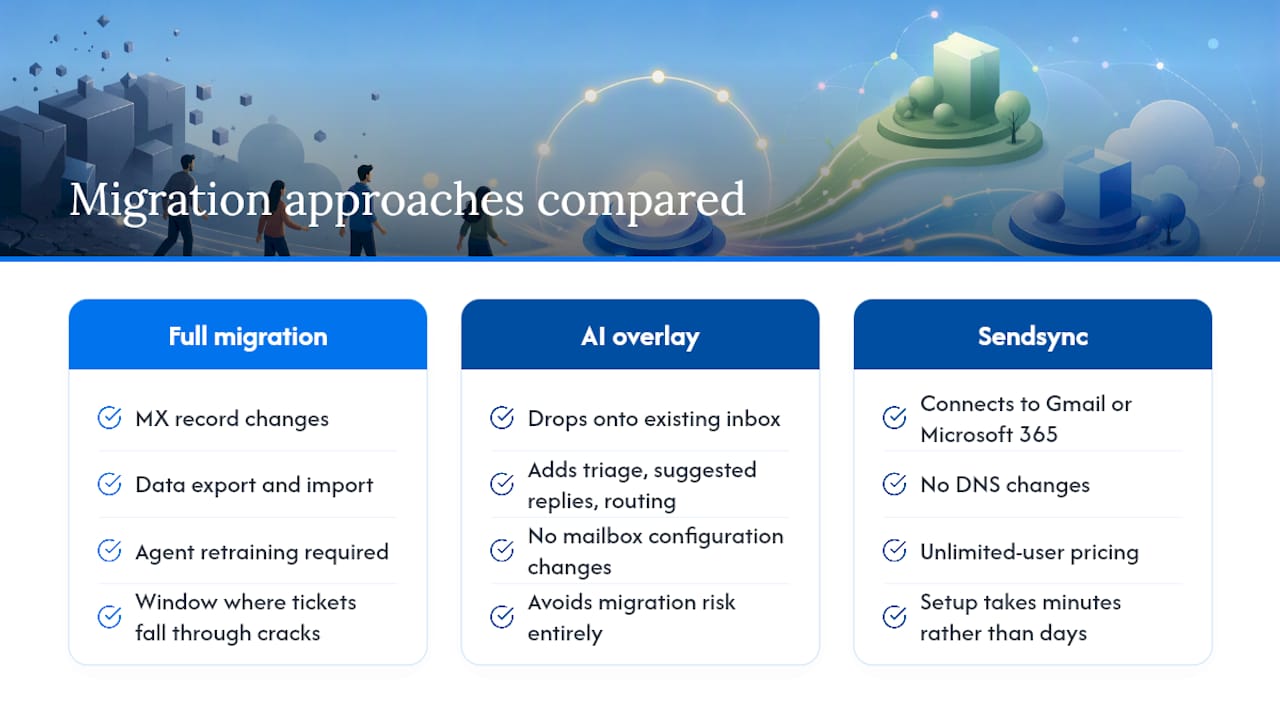
The logic is straightforward. A full helpdesk migration involves MX record changes, data export and import, agent retraining, and a window where tickets can fall through the cracks. An AI overlay drops onto your existing inbox and adds triage, suggested replies, and routing without touching your mailbox configuration. For teams whose pain is AI cost or response quality rather than the inbox tool itself, the overlay path is often the faster fix.
Sendsync sits at the intersection of both approaches. It connects directly to Gmail or Microsoft 365 without DNS changes, which means the “migration” is really just connecting a mailbox and inviting the team. Unlimited-user pricing removes the per-seat escalation trap. And because setup takes minutes rather than days, teams can run a meaningful proof-of-concept without committing to a full cutover.
SOC 2 compliance is worth checking for any platform you shortlist. It signals that the vendor has undergone independent auditing of its security controls, which matters when customer conversation data is involved.
Pro Tip: Before migrating any historical ticket data, export it from Help Scout in CSV format and store it in a shared drive. Most platforms import CSV, but the field mapping takes time. Having a clean export ready before you start the trial cuts the migration window shorter.
The Sendsync blog covers migration patterns and inbox organization strategies in depth for teams that want to go further than a basic trial.
Key Takeaways
The best Help Scout alternative for most SMB teams is Sendsync when the priority is fast setup, Gmail/M365 integration, and flat unlimited-user pricing removes cost escalation that per-seat pricing can create.
| Point | Details |
|---|---|
| Start with your switching trigger | AI billing surprises, collaboration gaps, and reporting depth are the three most common reasons teams leave Help Scout. |
| Flat pricing beats per-seat at scale | Sendsync’s unlimited-user model removes the cost escalation trap that per-seat platforms create as headcount grows. |
| DNS-free setup cuts migration risk | Platforms that connect via Gmail or Microsoft 365 natively (Sendsync, Hiver, Front) avoid the MX-change window where tickets can go missing. |
| AI overlay is a valid alternative to migrating | For teams whose pain is AI quality rather than the inbox tool, an overlay on the existing setup is faster and lower risk than a full platform switch. |
| Sendsync for quick wins | Connect a live mailbox, run 20 real tickets in a 14-day trial, and measure first-reply time to validate fit before committing. |
The case for keeping it simple
The conventional wisdom in help desk software is that more features equal better support. It does not. The teams that improve response times fastest are usually the ones that removed friction from their existing workflow rather than the ones that migrated to a more powerful platform.
Most SMB support managers I have spoken with describe the same arc: they outgrow Help Scout’s AI bundling or hit a reporting ceiling, spend weeks evaluating enterprise platforms, and then realize the actual problem was that three agents were working the same inbox with no assignment system. A shared inbox with clear ownership rules solves that in an afternoon.
That is where Sendsync’s positioning makes sense. It is not trying to be Zendesk. It is trying to be the thing you set up today that makes tomorrow’s support shift noticeably better. For teams that genuinely need SLA management, a 500-app marketplace, or commerce-specific order actions, a full migration to Zendesk, Freshdesk, or Gorgias is the right call. But for the majority of SMB teams whose pain is collaboration and setup friction, the migration is the problem, not the solution.
The honest trade-off: if your team handles more than 1,000 tickets per month across multiple channels (chat, voice, social), a purpose-built ticketing platform will eventually outperform a shared inbox. Start with the simpler tool, measure the results, and migrate only when the data tells you to.
Sendsync is the fastest path from Help Scout to a working inbox
If your team is evaluating Help Scout alternatives because of AI billing surprises, per-seat cost escalation, or a setup that took longer than it should have, Sendsync addresses all three directly. Connect your Gmail or Microsoft 365 mailbox in minutes, no DNS changes required. Every plan includes unlimited users, so your cost stays flat as the team grows. Assign tickets, leave internal notes, set automation rules, and track first-reply time from day one.

The 14-day free trial is the right place to start. Connect one live inbox, route 20 real tickets through it, and measure whether response times improve. That is a two-week test with zero migration risk and no MX records to touch. For teams that want to go deeper before trialing, the support inbox organization guide on Sendsync’s blog covers the workflow setup that makes the difference in the first week.
Start your free trial at sendsync.com and have your team’s inbox running before the end of the day.
Sources and further reading
The claims in this article are grounded in community review aggregates and independent roundups. Before finalizing your shortlist, check vendor trial pages and run your own two-week proof-of-concept.