
Chat <60s, Email <4hr: First Response Time Benchmarks for Small Teams
Chat <60s, Email <4hr: First Response Time Benchmarks for Small Teams ! Support agent handling multiple customer channels Top-performing support teams answer live chat in under 60 seconds, phone calls within 2 to 3 minutes, social messages within 60 minutes, SMS within 30 minutes

Top-performing support teams answer live chat in under 60 seconds, phone calls within 2 to 3 minutes, social messages within 60 minutes, SMS within 30 minutes, and email inside 4 hours. Those numbers describe the top quartile, not the industry average, and they only hold up if you measure them consistently, using business hours rather than raw elapsed time. Your actual target should shift based on industry, customer tier, and how your team defines a “response” in the first place.
TL;DR:
- Live chat should aim for a first reply under 40 to 60 seconds, with anything past 2 minutes considered a miss for top performers.
- Phone responses are expected within 2 to 3 minutes, including hold time, to maintain customer satisfaction.
- Email support top performers reply within 4 hours, but industry averages often extend beyond 7 hours once overnight and weekend delays are factored in.
- Measuring response times accurately requires using business hours, excluding automated messages, and tracking median alongside average to identify outliers.
- Fixing ticket assignment and routing before increasing staffing levels leads to faster reply times and more efficient support operations.
Table of Contents
- First Response Time Benchmarks by Channel
- How Do You Calculate First Response Time Accurately?
- Adjusting Benchmarks by Industry and Customer Tier
- Why First Response Time Moves the Needle on CSAT
- Proven Tactics to Reduce First Response Time
- Monitoring, Alerts, and Reporting That Actually Work
- Key Takeaways on First Response Time Benchmarks
- The Speed vs. Quality Trade-Off Nobody Budgets For
- Reduce First Response Time Without Rebuilding Your Stack
- Sources
- FAQ
First Response Time Benchmarks by Channel
Every channel carries a different expectation baked into how people use it, and pretending otherwise is why so many SLAs fail before they start. A customer messaging you on live chat has already decided the conversation is happening right now. A customer emailing you has accepted some delay as part of the deal.
Live chat sits closest to real-time software interaction. Usability research from the Nielsen Norman Group shows that a 1-second delay still feels fluid to users, but anything past 10 seconds breaks their attention entirely. Chat customers import that same expectation from every other app on their screen, which is why top performers aim for a first reply under 40 to 60 seconds and treat anything past 2 minutes as a miss.
Phone carries a different, older norm. Callers generally tolerate being answered within 2 to 3 minutes, including hold time, before satisfaction starts dropping. That tolerance shrinks fast if a caller has already tried chat or email first and gotten no answer there either.
Social media is more forgiving on paper and less forgiving in practice. HubSpot’s research found that 79% of customers expect a reply within 24 hours, but 39% expect one inside 60 minutes, and plenty expect faster than they admit to a survey. Average business response times on platforms like Facebook can be notably longer, which leaves a real gap between what companies deliver and what many customers actually want.
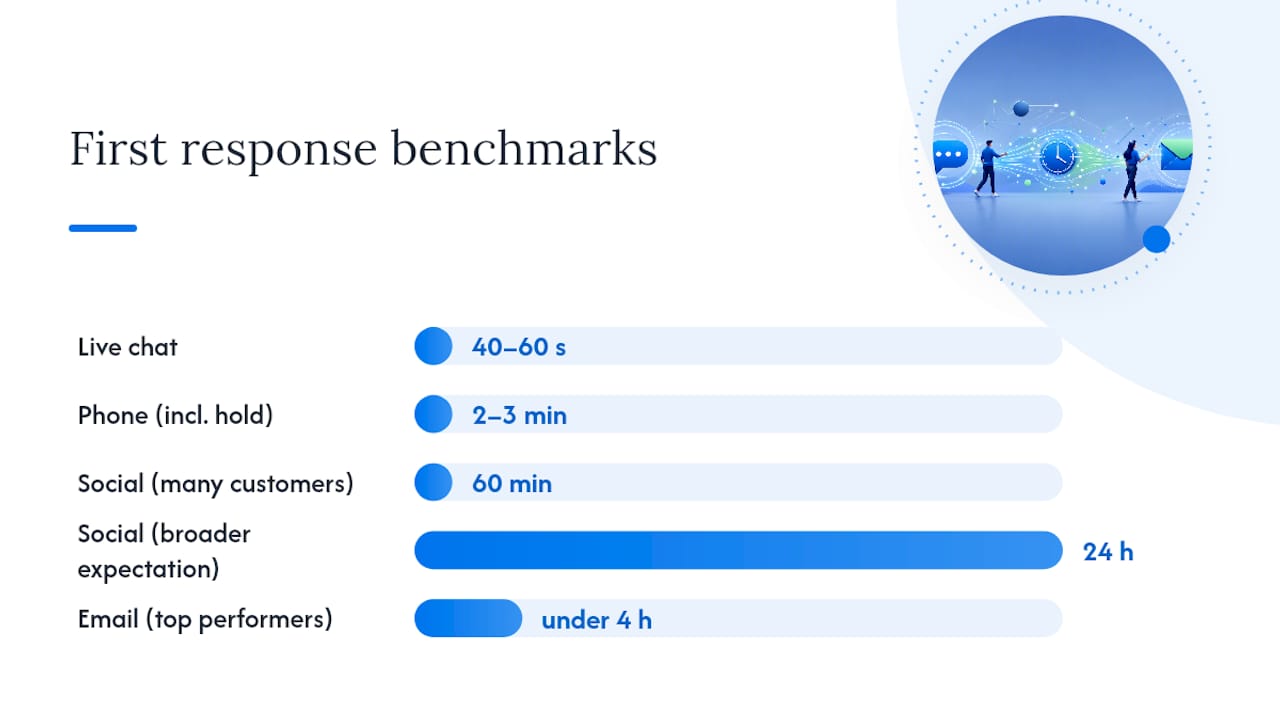
SMS and messaging apps (WhatsApp, Facebook Messenger) sit between chat and social in urgency. A 15 to 30 minute window is the common target, since texting implies a personal, immediate channel even when a business is on the other end.
Email is the most forgiving channel and the most misunderstood. Top performers reply inside 4 hours. Industry averages, though, routinely stretch to 7 to 12 hours or longer once you account for overnight backlogs and weekend gaps.
Channel targets at a glance: live chat under 60 seconds, phone 2 to 3 minutes, social under 60 minutes, SMS 15 to 30 minutes, email under 4 hours for top performers.
- Live chat: under 40 to 60 seconds for top performers
- Phone: answered within 2 to 3 minutes including hold time
- Social: under 60 minutes for public messages
- SMS/messaging apps: 15 to 30 minutes
- Email: under 4 hours for top performers, 7 to 12+ hours as a common industry average
How Do You Calculate First Response Time Accurately?
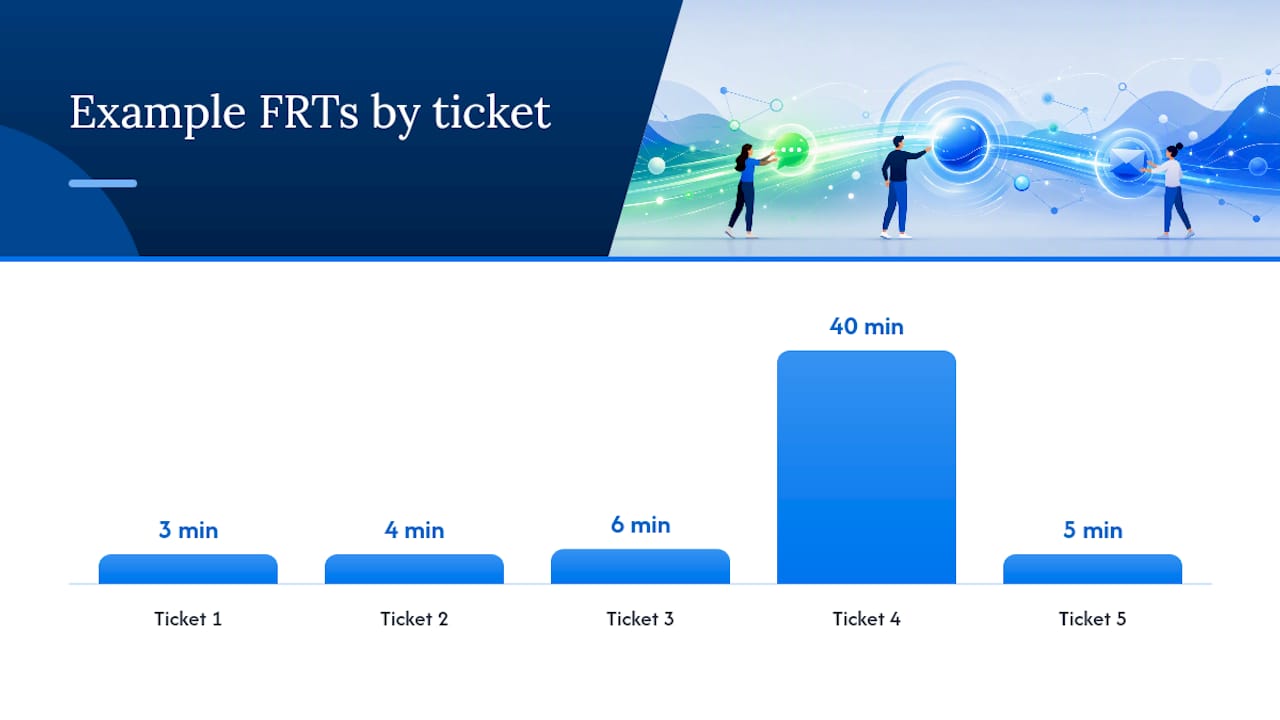
First response time (FRT) is the elapsed time between when a customer submits a request and when a human agent sends the first reply. The formula for average FRT is straightforward: add up the response times for every ticket in a period, then divide by the number of tickets. Median FRT takes the middle value of that same dataset, and it matters more than most dashboards admit, because a handful of overnight tickets sitting for 14 hours can drag your average up without reflecting how most customers actually experience your team.
Say your team handled 5 tickets with response times of 3, 4, 6, 40, and 5 minutes. The average is just under 12 minutes, distorted almost entirely by the one 40-minute outlier. The median is 5 minutes, which is a far more honest picture of typical service.
- Decide whether you’re measuring “first reply” (any agent touch, including a quick acknowledgment) or “first meaningful reply” (a substantive answer that moves the ticket forward).
- Choose business-hours calculation over raw elapsed time if your team doesn’t staff 24/7, so a Friday-5pm ticket answered Monday morning doesn’t read as a 63-hour failure.
- Exclude automated notifications, bot confirmations, and internal notes from the clock, since they inflate the appearance of speed without reflecting human effort.
- Standardize timezone handling across regions before comparing FRT across offices or shifts.
Geckoboard’s guidance on FRT specifically recommends the business-hours approach to avoid skew from off-hours submissions, which is the single most common measurement mistake teams make when benchmarking against industry numbers.
Pro Tip: Track both average and median FRT side by side on your dashboard. If the two numbers diverge sharply, you have an outlier problem, not a systemic speed problem, and the fix is different.
Adjusting Benchmarks by Industry and Customer Tier
A generic channel target is a starting point, not a finish line. SaaS support teams handling technical tickets often need more time on email (6 to 8 hours can be reasonable for complex bugs) but should hold tight on live chat, since trial users abandon fast. Ecommerce teams typically face the highest volume-to-complexity ratio, which makes canned responses and self-service deflection more valuable than raw headcount. B2B services with named account managers can often justify slower initial response if the eventual reply is unusually thorough and tied to a real relationship.
- SaaS: chat under 60 seconds, email 4 to 8 hours depending on ticket complexity
- Ecommerce: chat and social held tight, email flexible during peak sale periods
- B2B services: personalized response valued over raw speed, but no ticket should sit untouched past 24 hours
VIP or priority-tier customers deserve their own queue, not just a mental note to “get to them first.” Routing rules that auto-tag enterprise accounts or flag high-value customers push them into a faster lane without requiring every agent to memorize who’s important. Regulated industries, healthcare, finance, and anything touching safety, need tighter SLAs regardless of tier, since a delayed response can carry compliance consequences beyond lost satisfaction.
Why First Response Time Moves the Needle on CSAT
Response speed and customer satisfaction move together, but not in a straight line forever. NN/g’s research on perceived responsiveness shows that once feedback happens within roughly 1 to 10 seconds, users perceive the interaction as attentive; past that window, attention and patience drop sharply. Applied to support, this explains why a live chat reply at 30 seconds feels dramatically better than one at 3 minutes, while the jump from a 3-hour email reply to a 5-hour one barely registers.
That’s the diminishing-returns curve support leaders miss. Shaving live chat from 90 seconds to 45 seconds probably moves CSAT more than shaving email from 5 hours to 3. Past a certain point on any channel, a slower but more complete first reply beats a faster, thinner one, because resolution quality drives retention more than the first-touch clock alone. A workable rule of thumb: optimize speed aggressively on real-time channels, and optimize completeness on asynchronous ones.
Proven Tactics to Reduce First Response Time
Most FRT problems trace back to a handful of fixable habits, not a lack of effort.
- Fix triage before you fix speed. Auto-assign tickets by category, set priority queues for VIP or urgent tags, and route by business hours so nothing lands on an agent who’s already offline, following best practices in Proactive IT Support for Small Business Success.
- Build a canned-response library, but keep it loose. A set of 10 to 20 template replies covering your most common questions cuts typing time dramatically, as long as agents personalize the opening line so it doesn’t read as copy-pasted.
- Run light on-call rotations for small teams. Even a lightweight after-hours SLA (one person checks the inbox at 6pm and 9pm) closes the overnight gap that drags average FRT up more than almost anything else.
- Use auto-acknowledgments carefully. An instant “we got your message, a human will follow shortly” note helps on email and social, where silence reads as neglect, but it can backfire on live chat, where customers expect an actual person, not a bot buying time.
- Test one change at a time. Run a two-week A/B test comparing canned-reply usage against fully custom replies on a matched ticket set, or compare FRT before and after adding a single after-hours shift, before rolling a tactic out team-wide.
Pro Tip: Start with triage and routing before touching staffing levels. Teams often assume they need more agents when the real problem is that tickets are sitting unassigned for 20 minutes before anyone even sees them.
Monitoring, Alerts, and Reporting That Actually Work
FRT alone tells you speed, not health. Track it alongside ticket volume, backlog size, SLA compliance rate, and the average-versus-median split, so a rising average doesn’t get misread as a systemic slowdown when it’s really one bad shift.
- Set alert thresholds that flag tickets approaching SLA breach, not just tickets that have already blown past it.
- Review operational metrics daily; save trend reporting for leadership on a weekly cadence.
- Give the whole team real-time visibility into the shared inbox so agents can see what’s already claimed before duplicating work on the same ticket.
- Confirm every ticket gets assigned before anyone replies, which prevents the two-agents-answer-the-same-email problem that quietly inflates FRT.
Teams that adopt canned responses paired with clear assignment workflows tend to see reply times drop noticeably within the first few weeks, mostly because agents stop wasting time deciding who owns a ticket or retyping the same answer from scratch.
Key Takeaways on First Response Time Benchmarks
Aim for live chat under 60 seconds, phone within 2 to 3 minutes, social under 60 minutes, SMS within 30 minutes, and email under 4 hours. Three moves get you there fastest:
- Fix your measurement first: use business hours, exclude bot noise, track median alongside average.
- Set one SLA per channel instead of one blanket target for “support.”
- Pick a single tactic (canned replies or better routing) and test it for two weeks before scaling it.
The Speed vs. Quality Trade-Off Nobody Budgets For
Most teams chase the same fix when FRT slips: hire faster or reply shorter. Neither works long term. The teams that actually close the gap fix assignment first, so tickets stop sitting unclaimed, then layer canned responses and light on-call coverage on top. Speed matters most on real-time channels; on email, a slower, complete answer usually beats a fast, thin one.
— Nick
Reduce First Response Time Without Rebuilding Your Stack
A working shared inbox can be set up in minutes by connecting directly to Gmail or Microsoft 365 mailboxes without DNS setup. That matters here because every tactic in this article, faster triage, cleaner assignment, canned responses that don’t overlap between agents, depends on your team actually seeing the same inbox in real time instead of forwarding emails around and hoping nobody double-replies.

Pricing details are available on the Sendsync website, including multiple tiers with unlimited users and no per-seat fees. If your FRT numbers are slipping because tickets sit unassigned or agents are duplicating replies, start a trial on the Sendsync landing page and see whether a shared inbox closes the gap faster than another round of hiring.
Sources
- What Are Your Customers’ Expectations for Social Media Response Time? - HubSpot
- Response times: 3 important limits - Nielsen Norman Group
- First Response Time (FRT) | KPI examples - Geckoboard
FAQ
What Is Considered a Good First Response Time?
A good first response time depends entirely on the channel: under 60 seconds for live chat, 2 to 3 minutes for phone, under 60 minutes for social, and under 4 hours for email among top performers. Anything close to those numbers, measured in business hours, puts you ahead of most support teams.
What’s a Reasonable Response Time for Email Support?
Four hours is the top-performer benchmark for email, though many teams run closer to 7 to 12 hours once overnight and weekend gaps get counted. The key is measuring in business hours so a Friday-night ticket doesn’t unfairly inflate your average.
What Is the Benchmark for a Good Customer Satisfaction Score?
There’s no single universal CSAT benchmark, since it varies heavily by industry and survey method, but faster first replies consistently correlate with higher satisfaction scores, particularly on real-time channels like chat, where delays past 10 seconds break customer attention.
What Is the 10 to 10 Rule in Customer Service?
Definitions of this rule vary across sources, and there’s no single standardized version tied to first response time benchmarks specifically. Treat any “10 to 10” framework you encounter as a general speed-and-follow-up heuristic rather than an established industry standard.
Does Sendsync Help Lower First Response Time?
Sendsync connects directly to Gmail and Microsoft 365 mailboxes so teams can see, assign, and reply to tickets from one shared inbox instead of forwarding emails manually. Plans start at $10 a month on the Founder tier with unlimited users, and pricing details for every tier are available on the Sendsync site.