
Small Business Team Collaboration: The Real Role It Plays
Small Business Team Collaboration: The Real Role It Plays ! Hands placing a decision token on office desk Team collaboration is the operating system that turns individual effort into consistent, repeatable business results, converting scattered work into faster delivery, fewer er

Team collaboration is the operating system that turns individual effort into consistent, repeatable business results, converting scattered work into faster delivery, fewer errors, and better customer outcomes. Small teams with clear roles and open communication ship work faster and catch mistakes before customers do. That’s not a soft benefit. It shows up in response times, rework rates, and how often a customer has to repeat themselves to get help.
Do these three things in the next 72 hours:
- Write down who owns each recurring decision (even a one-line list beats nothing).
- Run one 15-minute team check on where handoffs currently break.
- Pick one shared doc or channel as the single source of truth for active projects.
A 2026 survey-based playbook found that businesses which diagnose friction before redesigning workflows see measurable gains in speed and quality within weeks, not quarters.
Key Takeaways
Small business collaboration works when leaders build rituals, assign clear decision rights, and measure results, converting individual effort into faster, more consistent outcomes for customers.
| Point | Details |
|---|---|
| Collaboration is a practice, not a tool | Rituals, decision rights, and documentation matter more than which app you buy. |
| Diagnose before you redesign | A quick anonymous survey across the five pillars finds real gaps faster than guessing. |
| Run a 30/90-day experiment | Introduce one change, measure velocity and rework, then decide to continue or pivot. |
| Fewer tools beat more tools | Collaboration drag from too many platforms wastes more time than it saves. |
| Shared inboxes solve support-specific chaos | Sendsync gives support teams one visible view of customer email with no DNS setup and unlimited users. |
Table of Contents
- What the Role of Team Collaboration in Small Business Actually Looks Like
- Benefits and Measurable Impact of Better Teamwork
- The Five Pillars That Make Collaboration Actually Work
- How to Improve Team Collaboration in 30 and 90 Days
- Which Collaboration Tools Actually Fit a Small Team
- Frameworks That Keep Decisions and Meetings Moving
- Simple Metrics to Prove Collaboration Is Working
- Common Collaboration Blockers and How to Fix Them Fast
- What Actually Moves the Needle on Small Teams
- A Simpler Way for Support Teams to Collaborate on Email
- Frequently Asked Questions
- Sources
What the Role of Team Collaboration in Small Business Actually Looks Like
Collaboration isn’t a Slack channel or a weekly meeting. It’s an operating practice: how decisions get made, who’s accountable for what, and how information moves between people without getting lost. In a five-person shop, that practice determines whether a customer complaint gets resolved in an hour or bounces between three inboxes for two days.
Get this right and the payoff compounds:
- Faster delivery. Fewer approval bottlenecks mean projects move without waiting on one person to notice an email.
- Better ideas. Teams that trust each other surface more solutions, not just louder opinions.
- Higher engagement. People who feel heard stick around longer and do better work while they’re there.
- Stronger customer outcomes. Clear internal handoffs mean customers get consistent answers instead of conflicting ones.
Small-business advisors at the U.S. Chamber of Commerce point to a simple pattern: businesses that equip teams with the right tools, set shared goals, and reward teamwork outperform those that leave coordination to chance. That’s not a call to buy more software. It’s a call to build the practice first.
Benefits and Measurable Impact of Better Teamwork
The business case for collaboration isn’t abstract. Structured teamwork with clear roles and shared trust drives measurable gains in productivity and profitability for small firms, according to SME-focused research from Gammatica.
Here’s where that shows up in daily operations:
- Faster customer response times when handoffs are clear instead of ambiguous.
- Less rework because mistakes get caught earlier, by more eyes.
- Higher retention, both of customers who get consistent service and employees who feel ownership.
- Better decision quality when teams pool complementary strengths instead of one person guessing alone.
Gallup’s research on collaboration frames it precisely: collaboration means combining different strengths toward one goal, and managers account for a large share of the variance in how well that actually happens. A five-person marketing shop that moved from ad hoc email threads to a single shared project view cut its client response time nearly in half within a month. Nothing about that required new hires. It required a shared system of record and one person accountable for keeping it current.
The Five Pillars That Make Collaboration Actually Work
Most collaboration failures trace back to a gap in one of five areas. Skip diagnosing these and any tool or ritual you add just adds noise on top of the same problem.
- Psychological safety. Can people flag a mistake or disagree with a plan without fear of blowback? Ask: “When did someone last push back on an idea here, and what happened?”
- Role clarity. Does everyone know what they own versus what they’re consulted on? Ask: “Could you name who’s responsible for X without checking?”
- Dependability. Do people follow through on what they commit to? Ask: “What’s the last commitment that slipped, and why?”
- Shared purpose. Does the team understand how their work ladders up to the business goal? Ask: “How does this project affect revenue or retention?”
- Visible impact. Do people see the results of their work reflected back to them? Ask: “When did you last hear how your work landed with a customer?”
Harvard Business Review’s research on modern teams identifies psychological safety and shared ownership as the two conditions that separate high-performing teams from the rest. McKinsey’s analysis of team health adds that most cross-functional teams underperform, and leadership behavior is the biggest lever for changing that. A RACI or DACI framework (covered below) is the practical mechanism for fixing role clarity specifically.
Pro Tip: Run a five-question anonymous survey once a quarter, one question per pillar. It takes ten minutes to build and surfaces gaps a team meeting never will, because people say things anonymously they won’t say out loud.
How to Improve Team Collaboration in 30 and 90 Days
You don’t need a reorg. You need a short experiment with a clear before-and-after.
First 30 days:
- Install a weekly 30-minute team sync focused only on blockers, not status updates.
- Start biweekly 1:1s between managers and direct reports if they don’t already exist.
- Write a one-paragraph role description for every position, even informal ones.
- Pick one shared doc as the single source of truth for active projects and retire competing versions.
Next 60 days: 5. Review the 30-day baseline: are handoffs faster? Is anyone still confused about ownership? 6. Introduce a lightweight decision framework (RACI or DACI) for your two most recurring decision types. 7. Run one team retrospective asking what’s working and what’s still friction.
Leadership behavior sets the ceiling here. IDEO’s approach to creative collaboration stresses that trust and process have to come from how leaders show up, not from a policy document. If you want more diverse thinking on your team, build hiring prompts that specifically probe how a candidate handled disagreement or ambiguity in a past role.
Pro Tip: If your 30-day check reveals the same complaint from three or more people, that’s not a coincidence. It’s a structural problem worth an offsite or a formal reset, not another Slack message.
Which Collaboration Tools Actually Fit a Small Team
Tools amplify practices that already work. They don’t fix a team that lacks clear roles or trust. With that caveat, here’s what each major platform is genuinely best at:
- Slack – real-time chat and quick decisions across small, fast-moving teams.
- Microsoft Teams – chat plus video plus document collaboration for teams already on Microsoft 365.
- Google Workspace – shared docs, sheets, and calendar for teams that live in Gmail.
- Zoom – video meetings and screen sharing for remote or hybrid check-ins.
- Asana – task and project tracking for teams managing multiple concurrent workflows.
- Notion – a flexible wiki for documenting roles, processes, and decisions in one searchable place.
- ClickUp – an all-in-one project and task hub for teams that want fewer separate tools.
- Trello – simple visual boards for teams that think in cards and columns.
- Monday.com – customizable workflow tracking for teams with varied project types.
Before picking one, run it through four filters: how fast can the team actually set it up, does it integrate with your existing email and calendar, does it show work visibly (shared boards, docs) instead of hiding it in private threads, and does a usable free tier exist. Indeed’s guidance on workplace collaboration notes that role clarity and shared resources matter more than which specific tool you pick. Microsoft 365’s collaboration features are worth a look if your team already lives in Outlook and Teams.
Frameworks That Keep Decisions and Meetings Moving
Two frameworks solve most of the “who decides this” confusion in a small business.
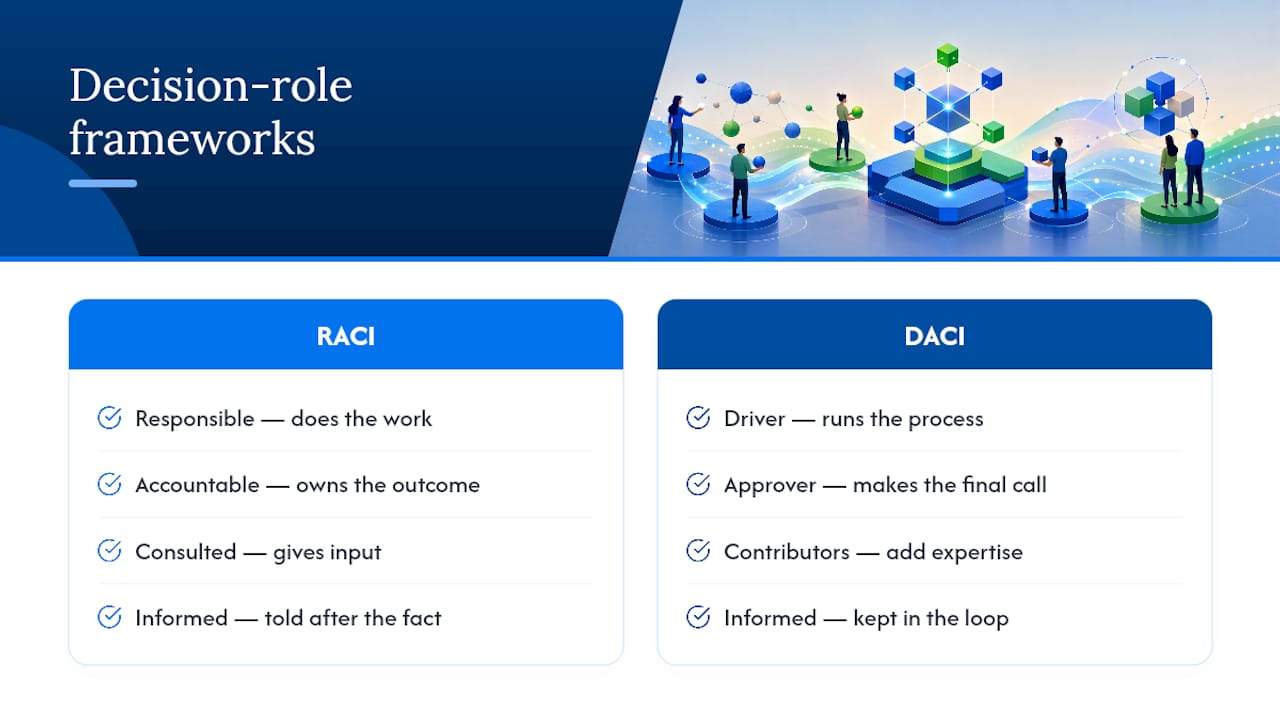
RACI assigns four roles to any decision or task: Responsible (does the work), Accountable (owns the outcome), Consulted (gives input), and Informed (told after the fact). Use it for recurring processes, like a customer onboarding workflow where the account manager is Responsible, the founder is Accountable, support is Consulted, and billing is Informed.
DACI works better for one-off strategic calls: Driver (runs the process), Approver (makes the final call), Contributors (add expertise), Informed (kept in the loop).
For meetings, assign three roles every time: someone decides, someone reviews the decision before it ships, and someone executes it. A decision-rights matrix template can make this concrete for recurring project types.
Simple Metrics to Prove Collaboration Is Working
Track a handful of numbers before and after any change, not a dashboard full of them.
- Project velocity – time from task assignment to completion.
- Rework time – hours spent redoing work due to miscommunication.
- Response time – how fast customer or internal requests get a first reply.
- Meeting overhead – total hours per week spent in meetings versus doing the work.
- Voluntary turnover – whether people are leaving, and why, if exit interviews mention teamwork.
Run a simple 30/90-day plan: measure these five for two weeks as a baseline, introduce one change (a new ritual or role clarity fix), then re-measure at 30 and 90 days. If velocity improves and rework drops, keep going. If nothing moves, the problem probably sits in a different pillar than the one you targeted.
Common Collaboration Blockers and How to Fix Them Fast
Most collaboration problems trace back to a short list of repeat offenders.
- Too many tools. Pick one system of record per function and retire the rest. HubSpot’s research calls this “collaboration drag,” and it costs real hours every week.
- Unclear responsibilities. Apply RACI to your top three recurring workflows this week.
- Low psychological safety. Model it from the top: a leader who admits a mistake publicly does more than any policy.
Red flags that mean it’s time to escalate: repeated missed handoffs, rising rework two months running, or the same complaint surfacing from multiple people independently.
Pro Tip: A tactical fix (a new template, a clearer channel) solves a workflow problem. A cultural reset, with outside facilitation if needed, is what you need when the same trust issue keeps resurfacing regardless of process changes.
What Actually Moves the Needle on Small Teams
I’ve watched a six-person agency go from missed deadlines to on-time delivery by making exactly one change: a shared weekly doc listing who owned what, updated live instead of buried in email. Nothing fancy. No new software budget. Just visibility.

That’s the pattern worth remembering: collaboration is an operating system, not a purchase. Start with one ritual, one document, one clear owner. The rest follows.
A Simpler Way for Support Teams to Collaborate on Email
Everything above applies to how a team works together generally. Support teams have one specific version of this problem: shared customer email that turns into chaos the moment more than one person touches it. Forwarded threads, “who’s replying to this?” Slack pings, and customers getting two different answers from two different people.

A shared inbox is the practical fix here, purpose-built for exactly this friction rather than a general project tool bent into shape for email. Sendsync connects directly to Gmail or Microsoft 365 in minutes, with no DNS configuration and no per-seat fees, so every team member sees the same conversation thread, assigns it clearly, and replies without stepping on a colleague’s response. Unlimited users means a growing support team doesn’t get penalized for adding another person to the inbox. If your team is still coordinating support email through forwards and guesswork, start a free trial with Sendsync and see what a shared view of the inbox actually changes.
Frequently Asked Questions
What is the main role of team collaboration in a small business? Team collaboration converts individual effort into faster, more consistent business results by clarifying who does what and keeping information visible across the team, which shows up directly in delivery speed and customer experience.
How do I improve team collaboration without adding more meetings? Focus on written role clarity and a single shared source of truth first. A well-documented decision framework like RACI often reduces the need for meetings because fewer questions require a live conversation to resolve.
What are the biggest blockers to collaboration in small firms? Too many overlapping tools, unclear responsibilities, and low psychological safety top the list. Fixing the tool sprawl and clarifying one recurring decision each week produces visible results within a month.
Which collaboration tool should a small business start with? It depends on your existing email platform. Teams on Gmail typically start with Google Workspace, teams on Outlook with Microsoft Teams, and most add a lightweight project tracker like Trello or Asana once a single-doc system stops scaling.
How do I measure whether collaboration is actually improving? Track project velocity, rework time, and response time before and after a specific change, using a 30 to 90-day window. If those numbers move in the right direction, the change is working.
Sources
- Go, teams: When teams get healthier, the whole organization benefits | McKinsey
- The secrets of great teamwork | Harvard Business Review
- Collaboration at work | Gallup (CliftonStrengths)
- Svsb